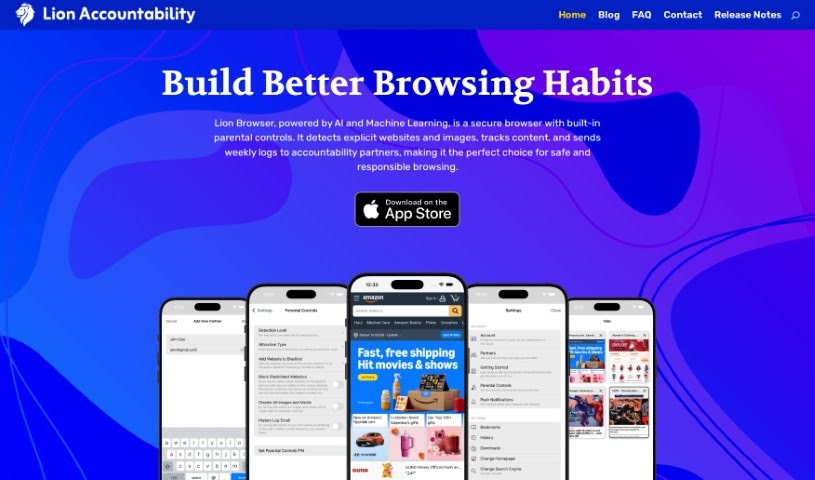
Screenshot of Lion Browser

Lion Browser

Discover what Lion Browser is and how to use it effectively in 2025. We'll explore its features, compare it to other search engines, and show you how it promotes responsible internet use.

Screenshot

What is Lion Browser?

Lion Browser is your AI-powered accountability partner for the internet, complete with built-in parental controls. It uses smart Artificial Intelligence and Machine Learning to spot explicit websites and images as you browse, all in real-time. What’s really neat is that Lion Browser puts together a detailed weekly report of any explicit content it finds. You can then choose to send this report to trusted partners, like family members, for monitoring. Plus, you have control over how sensitive the detection is, you can create your own list of blocked websites, easily review your history, and even turn off images and media for an extra layer of protection. Honestly, it offers a really smooth browsing experience, much like what you’d expect from popular browsers like Safari, Chrome, Firefox, or DuckDuckGo. People who’ve used it often say it’s incredibly effective, super simple to use, and genuinely helpful for encouraging responsible internet habits and accountability.

Patrick Adams, the creator, developed the Lion Accountability Browser with a clear goal: to help people build healthier online browsing habits. He recognized how tough it is to avoid inappropriate content these days. This browser is designed to be a tool that assists users in forming positive online behaviors, leading to a safer and more responsible internet experience for everyone. Patrick is really grateful for all the support Lion Browser has received and is always working to update and improve the app based on what users need.

Who created Lion Browser?

Patrick Adams is the mind behind Lion Browser. He first launched it on January 11, 2023. The browser itself is developed by Lion Accountability Browser, a company dedicated to online safety. They focus on using AI-powered accountability features and parental controls to make the internet a safer place. Patrick created this browser specifically to help users develop good online browsing habits and to ensure a safe internet experience, offering built-in protections against explicit content.

What is Lion Browser used for?

Here’s a breakdown of what you can do with Lion Browser:

  • Real-time Detection: It can spot explicit images instantly while you’re browsing.
  • Accountability Logs: It keeps track of explicit websites you visit and compiles them into a weekly report that can be sent to partners.
  • Extensive Blacklist: It includes a blacklist of over 4.5 million adult websites, which you can use for tracking or blocking.
  • Customizable Sensitivity: You can adjust how sensitive the AI is to detecting suggestive or explicit images.
  • Shareable History: You have the option to send daily or weekly browsing history logs to partners.
  • Enhanced Protection: You can block all images and media entirely for an extra layer of safety.
  • Smooth Browsing: It provides a top-notch browsing experience, comparable to well-known browsers like Safari, Chrome, Firefox, and DuckDuckGo.
  • Clean Design: The browser features a minimal and clean design, making it really easy to use.
  • Habit Building: It helps users build good online browsing habits.
  • Transparency: It supports transparency and accountability in your online activities.

Who is Lion Browser for?

Lion Browser is a great tool for:

  • Parents looking to monitor their children’s online activity.
  • Individuals who prioritize their online safety.
  • Anyone seeking greater accountability in their internet use.

How to use Lion Browser?

Using Lion Browser is pretty straightforward. Here’s a quick guide:

  1. Explore the Features: Lion Browser is an AI-powered browser with parental controls. It’s designed to detect explicit websites and images in real-time, compile a weekly log of what it finds, and then send that log to partners you choose for accountability.
  2. Manage the Blacklist: The browser comes with a blacklist of over 4.5 million adult websites. You can use this list to track or block sites, and you can also add your own specific entries to the blacklist.
  3. Adjust Detection Levels: You can easily tweak the sensitivity of the AI. This lets you decide how closely it should track suggestive or explicit images based on your preferences.
  4. Review and Send History Logs: The browser makes it simple to send daily or weekly browsing history emails to partners, keeping them informed about online activity.
  5. Utilize Parental Controls: For even more protection, you can choose to disable all images and media within the browser.
  6. Enjoy the Browsing Experience: Lion Browser offers a user-friendly experience that feels very similar to popular browsers like Safari, Chrome, Firefox, and DuckDuckGo.
  7. See What Users Say: People who use Lion Browser often give it high praise, highlighting how effective, simple, and accountable it is.
  8. Learn About the Creator: Lion Browser was created by Patrick Adams. His goal was to help people develop good online browsing habits and build trust in how they use the internet.
  9. Get Support & Stay Updated: If you have questions, you can always reach out to the creator. Plus, you can check the release notes to see all the ongoing improvements and updates.
  10. See Where It’s Featured: Lion Browser has been featured on platforms like Product Hunt, among others.

What really makes Lion Browser stand out is its AI-based accountability features, the flexibility you have with customization, and its easy-to-use interface. It’s a really valuable tool if you’re looking to maintain a safe and responsible online experience.

Related AI Tools

Discover more tools in similar categories that might interest you

Stay Updated with AI Tools

Get weekly updates on the latest AI tools, trends, and insights delivered to your inbox

Join 25,000+ AI enthusiasts. No spam, unsubscribe anytime.