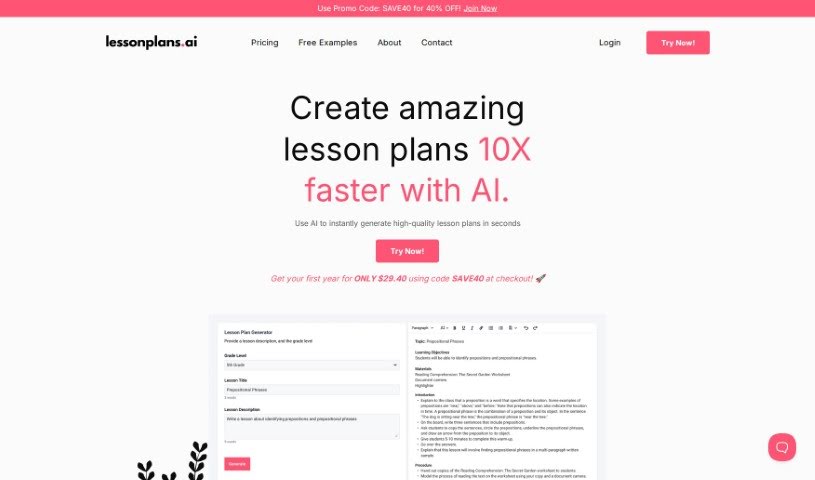
Screenshot of Lesson Plan AI

Lesson Plan AI

Discover what Lesson Plan AI is and how to use it effectively in 2025. We'll explore its features and compare it to other teacher tools.

Screenshot

What is Lesson Plan AI?

LessonPlans.ai is a smart tool designed specifically for teachers, using AI to help create lesson plans. Its main goal is to make the whole process of planning lessons much easier and more efficient for educators. Plus, it aims to provide really good, engaging content for students. The AI behind LessonPlans.ai is always learning and updating itself, so the lesson plans it generates stay relevant and current. The platform is built to boost teachers’ productivity by offering a smooth, user-friendly experience that can be adjusted for any classroom’s unique needs. It’s important to remember that while AI can certainly help with things like grading and planning, it can’t completely take over a teacher’s role. The personal connection and emotional understanding that teachers bring to the classroom are irreplaceable.

Who created Lesson Plan AI?

A team of teachers actually built Lessonplans.ai. They created it with the specific purpose of helping other educators with their lesson planning. The platform is all about making lesson planning quicker and better, while also ensuring students get high-quality material. The AI technology it uses keeps learning and adapting, which means it can generate lesson plans that are always relevant and up-to-date. The company behind it believes in helping teachers be more productive and creative. They understand that while AI can be a great assistant for certain tasks, it will never be able to fully replace the human touch of teachers.

What is Lesson Plan AI used for?

  • Quickly create high-quality lesson plans: Get ready-made plans in seconds.
  • Get help writing great lesson plans: It assists you in crafting effective plans.
  • Generate lessons for any K-12 topic: Covers all subjects and grade levels.
  • Save valuable time on planning: Spend less time preparing, more time teaching.
  • Create engaging, effective lessons: Design lessons that capture students’ attention.
  • Customize plans to your style: Adapt lessons to fit how you teach and what your students need.
  • Improve your lesson planning skills: Learn new ways to approach planning.
  • Make lesson planning easier and more efficient: Streamline the entire process.
  • Provide high-quality, engaging content for students: Ensure students receive the best material.
  • Enhance the overall educational experience: Make learning more enjoyable for students.
  • Instantly generate top-notch lesson plans: Get professional-quality plans right away.
  • Create personalized plans: Tailor lessons based on individual student needs and abilities.
  • Automate the lesson planning process: Let AI handle the heavy lifting.
  • Address individual student needs: Adapt plans for specific strengths and weaknesses.
  • Provide high-quality instruction: Ensure lessons align perfectly with learning goals.
  • Dedicate more time to students: Free up time for feedback and interaction.
  • Experience convenient, automated planning: Enjoy the ease of AI-driven preparation.
  • Transform your teaching: Use AI-generated plans to change your approach.
  • Unlock student potential: Help students reach their best with AI assistance.
  • Write quality lesson plans fast: Get help with writing plans quickly.
  • Create engaging, effective lessons: Design lessons that truly work.
  • Improve planning skills and save time: Get better at planning and reclaim your time.
  • Maximize your time: Make the most of your schedule with AI plans.
  • Cater to individual student needs: Adapt lessons for each student’s unique strengths and weaknesses.
  • Help teachers write quality plans in seconds: Get assistance with writing plans quickly.
  • Generate K-12 lessons for any topic instantly: Create plans for any subject and grade level in seconds.
  • Create engaging and effective lessons for students: Design lessons that truly work.
  • Make lesson planning easier and more efficient for educators: Streamline the entire process.
  • Generate personalized plans based on student data: Create tailored lessons using performance data, learning objectives, and curriculum standards.

Who is Lesson Plan AI for?

  • Teachers
  • Instructors
  • Educators

How to use Lesson Plan AI?

To get the most out of Lessonplans.ai, here’s a simple, step-by-step guide:

  1. Sign Up: First, create your account on Lessonplans.ai. You’ll just need to provide some basic info and set up a secure password.
  2. Explore Features: Take a little time to look around and see what the platform offers. Check out the lesson plan templates, the tools you can customize, and any collaboration features.
  3. Create a Lesson Plan: When you’re ready, click the “Create New Lesson Plan” button. You’ll start by entering the lesson’s title, its main objectives, and other key details to give it a basic structure.
  4. Add Resources: Make your lesson plan even better by adding things like images, videos, or documents. These extra bits can really help make your lesson more engaging and informative for students.
  5. Collaborate: If you want to work with colleagues or even students on a lesson plan, use the collaboration tools. They make teamwork and sharing feedback really smooth.
  6. Customize Templates: Lessonplans.ai offers different templates. Browse through them to find the one that best fits your teaching style and the subject you’re covering.
  7. Review and Edit: Before you consider it finished, give your lesson plan a good read-through. Check for accuracy and make sure everything flows well and matches your learning objectives. Then, make any edits needed.
  8. Save and Share: Once you’re happy with it, save your lesson plan on the platform so you can easily access it later. You can also share it with others, like colleagues or students, for their input or to use it.
  9. Track Progress: Keep an eye on how your lesson plans are performing. You can check analytics and feedback from collaborators or students. Use this information to make your future lessons even better.
  10. Engage with Community: Jump into the Lessonplans.ai community! You can find helpful tips, learn about best practices, and discover creative ideas to boost your teaching strategies.

By following these steps, you’ll be able to use Lessonplans.ai really effectively to simplify your lesson planning and make your teaching materials even better.

Related AI Tools

Discover more tools in similar categories that might interest you

Academic Help Free Essay Generator

Education Academic Writing
Learn More

Stay Updated with AI Tools

Get weekly updates on the latest AI tools, trends, and insights delivered to your inbox

Join 25,000+ AI enthusiasts. No spam, unsubscribe anytime.