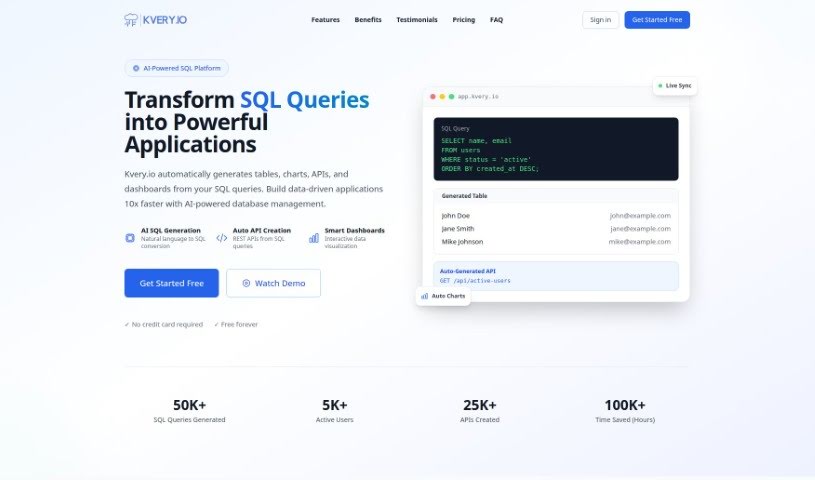
Screenshot of Kvery

Kvery

Discover what Kvery is and how to use it effectively in 2025. We'll explore its features and see how it stacks up against other Data Analytics Tools.

Screenshot

What is Kvery?

Kvery is a modern SQL editor built specifically for today’s data professionals. It offers a really easy-to-use interface packed with helpful features like syntax highlighting, code completion, and advanced data management tools. All of this is designed to boost your productivity and cut down on mistakes when you’re writing SQL. Kvery gives you powerful ways to work with large, complex datasets, which saves you time and makes your data handling much more accurate. Whether you’re a developer, a data analyst, or a database administrator, Kvery is made to simplify how you query databases and help you get valuable insights from your data quickly.

Who created Kvery?

Kvery was actually started by a team of developers who were really passionate about making everyday tasks simpler. The CEO is Zsolt Kukucska, and he works with a great team that includes IT developers Martin Pamuki and Balázs Fábián, frontend developer Balázs Dányi, and project manager Gergő Nagy. Their main goal with Kvery is to offer a complete SQL tool that can quickly respond to business needs for data extraction and analysis. Ultimately, they want to make managing databases a lot easier and more efficient for everyone who uses it.

What is Kvery used for?

Here’s a look at what Kvery helps you do:

  • Handle authentication securely.
  • Automatically create a table right from your prompts.
  • Easily build charts using your data.
  • Adjust chart colors to fine-tune their appearance.
  • Specify your data source to ensure accuracy.
  • Choose from a variety of chart types.
  • Integrate background and foreground images.
  • Work with modal integrations.
  • Create fully responsive tables.
  • Use scheduling capabilities.

Who is Kvery for?

Kvery is a great tool for:

  • Developers
  • Data Analysts
  • Database Administrators

How to use Kvery?

To get the most out of Kvery, just follow these simple steps:

  1. Get Started with Kvery: Head over to the Kvery website or open the app to start using the tool.
  2. Sign Up or Log In: You’ll need to create an account or log in using your name, email, and a password. Don’t worry, your data is kept safe with encryption.
  3. Know Your SQL Basics: It’s really helpful to be familiar with basic SQL, as that’s the main language Kvery works with.
  4. Explore All the Features:
    • Easy-to-Use Interface: You’ll find the environment very user-friendly, which really helps boost your productivity.
    • Syntax Highlighting: Write SQL without errors more easily, thanks to keywords that stand out visually.
    • Code Completion: Speed up your coding with smart suggestions that pop up as you type.
    • Advanced Data Management: You get powerful tools that make handling complex datasets much simpler.
    • Boost Your Efficiency: Save time and make your data handling more accurate.
  5. Make the Most of Key Features:
    • You can automatically generate tables right from your prompts.
    • Creating charts from your data is straightforward.
    • You can customize charts to present your data more clearly.
    • Plus, explore other handy features like modal integrations, authentication, version control, scheduling, error handling, and much more.
  6. Work More Productively:
    • Kvery really streamlines your workflow, making it cost-effective, easy to use, and highly productive.
    • You’ll benefit from an interface that’s simple to navigate, tables that are fully responsive, forms you can customize, and a lot more.
  7. Check Out the Pricing Plans:
    • Choose the plan that best fits what you need, or feel free to reach out to Kvery for a custom deal.

By following these steps, you’ll be able to use Kvery’s powerful features effectively for all your SQL editing and data management tasks.

Related AI Tools

Discover more tools in similar categories that might interest you

Stay Updated with AI Tools

Get weekly updates on the latest AI tools, trends, and insights delivered to your inbox

Join 25,000+ AI enthusiasts. No spam, unsubscribe anytime.