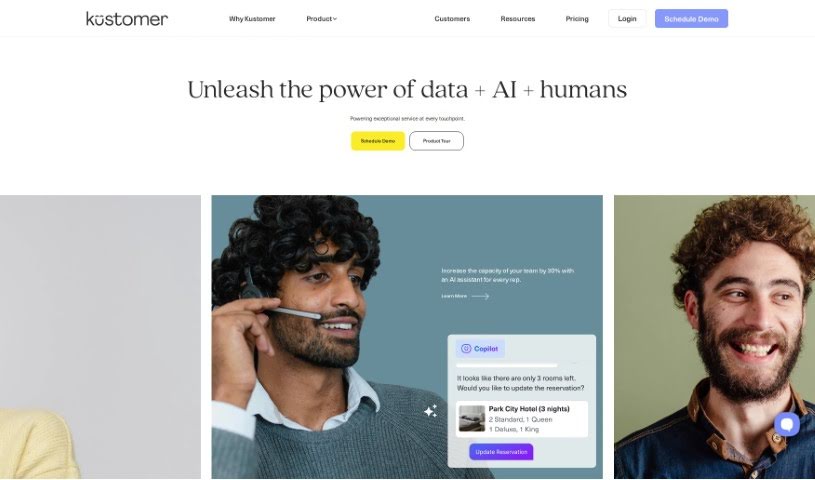
Screenshot of Kustomer

Kustomer

Discover what Kustomer is and how to use it effectively in 2025. We'll explore its key features, compare it to other customer service tools, and guide you through its setup and usage.

Screenshot

What is Kustomer?

Kustomer is a customer service CRM platform powered by AI. It brings together all your customer interactions, data, orders, and support tickets into one place. This gives businesses a single, clear view of each customer, no matter where they reach out from. The goal is to make customer service tasks smoother and help deliver truly great customer experiences. Kustomer uses AI to help resolve customer issues quickly and accurately, and it even assists agents and customers with self-service options. Plus, its AI-driven automations can cut down on the number of incoming support requests by anticipating what customers might need before they even have to ask, leading to more proactive, data-informed customer support.

Some of Kustomer’s standout features include:

  • AI-driven automations: Automate repetitive tasks and workflows.
  • Omnichannel messaging: Connect with customers across all their preferred channels.
  • Unified customer view: Get a complete picture of each customer for better engagement.
  • Data-driven support: Make informed decisions based on customer data.
  • Customer self-service: Empower customers to find answers themselves.
  • Swift and accurate issue resolution: Solve problems faster and more reliably.
  • Integrations: Connect with other essential business applications.

The platform lets businesses tap into AI, like using chatbots, to guide customers through problem-solving and predict their needs with smart automations. Kustomer is a flexible tool that works for brands in many different industries. If you’re looking to boost customer engagement with highly personalized service, powered by smart use of customer data, Kustomer can help. It supports multiple languages and includes features like KIQ Agent Assist, which has been shown to boost agent efficiency by as much as 65%.

Who created Kustomer?

Kustomer was founded back in 2015 by Brad Birnbaum and Jeremy Suriel. Their main aim was to really change customer service by making the customer the absolute focus. Their platform does more than just traditional CRM; it combines CRM data with omnichannel support and advanced automations to handle routine tasks automatically. In 2023, Meta (which used to be known as Facebook) spun Kustomer out so it could keep pursuing its mission to transform customer service.

What is Kustomer used for?

  • Creating superior customer experiences
  • Centralizing all customer data in one spot
  • Providing omnichannel messaging across the entire platform
  • Offering a unified view of customers
  • Boosting data-driven support efficiency
  • Resolving customer issues quickly
  • Ensuring accurate problem resolution
  • Anticipating customer needs before they arise
  • Minimizing the volume of incoming support requests
  • Offering proactive assistance to potential customers
  • Enhancing customer self-service capabilities

Who is Kustomer for?

  • Customer service representatives
  • Customer support agents
  • Customer success managers
  • Sales representatives
  • Marketing professionals
  • Customer relationship managers
  • Call center operators
  • Customer experience managers
  • Business analysts
  • Data analysts
  • Sales teams
  • Marketing teams
  • E-commerce businesses
  • Startup companies

How to use Kustomer?

To get the most out of Kustomer, here’s a straightforward guide:

  1. Getting Started: First, reach out to Kustomer’s Sales team. They’ll help you pick the right plan and go over the options available. You’ll need at least 8 seats to make a purchase, and plans are typically annual, though adjustments can be made if necessary.
  2. Security and Data Privacy: Kustomer takes customer security and data privacy very seriously. The platform is built with enterprise-grade security features and goes through thorough audits to make sure your data is well-protected.
  3. Integration: Kustomer makes it easy to connect with other applications you might already be using, like Amazon Connect, Shopify, Segment, and many more. This helps ensure everything aligns smoothly with your current tech setup.
  4. Features: Make sure to explore and use the AI-powered features. Things like omnichannel messaging, centralized data, automated chats, and proactive customer support are designed to simplify your tasks and really improve the customer experience.
  5. Enhanced Efficiency: Take advantage of Kustomer’s AI-driven automations and the KIQ Agent Assist tool. They’re designed to boost agent efficiency by up to 65%, helping to resolve customer issues faster and more accurately.
  6. Proactive Support: Use the platform’s robust data to anticipate what your customers might need. Offering proactive help can significantly reduce the number of incoming support requests and increase the use of automated chats.
  7. Unified Customer View: You’ll get a unified view of your customers across all channels. This means your agents have all the information they need to engage customers with highly personalized service, backed by solid data insights.
  8. Multilingual Support: Kustomer supports several languages, including English, Spanish (Español), and French (Français), so you can cater to a diverse customer base.
  9. App Marketplace: Check out the app marketplace within Kustomer. You can find various integrations there that can suit your specific business needs and help boost operational efficiency.
  10. Pricing and Add-Ons: Kustomer offers clear pricing, with optional add-on packages for more complex needs. You can get discounts by choosing annual subscriptions, and the price per agent stays the same even if you add more team members.

By following these steps, you can effectively use Kustomer’s AI-powered Customer Service CRM Platform. It’s designed to streamline how you handle customer interactions, improve engagement, and ultimately deliver those superior customer experiences.

Related AI Tools

Discover more tools in similar categories that might interest you

Stay Updated with AI Tools

Get weekly updates on the latest AI tools, trends, and insights delivered to your inbox

Join 25,000+ AI enthusiasts. No spam, unsubscribe anytime.