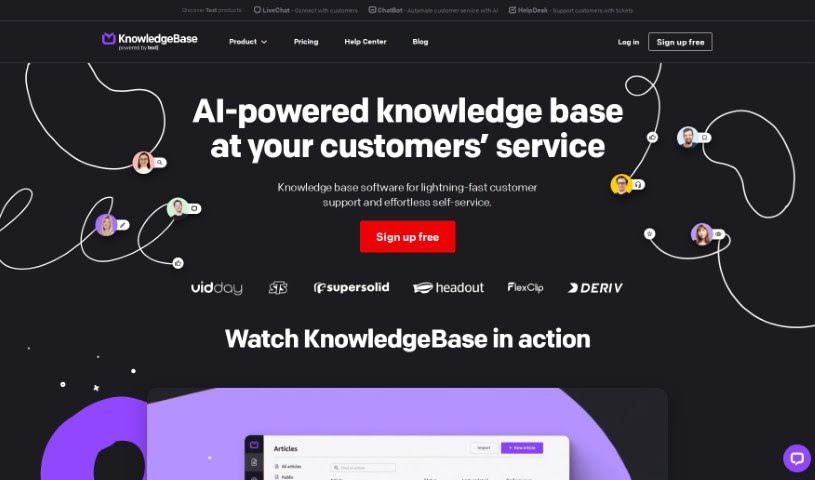
Screenshot of Knowledge Base

Knowledge Base

Discover what a Knowledge Base is and how to make the most of it in 2025. We'll explore its features and see how it stacks up against other customer service tools.

Screenshot

What is a Knowledge Base?

KnowledgeBase AI is a software designed to help you build and manage a knowledge base. It uses AI-powered technology to make customer support and self-service much smoother. It is a smart assistant that helps you find answers faster, even generating articles for you. You can also customize it to match your brand’s voice and manage multiple knowledge bases all from one easy-to-use dashboard. The main goal? To improve how you handle information, lighten the load on your support team, and give your customers 24/7 access to the help they need.

Key features include robust Knowledge Management, helpful Knowledge Visualisation, detailed Reporting, AI-powered task automation, and plenty of customization to keep your brand consistent. It’s all about giving customers quick, accurate answers, making your internal processes run like a well-oiled machine, and managing all your knowledge bases without a hitch.

This platform makes it simple to handle several knowledge bases. It really helps customers help themselves, offering round-the-clock service options, personalized support, and making sure the most important tasks get done first. Plus, it can even boost your website’s visibility with SEO-friendly content, ensuring your customer service always sounds like you.

Who created Knowledge Base?

Knowledgebase AI was developed by Text, Inc. They launched the platform on March 2, 2023, offering AI-powered software specifically for efficient customer support and self-service. Text, Inc. focuses on providing super-fast customer support, making self-service effortless, and simplifying internal operations. They achieve this through features like automated task management and maintaining a consistent communication tone.

What is a Knowledge Base used for?

  • You can try it out with a free trial.
  • It helps customers find answers to their own problems.
  • It provides easy access to learning materials.
  • It acts as a hosted help center for your customers.
  • It enables quick customer support.
  • It offers a great way for customers to help themselves.
  • It’s a tool for effective knowledge management.
  • It supports data and knowledge sharing across your team.
  • It can automate the creation of tasks.
  • It helps generate articles that are friendly to search engines (SEO-friendly).

Who is Knowledge Base for?

  • Customer Support Representatives
  • Customer Service Managers
  • Technical Support Specialists
  • Content Managers
  • Knowledge Managers
  • Digital Marketers
  • Customer Support Specialists (again, it’s that important!)
  • Customer Service Representatives (yes, another mention because it’s key)
  • Technical Support Engineers
  • Content Creators
  • SEO Specialists

How to use Knowledge Base?

To get the most out of Knowledgebase AI, here’s a straightforward approach:

  1. Choose Your Platform: Start by picking a good platform or knowledge base software, like KnowledgeBase itself, to host and manage all your content.
  2. Figure Out Your Focus: Decide what main topics and categories you want your knowledge base to cover.
  3. Gather Your Information: Collect all your existing documents, frequently asked questions (FAQs), and other helpful resources.
  4. Organize It Logically: Create a clear structure with categories and subcategories so users can easily find what they need.
  5. Write Your Articles: Craft articles that are clear, concise, and easy for users to understand. Use visuals like images or videos when they help explain things.
  6. Test and Refine: Before you officially launch, get feedback from a small group. After it’s live, keep an eye on your analytics to see what’s working.
  7. Keep It Fresh: Regularly maintain and update your content. Review articles, add new information, and remove anything that’s no longer relevant to keep it accurate and useful.
  8. For Internal Use: If you’re building a knowledge base for employees, think about key topics for different roles. Include company policies, organize everything into categories, and make sure everyone can access it easily.
  9. For Customer Self-Service: Create a collection of support articles, guides, and resources that customers can use to solve problems on their own, without needing to contact support directly.
  10. Bring in the AI: Use AI features to help generate articles, suggest titles, and find keywords. This saves you time, boosts efficiency, and lets you focus on the really important stuff.

KnowledgeBase AI comes with AI capabilities, helps you manage tasks by prioritizing them, offers customization, and has a user-friendly dashboard for efficiently handling multiple knowledge bases. Its 24/7 self-service options, personalized responses, and SEO-friendly content all work together to improve customer support and your website’s visibility, while also reducing the burden on your support staff.

By following these steps and using the features Knowledgebase AI offers, you can really boost your customer support, make your internal processes run more smoothly, and ensure everyone has a consistent and positive experience.

Related AI Tools

Discover more tools in similar categories that might interest you

Stay Updated with AI Tools

Get weekly updates on the latest AI tools, trends, and insights delivered to your inbox

Join 25,000+ AI enthusiasts. No spam, unsubscribe anytime.