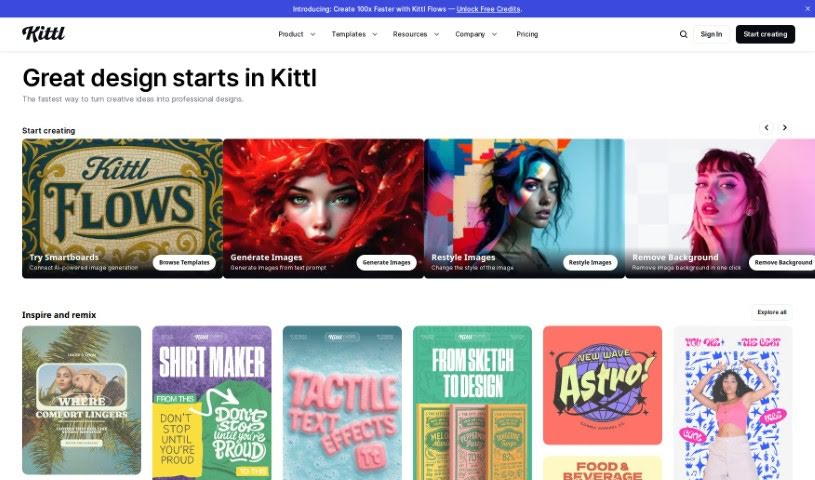
What is Kittl?
Kittl is a design platform that really makes creating stunning graphics easy and fast, thanks to its AI-powered tools. You can generate vector logo icons and clipart just by typing what you want. Plus, it’s packed with features like advanced text editing, a ‘Magic Recoloring’ tool that lets you swap colors instantly with trending palettes, and tons of ready-to-use templates. You get unlimited access to content, a huge illustration library, some really great fonts, and a photo catalog. It’s super simple to customize professional design templates, grab millions of free photos, and play around with texture clipping and other design elements like shapes, banners, and frames. Kittl offers different plans for individuals and teams, giving you access to vector files, advanced editing, high-res downloads, and premium features depending on what you choose. And don’t worry, you can always cancel or upgrade your plan if your needs change.
Who created Kittl?
Kittl was actually created by Chris Spooner, who you might know as the founder of Spoon Graphics. Chris himself has described Kittl as a tool that’s not just unique, but also offers a higher quality experience compared to what you might find with tools from Adobe. Essentially, Kittl is a platform designed to let you create stunning graphics seamlessly, right in your browser, by offering advanced design tools and professional templates.
What is Kittl used for?
- You can generate vector logo icons and clipart just by using simple text prompts.
- It offers advanced text editing, letting you transform text in real-time.
- The Magic Recoloring feature lets you pick from popular color palettes and swap colors instantly.
- You can easily customize professional design templates for your personal or commercial projects.
- It gives you access to thousands of illustrations, fonts, photos, icons, and textures.
- Swap out colors in any design with just a single click.
- Quickly apply textures like grunge, noise, paper, or patterns to your designs.
- You get direct access to a wealth of illustrations, fonts, photos, icons, and textures.
- Easily drag and drop high-quality illustrations, frames, icons, and shapes.
- Create amazing designs using powerful vector text shading effects.
- Whip up graphics in seconds with its impressive design tools.
- It features advanced text editing with real-time transformation capabilities.
- The magic recoloring tool makes changing colors a breeze.
- Innovative texture clipping lets you apply textures to your designs easily.
- You have access to a vast library filled with illustrations, fonts, photos, icons, and textures.
- Use beautifully crafted design templates made by world-class designers.
- There are shading text effects for vector text.
- You can add text decoration effects to give your creations more detail.
- Artistic text transformation features are also available.
- Drag and drop functionality makes working with high-quality vector illustrations simple.
- Generate vector logo icons, stunning images, and clipart using simple text prompts with Kittl AI.
- Customize thousands of professional design templates that are ready for personal or commercial use.
- Bring your creative ideas to life and build upon them with Kittl’s design tools.
- Get direct access to illustrations, fonts, photos, icons, textures, and more.
- Drag and drop thousands of high-quality illustrations, frames, icons, and shapes, and then customize them to fit your needs.
- Stop wasting time searching for the perfect font; Kittl offers hundreds of beautifully crafted ones.
- Millions of free-to-use photos are available for your designs.
- Apply grungy, noisy, paper, or pattern textures to your designs in no time at all.
- Choose from thousands of professional design templates and customize them with just a few clicks.
- Speed up your workflow using Kittl’s design tools, including advanced text editing, magic recoloring, and more.
- Generate vector logo icons and clipart using AI-powered design tools.
- Real-time text transformation makes editing text super easy.
- Instantly replace colors using trending color palettes.
- Access illustrations, fonts, photos, icons, and textures to spark your creative ideas.
- Use beautifully crafted fonts to make your designs even better.
- Easily access millions of free-to-use photos.
- Apply texture clipping for various design textures.
- Export your creations as JPG, PNG, SVG, or PDF files.
- Advanced text editing allows for real-time text transformation.
- Magic recoloring lets you instantly replace colors in your designs.
- Bring your creative ideas to life and build on them with the available design tools.
- You get access to illustrations, fonts, photos, icons, and textures.
- Drag and drop high-quality illustrations, frames, icons, and shapes for easy customization.
- It’s used by merchandise designers, lettering artists, DIY bloggers, and type & graphic designers.
- Create stunning artworks with historical themes.
- Design amazing artworks without any limitations.
- Real-time text transformation lets you warp any text with just a few clicks.
- Choose from trending color palettes and instantly replace colors in any design with a single click.
- Customize thousands of professional design templates that are ready to use for personal or commercial projects.
- Get direct access to illustrations, fonts, photos, icons, textures, and more.
- Access award-winning fonts to enhance any project.
- Millions of free-to-use photos are available for you to explore and drag-and-drop onto your artboard.
- There are shading text effects, text decoration effects, and text transformation features available.
- Apply grungy, noisy, paper, or pattern textures to designs in no time.
Who is Kittl for?
- Merchandise Designers & YouTubers
- Lettering Artists
- DIY Bloggers
- Type & Graphic Designers
- Founders (like Chris Spooner of Spoon Graphics)
- Merchandise Designers
- YouTubers
How to use Kittl?
Here’s how you can get started with Kittl:
- You can access Kittl directly online – no downloads needed!
- Pick from a wide variety of professional design templates that you can customize.
- Use the advanced text editing features for real-time text transformation and cool shading effects.
- Take advantage of the magic recoloring feature to instantly swap colors in your design.
- Employ innovative texture clipping to quickly apply various textures.
- You get unlimited access to content, including illustrations, fonts, photos, icons, and more.
- Explore Kittl’s vector ornament library and shapes.
- Easily upload your own custom graphics in JPG, PNG, or SVG format.
- Download your finished creations as JPG, PNG, SVG, or PDF files.
- Share your work on social media or directly with friends and customers.
- Check out tutorials, how-to videos, and inspiration on Kittl’s YouTube channel to really master the tool.
- Choose a plan that fits your needs: Free, Pro, Expert, or Business.
- Your plan will renew automatically based on your selection.
- You can cancel or upgrade your plan anytime you want.
- Students and teachers can get special discounts and referral bonuses for a Pro plan.