What is Keysha AI?
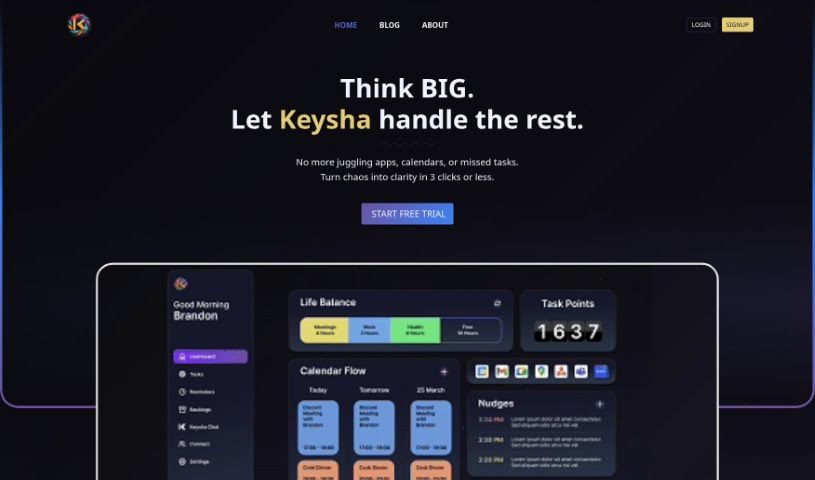
Keysha AI is essentially your AI-powered personal assistant, built to help you manage your tasks, your schedule, and your day-to-day routines. It does this by connecting with your calendars, learning what you like, figuring out the best ways to manage your time, and sending you reminders and updates that are just right for you. It uses smart AI technology to blend into your personal and professional life, making everything feel smooth and easy. Keysha helps you get more done by making you more efficient, helping you hit deadlines with smart prioritization, and offering great organizational tools. Plus, by bringing all your tools together in one place, Keysha is a really cost-effective choice. It saves you time and money, makes your operations run more smoothly, and boosts your overall efficiency. The team behind Keysha is pretty impressive, too: Brandon Ward is the CEO, Dionte Johnson is the CTO, Jason Bledsoe is the COO, and Faiza Khureshi is the CMO. Each of them brings a ton of valuable experience and leadership to the company. Keysha.ai’s vision for the future is one where businesses can operate at their absolute best, both in terms of efficiency and productivity, all thanks to AI technology. They aim to automate the routine stuff, freeing up teams to concentrate on growing and innovating.
Who created Keysha AI?
Brandon Ward, the Chief Executive Officer (CEO) of the company, is the person who created Keysha AI. The company officially launched Keysha AI on November 20, 2023. Their big vision is for businesses to run smoothly and productively using advanced AI technology. They’re aiming to provide a super-efficient, AI-driven executive assistant that can handle daily business operations.
What is Keysha AI used for?
- Cost-Effective: It’s a budget-friendly way to manage your workload.
- Efficiency with Your Team: Helps your team work together more smoothly.
- Optimize Your Time: Makes sure you’re using your time as wisely as possible.
- Streamline team’s workflow and boost productivity: It smooths out how your team works and helps everyone get more done.
- Manage personal and professional life through unified interface: You can handle both your work and personal life from one central place.
- Enhance workflow for optimal efficiency: It makes your work processes better and more efficient.
- Cut operational expenses by eliminating manual tasks: By taking over manual jobs, it lowers your costs.
- Broaden services for diverse client needs: It helps you offer a wider range of services to different clients.
- Automated scheduling for time savings: Scheduling happens automatically, saving you valuable time.
- Focus on task execution with automated scheduling: Since scheduling is automated, you can concentrate on actually doing the work.
- Manage tasks, schedule, and daily routines: It helps you keep track of everything you need to do.
- Optimize time management: It helps you make the most of your time.
- Provide reminders and updates tailored to individual needs: You get reminders and updates that are specific to what you need.
- Boost productivity by enhancing efficiency and helping meet deadlines: It makes you more productive and helps you finish things on time.
- Cost-effective solution for managing tasks and schedule by consolidating tools into one platform: It’s a smart, affordable way to manage your tasks and schedule because it puts all your tools in one spot.
- Manage various aspects of life through a unified interface for task management, calendar syncing, and updates: You can handle many parts of your life using one interface that manages tasks, syncs calendars, and provides updates.
- Enhance productivity and streamline tasks through real-world applications tailored to unique needs: It improves how much you get done and simplifies tasks with practical uses designed for your specific requirements.
- Keep track of key metrics to ensure team works smoothly and efficiently: It monitors important numbers to make sure your team is running well and efficiently.
- Automate workflows and streamline tasks to increase efficiency and prioritize high-priority tasks: It automates how work gets done, simplifies tasks, boosts efficiency, and helps you focus on what’s most important.
- Smooth team workflow by enhancing communication and organizing tasks: It makes your team’s work flow better by improving how you communicate and organizing tasks.
Who is Keysha AI for?
- Design Agency Owner
- Ecommerce Owner
- Web Developer
- Business Owner
How to use Keysha AI?
To get the most out of Keysha AI, just follow these simple steps:
- Personalized Setup: First, connect Keysha with your calendar and let it know your preferences. This helps Keysha manage your time better by giving you reminders and updates that are just for you.
- Boost Productivity: Use Keysha’s AI smarts to work more efficiently, meet your deadlines, and figure out which tasks are most important. Let Keysha handle the repetitive stuff so you can focus on the big-picture activities.
- Enhanced Workflow: You can actually customize Keysha to perfectly fit what your business needs. Automate your workflows, simplify tasks, and make everything more efficient overall. Keysha’s personalized features can really adapt to your specific requirements.
- Real-time Updates: Get instant notifications that keep you in the loop, giving you much better control over your schedule.
- Adaptive Learning: Keysha gets smarter over time, adjusting its suggestions as your scheduling preferences change, which means even better efficiency.
- Predictive Availability: You can even predict when participants are free, making scheduling much easier with helpful future insights.
- Efficient Language Processing: Keysha can smoothly turn your preferences into actual calendar events thanks to its advanced language processing.
- Automated Resolution: It can spot and fix conflicts in your calendar automatically, making scheduling a stress-free experience.
- Smart Algorithm: Keysha uses its smart algorithm to create the best possible schedules based on your preferences and priorities, really helping you maximize your productivity.
By following these steps, you can really tap into Keysha AI’s power to organize your tasks, boost your productivity, and manage your schedule like a pro. If you have more questions or need a hand, don’t hesitate to reach out to Keysha’s support team. They’re there to help you get the most out of the platform.