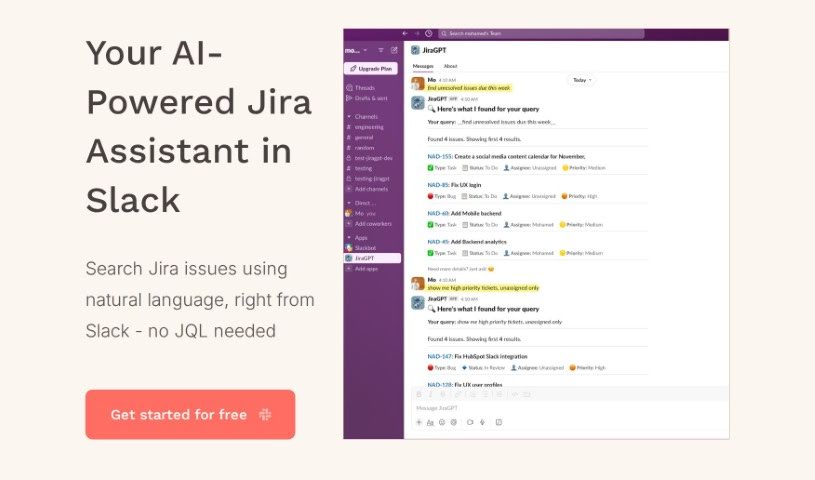
Screenshot of JiraGPT

JiraGPT

Discover JiraGPT in 2025! Learn what this AI tool does, how to use its features for project management, and how it stacks up against other tools. Get practical tips for seamless integration.

Screenshot

What is JiraGPT?

JiraGPT is a really smart AI tool built to make your Jira tasks much simpler. Imagine being able to search for Jira issues using everyday language, right from Slack. That’s exactly what JiraGPT lets you do, and you don’t need to know any complicated Jira Query Language (JQL) to make it happen.

This tool fits right into your Slack and Jira setup, offering a super easy way to work. It boosts your productivity because you won’t have to jump between different apps or learn those tricky query languages anymore. You can just chat with JiraGPT in your Slack channels, asking questions or giving commands naturally. This really speeds up how you find issues and manage your tasks.

JiraGPT is your personal Jira assistant, working directly within your Slack channels. It’s designed to understand what you’re saying in plain English, so you can keep track of Jira issues and use the tool without ever leaving Slack. It makes finding issues a breeze by skipping those complex JQL queries and letting you communicate like you’re just having a conversation. This all adds up to better efficiency and more productivity.

Plus, you can give JiraGPT a try for free! They’re serious about keeping your data safe and private, too. Your interactions are encrypted, and they process everything instantly without ever storing or sharing what you create.

Who created JiraGPT?

JiraGPT comes from a company called TinyAI. They launched it on July 20, 2023. The whole idea behind it was to make Jira tasks easier by letting people search for issues using natural language directly in Slack, cutting out the need to know JQL.

What is JiraGPT used for?

  • Getting quick updates on your projects.
  • Keeping an eye on what team members are working on.
  • Tracking bugs efficiently.
  • Saving valuable time when you’re searching for issues.
  • Boosting your productivity when you’re tracking issues.
  • Keeping tabs on Jira issues just by using natural language commands.
  • Interacting with Jira issues without leaving your Slack workspace.
  • Making the whole process of searching for issues much simpler by using natural language.

Who is JiraGPT for?

This tool is a great fit for a wide range of professionals, including:

  • Project Managers
  • Software Developers
  • IT Professionals
  • Software Engineers
  • Product Managers
  • Quality Assurance Specialists
  • Business Analysts
  • Team Leads
  • DevOps Engineers
  • Scrum Masters
  • Agile Coaches

Basically, anyone involved in managing projects, developing software, or ensuring quality will find JiraGPT incredibly useful.

How to use JiraGPT?

Getting started with JiraGPT is pretty straightforward. Just follow these simple steps:

  1. Installation: First, you’ll need to add the JiraGPT app to your Slack workspace. Then, connect your Jira account to JiraGPT so they can talk to each other.
  2. Connecting: Once installed, you can connect JiraGPT to your Slack channels. Just invite it by typing /invite @JiraGPT in the channel you want to use it in.
  3. Engaging: Now you’re ready to start using JiraGPT! Simply type commands in Slack, like /jiragpt show me in progress issues, and it’ll do the work for you.

JiraGPT really simplifies things by letting you ask questions in plain English. It makes tracking issues super smooth, right there in Slack, and you can forget about needing to know JQL. It’s also designed with data security in mind and is really easy to use. You’ll find your productivity gets a nice boost because it works so seamlessly within the chat platforms you’re already familiar with.

Why not try it out with a free trial? You can see for yourself just how efficient and easy it is to bring JiraGPT into your daily workflow.

If you need more details on specific commands or run into any issues, the comprehensive guide provided by JiraGPT has you covered.

Related AI Tools

Discover more tools in similar categories that might interest you

Stay Updated with AI Tools

Get weekly updates on the latest AI tools, trends, and insights delivered to your inbox

Join 25,000+ AI enthusiasts. No spam, unsubscribe anytime.