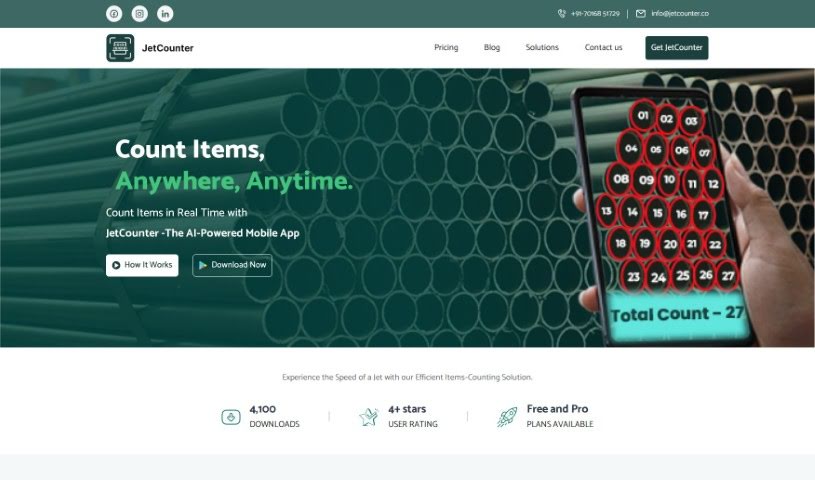
Screenshot of Jetcounter

Jetcounter

Discover what Jetcounter is and how to use it effectively in 2025. Explore its features, compare it with other startup tools, and learn how it simplifies inventory management.

Screenshot

What is Jetcounter?

JetCounter is a really neat AI-powered mobile app that makes counting things from photos super simple. It is your go-to for automating inventory management, whether you’re in manufacturing, healthcare, food service, or even working with livestock. You can either snap a new picture right in the app or upload one you already have. JetCounter uses smart AI to identify and count your items, aiming for perfect accuracy. It even comes with built-in templates for different kinds of products, lets you export your counts as PDFs, and has a zoom feature with manual correction if you need to tweak anything. It’s a fantastic tool for any business looking to speed up operations and modernize how they handle inventory. You can start with a free license for 100 scans, or opt for premium plans if you need unlimited counting.

Who created Jetcounter?

JetCounter was developed by an unnamed founder connected to the company behind this innovative AI mobile app. The core idea is to make counting objects from photos much easier. It’s designed for industries like manufacturing, medicine, food, and livestock. JetCounter relies on advanced AI to accurately identify and count items, which really helps streamline inventory management and cut down on counting mistakes.

What is Jetcounter used for?

JetCounter is incredibly versatile! Here’s a breakdown of what it helps with:

  • Inventory Management: It’s a lifesaver for keeping track of stock in industrial, medical, food, and livestock sectors.
  • Specific Counting: Need to count electronic components, medical supplies, packaged foods, or even livestock? JetCounter handles it.
  • Efficiency Boost: It saves you a ton of time and helps you avoid those frustrating counting errors.
  • Streamlining Operations: It’s all about updating and making your business processes smoother.
  • Reporting: You can get detailed counting reports, complete with location information.
  • AI Power: It uses AI for identifying and counting objects accurately.
  • Easy Templates: Built-in templates make counting specific items straightforward.
  • Flexible Input: You can either upload existing photos or capture new ones directly.
  • Precision Tools: Features like zoom and manual adjustments let you fine-tune counts.
  • Error-Free Counts: The goal is always to provide counts you can trust.
  • Modernization: It helps businesses update their practices and stay competitive.
  • Record-Keeping: PDF exports make keeping records efficient.

Essentially, it simplifies stock management across the board, automates object counting from photos, saves time, eliminates errors, and helps businesses modernize.

Who is Jetcounter for?

JetCounter is a great fit for anyone working with physical inventory across several key sectors:

  • Industrial Professionals
  • Medical Professionals
  • Food Sector Professionals (including the food industry)
  • Livestock Sector Professionals (including the livestock industry)
  • Anyone working within the Industrial Sector, Medical Sector, Food Sector, or Livestock Sector.

How to use Jetcounter?

Using JetCounter is pretty straightforward. Here’s how you can get the most out of it:

  1. Grab the App: First, download JetCounter from the Google Play Store. You can find the link easily.
  2. Pick Your License: When you set it up, you’ll choose your license. There’s a free option that lets you count up to 100 items. If you need more, they offer premium plans with unlimited counting, available daily, weekly, monthly, or yearly.
  3. Select a Template: Choose the right template for whatever you’re counting. JetCounter has templates for different product types to help with accuracy.
  4. Snap or Upload: You can either take a new photo with your phone’s camera or upload an image from your device’s gallery. For the best results, try to make sure the angle and background of your photo match the template you selected.
  5. Let the AI Count: Once you’ve got your image ready, JetCounter’s AI technology will automatically find and count the objects. It’s designed to give you error-free results.
  6. Make Any Tweaks: If you need to be extra precise, you can use the zoom feature and the manual rectification tools to make any small adjustments.
  7. Export Your Reports: Need a record? You can easily export your counting results as a PDF. These reports can even include location information, which is super handy for record-keeping.
  8. Ideal Industries: Remember, this app is especially useful for industrial, medical, food, and livestock sectors, handling a wide variety of items.
  9. Special Offer: Here’s a cool bonus: if you can provide 500 or more product image samples, they’ll create a custom template for you for free!

By following these steps, you’ll find that JetCounter really helps streamline your inventory management, saves you valuable time, and ensures your counts are accurate, no matter which industry you’re in.

Related AI Tools

Discover more tools in similar categories that might interest you

Stay Updated with AI Tools

Get weekly updates on the latest AI tools, trends, and insights delivered to your inbox

Join 25,000+ AI enthusiasts. No spam, unsubscribe anytime.