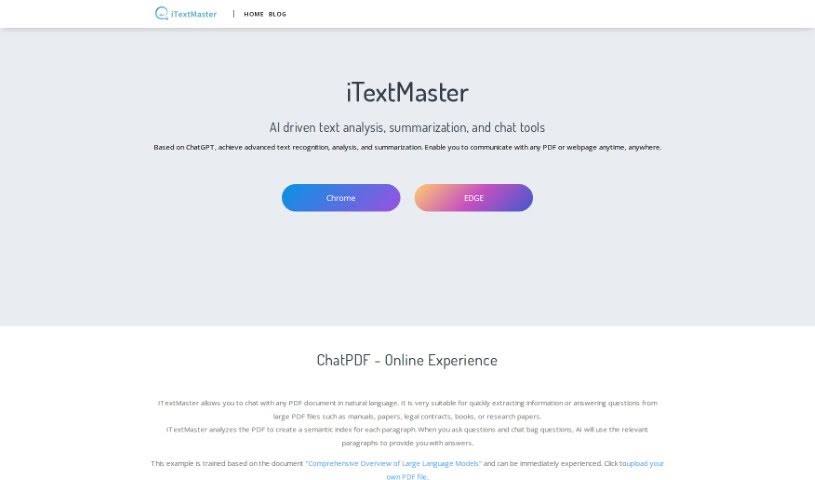
What is iTextMaster?
ITextMaster is a smart tool designed to help you interact with PDF documents and web pages. It uses artificial intelligence, specifically ChatGPT technology, to make this process much easier. You can upload all sorts of documents, get quick summaries, ask questions and get intelligent answers, and it even supports multiple languages. Essentially, iTextMaster wants to simplify how you handle text, help you understand things faster, and save you precious time. It does this by creating detailed indexes for each paragraph, which means it can give you really accurate and relevant answers to whatever you ask.
Who created iTextMaster?
An AI-driven text processing tool called iTextMaster was launched on February 16, 2024. The team behind it includes AI experts who really know their stuff when it comes to document processing. Their goal was to build a platform that could provide smart answers, generate summaries, and work with many different languages. iTextMaster really boosts how you interact with documents by offering features like creating semantic indexes, analyzing PDFs and webpages, and truly understanding the content within them.
What is iTextMaster used for?
Here’s a look at what you can do with iTextMaster:
- Academic Research: It’s a great help for researchers needing to pull key information from papers, books, PDFs, or academic websites.
- Real-time Interaction: You can process text as it happens. Just give it a webpage address or upload a PDF, and it’ll instantly retrieve the content for you to interact with.
- Summarizing Long Documents: It can take those lengthy PDF documents and give you a concise summary, thanks to its advanced text recognition and analysis.
- Web Content Retrieval: It can pull a wide range of content from webpages, making it easy to analyze and interact with.
- Meaningful Answers: It provides genuinely helpful answers to your text questions by using a detailed, semantically rich index it creates for every paragraph.
- Conversational Chatting: You can actually chat with your PDF documents! It fields your specific questions and gives you smart answers.
- Multi-Language Support: If you’re dealing with documents in different languages, or if English isn’t your first language, iTextMaster can help.
- Fast Information: It’s quick at retrieving document content, parsing web content for interaction, and even generating common questions you might have.
- Intelligent Processing: It makes sure you get accurate answers with the right context, thanks to its smart processing and instant key extraction.
- One-Click Summaries: You can summarize web content with a single click and dive deep into analyzing PDF content.
- More Research Help: It’s particularly useful for academic research, helping you extract key info from research papers, books, and those long PDF files or academic web pages.
- Instant Interaction: It supports real-time interactive text processing by quickly getting content ready for you.
- Smart Responses: It gives meaningful answers to all your text questions by using that detailed index for each paragraph.
- Getting Started: All you need to do is provide a text document, like a PDF or a webpage, to kick off the analysis.
- Chatting with PDFs: You can have a conversation with your PDF documents.
- Webpage Interaction: It lets you interact with webpages by analyzing and extracting key information.
- Flexible Input: It supports real-time interactive text processing, whether you input a webpage or upload a document.
- Accurate Answers: It provides meaningful answers to all your text questions by using that semantically rich index.
- Conversational PDFs: You can interact with your PDFs in a conversational way.
- Language Help: It helps non-native speakers and those working with multi-lingual documents thanks to its multi-language support.
- PDF Enhancement: It makes interacting with PDFs better by creating a semantic index for every paragraph.
- Efficient Understanding: It helps you understand and process documents more efficiently, whether for academic or practical topics.
- Research Assistance: It’s great for academic research, helping you pull key information from research papers, books, PDFs, and web pages.
- PDF Summaries: It can summarize lengthy PDF documents, pulling out the most important insights.
- Semantic Indexing: It provides meaningful answers to all your text questions by using semantic indexing.
- Analysis Start: You need to give it text documents, like PDFs or webpages, to start the analysis.
- PDF Conversations: You can chat with PDF documents in natural language to get information.
- Webpage Extraction: It lets you interact with webpages to analyze and extract key information.
- Real-time Processing: It supports real-time interactive text processing, taking input from webpages or uploaded documents.
- Meaningful Responses: It provides meaningful answers to all text inquiries by using that semantically rich index.
- Conversational Interaction: You can interact with your PDF documents in a conversational format.
- Multi-Language Use: It helps non-native speakers and users dealing with multi-lingual documents with its multi-language support.
- Semantic Indexing for PDFs: It improves how you interact with PDFs by creating a semantic index for each paragraph.
- Efficient Processing: It makes document understanding and processing efficient for both academic and practical topics.
- Research Support: It assists with academic research by extracting key information from research papers, books, PDF files, and web pages.
- Insightful Summaries: It summarizes lengthy PDF documents by extracting key insights from large documents.
- Accurate Answers: It provides meaningful responses to all text inquiries through semantic indexing.
- Analysis Input: It requires textual documents like PDFs or webpages to begin its analysis.
- PDF Conversations: You can operate in a conversational format when interacting with PDF documents.
- ChatPDF Feature: It enables users to communicate with any PDF or webpage anytime, anywhere using ChatPDF.
- Webpage Parsing: It interacts with web pages by automatically retrieving and parsing content from webpage addresses.
- Question Generation: It generates common questions, ensures answers are contextual and accurate, and saves you time.
- Advanced Features: It supports uploading PDFs and webpages, deep PDF content analysis, and generating semantically rich indexes.
- Efficient Handling: It handles queries efficiently, from academic topics to practical ones.
Who is iTextMaster for?
- Researchers
- Academics
- Legal experts
- Academic Researchers
- Non-native speakers
How to use iTextMaster?
Using iTextMaster is pretty straightforward. Just follow these simple steps:
- Upload Your Documents: You can easily upload PDF files or just paste in webpage links that you want analyzed.
- Ask Your Questions: You can ask specific questions, or if you prefer, the tool can even generate common queries for you to get information faster.
- Chat with the AI: Have a conversation with the AI, which is powered by ChatGPT, to get intelligent answers to your questions.
- Analyze Text: Let the tool’s AI capabilities work their magic to efficiently pull out key information from your documents.
- Get Summaries: Need a quick overview? Use iTextMaster to summarize those long PDF documents and get the key insights.
- Multi-Language Support: It’s great for everyone, as it supports interacting in multiple languages.
By doing these things, you can really make the most of iTextMaster for your academic research, managing your own documents, or any task that involves processing text efficiently. The tool is easy to use, lets you upload documents quickly, and its smart processing makes it a really helpful assistant for people in all sorts of fields.