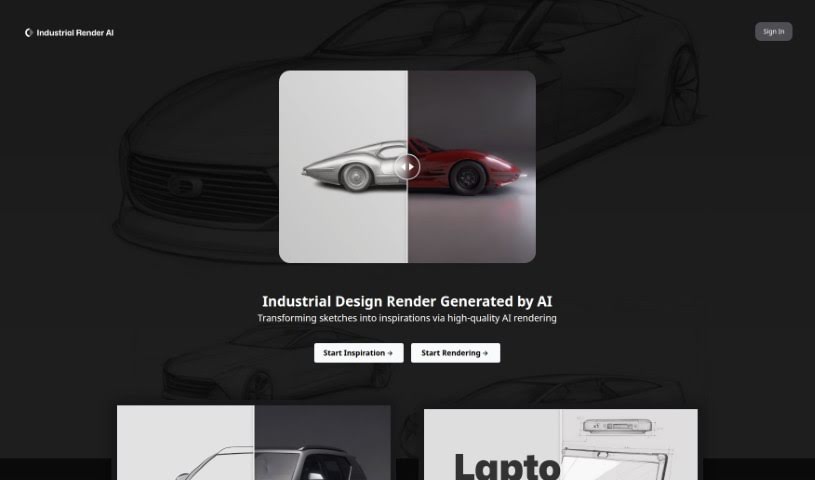
Screenshot of Industrial Render AI

Industrial Render AI

Discover what Industrial Render AI is and how to use it effectively in 2025. We'll explore its features and compare it to other design generators.

Screenshot

What is Industrial Render AI?

Industrial Render AI is a specialized tool for industrial design. It takes your conceptual product design sketches and turns them into high-quality renderings. It uses technology inspired by Generative Pretraining Transformer (GPT) models. The goal here is to really boost creativity, make communication smoother during the design process, and generally improve the quality and efficiency of your designs. You can upload your hand-drawn drafts, tweak some settings, and then generate all sorts of renders, perfect for your portfolio. By understanding and improving your sketches with GPT-based tech, Industrial Render AI is changing the game for industrial design, making it much faster to get great-looking renders.

One cool feature is its ‘describe and draw’ capability. You can simply describe a product design, and the tool will quickly create a sketch based on your words. This is fantastic for making sure everyone involved in a design project is on the same page. Plus, Industrial Render AI really shakes things up by turning sketches into high-quality renders super fast. This means you save time and your designs look much better. The ability to create different renders from the same sketch is also a great way to spark new ideas, giving you lots of visualization options.

Who created Industrial Render AI?

XLLab AI Development is the company behind Industrial Render AI. They launched it on November 7, 2023. XLLab AI Development focuses on creating AI solutions specifically for industrial design workflows.

What is Industrial Render AI used for?

  • It helps boost your creativity.
  • It enhances the overall quality of your designs.
  • It transforms your sketches into polished renderings.
  • It makes design communication much easier.
  • It improves how efficient your design process is.
  • It includes a handy ‘describe and draw’ feature.
  • It works well with your hand-drawn drafts.
  • You can fine-tune various parameters for your renders.
  • It lets you generate multiple render options from a single sketch.
  • It acts as a source of design inspiration.
  • It’s used for turning conceptual product design sketches into high-quality renderings.
  • It aids conceptual design by adding clarity and dimension to early ideas.
  • It enhances design communication by providing visual representations of sketches.
  • It increases design efficiency by quickly turning sketches into high-quality renders.
  • It generates multiple renders from the same sketch, letting you explore different visual ideas.
  • It helps create professional portfolio pieces.
  • It offers quick design visualization for faster project reviews.
  • It creates tangible design inspirations to spark creativity and innovation.
  • It converts verbal briefs into product designs using the ‘describe and draw’ function.
  • It’s revolutionizing industrial design by integrating AI assistance.

Who is Industrial Render AI for?

  • Industrial designers
  • Product designers
  • Creative designers
  • Marketing professionals
  • Sales professionals
  • Conceptual designers

How to use Industrial Render AI?

Here’s how you can get the most out of Industrial Render AI:

  1. Upload Your Hand-Drawn Designs: Start by uploading your hand-drawn design drafts directly onto the Industrial Render AI platform.
  2. Fine-Tune Parameters: Adjust settings like lighting, texture, color, and perspective to get the exact look you want for your renderings.
  3. Transform Your Sketches: The AI uses GPT-inspired technology to interpret and enhance your sketches, adding dimensions, textures, and colors to create high-quality renderings.
  4. Build Your Portfolio: Generate a variety of high-quality renders to create professional and unique additions to your portfolio.
  5. Use the ‘Describe and Draw’ Feature: If you have a product idea, just describe it briefly, and the AI will quickly generate a sketch for you.
  6. Improve Communication: This tool makes design communication better by offering visual versions of your conceptual sketches, which really helps when collaborating with others.
  7. Boost Your Creativity: Industrial Render AI sparks creativity not just by transforming sketches, but also by generating multiple render variations, encouraging you to explore different visual possibilities.
  8. Gain Efficiency and Quality: Make your design processes more effective and higher quality by quickly turning sketches into detailed, accurate renderings based on your original drafts.
  9. Conceptual Design with AI: Use the tool for conceptual design to bring clarity and dimension to your early design ideas with high-quality renderings.
  10. Discover Unique Features: What makes Industrial Render AI stand out is its GPT-inspired technology and the ‘describe and draw’ functionality, offering a distinctive way to create product renders from descriptions.

Related AI Tools

Discover more tools in similar categories that might interest you

123RF AI Image Generator

Creative Image Generation
Learn More

Stay Updated with AI Tools

Get weekly updates on the latest AI tools, trends, and insights delivered to your inbox

Join 25,000+ AI enthusiasts. No spam, unsubscribe anytime.