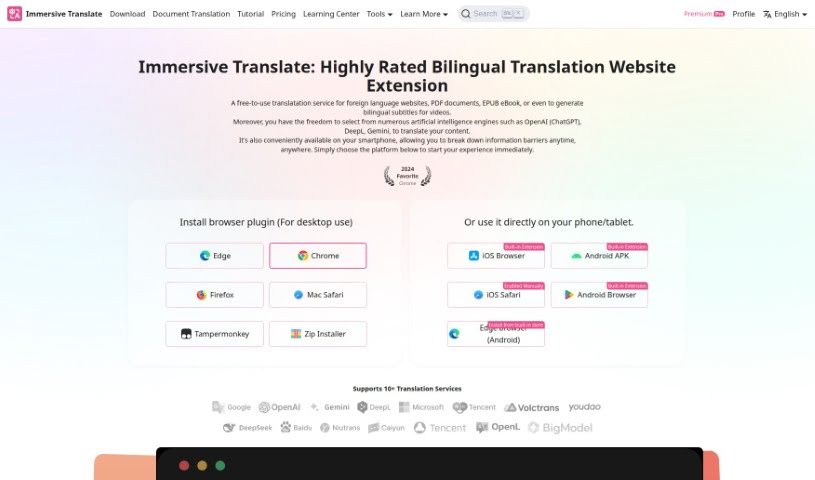
Screenshot of Immersive Translate

Immersive Translate

Discover Immersive Translate in 2025! Learn about its features for translating webpages, PDFs, and subtitles, and see how it stacks up against other translation tools.

Screenshot

What is Immersive Translate?

Immersive Translate is a really handy tool that makes understanding different languages so much easier. It’s great for translating entire webpages and also handles PDF documents really well. This service is completely free and supports a bunch of languages, including Chinese, English, Japanese, Korean, and Spanish. You can use it to translate websites, documents, e-books, and even video subtitles right from your browser or phone. Plus, it works with popular translation services like DeepL, Google, and Baidu, so you can pick the one you like best. It’s designed to be super user-friendly, offering cool features like bilingual subtitles for videos, ePub translations, and letting you read PDFs side-by-side with the original and translated text. Honestly, it’s a must-have if you need to communicate, learn, or just get information across different languages.

Want to dive deeper? You can check out the official website at Immersive Translate.

Who created Immersive Translate?

Dan is the founder of Immersive Translate, as one user mentioned in a review of the Chrome extension. Since launching in 2023, the company has focused on providing AI-powered bilingual webpage translation extensions. They’ve already helped over a million people break down language barriers. Immersive Translate is known for integrating several top translation engines, including DeepL, OpenAI (ChatGPT), and Google Translate, to give users a smooth and really thorough translation experience.

What is Immersive Translate used for?

Here’s a look at what you can do with Immersive Translate:

  • Translate website content: Get bilingual translations for webpages.
  • Bilingual video subtitles: Translate subtitles for videos on more than 60 major international platforms.
  • PDF document translation: Translate PDFs while keeping the original layout, and get side-by-side bilingual versions.
  • EPUB e-book translation: Translate e-books into either bilingual or single-language formats, perfect for e-readers.
  • Mouse hover translation: Simply hover your mouse over text for instant paragraph translations.
  • Input box translation: Quickly translate text directly within input boxes on webpages.
  • Bilingual reading: Enhance how you learn and understand information by reading in two languages at once.
  • Easy browsing: Use Immersive Translate to browse platforms like Twitter more easily.
  • Information access: Get information and communicate across languages more efficiently.
  • Better PDF reading: Improve your PDF reading experience with bilingual translations.

Who is Immersive Translate for?

Immersive Translate is a great tool for:

  • Educators
  • Translators
  • Content creators
  • Researchers
  • Business professionals
  • Journalists
  • Developers
  • Travel agents
  • Tour Guides
  • Students

How to use Immersive Translate?

Using Immersive Translate is pretty straightforward. Just follow these steps:

  1. Install the plugin: First, grab the browser plugin that works best for you, like for Microsoft Edge or Google Chrome.
  2. Explore the website: Head over to the Immersive Translate website to see all its features. You can translate foreign language websites, PDF documents, EPUB eBooks, and even get bilingual subtitles for videos.
  3. Choose your AI engine: Pick from different AI translation services, such as OpenAI (ChatGPT), DeepL, and Gemini, to translate your content.
  4. Translate on the go: You can even use Immersive Translate on your smartphone, making it easy to overcome language barriers wherever you are.
  5. Start translating: Select the languages you want to translate from and to on the platform.
  6. Input your content: Either type in the text you need translated or paste a link to a webpage or document.
  7. Review and edit: Take a look at the translated text and make any necessary edits.
  8. Save or copy: Once you’re happy with it, save or copy the translated text for your use.

Immersive Translate really makes translating across different platforms a smooth experience, so you can get the translated content you need, whenever you need it.

Related AI Tools

Discover more tools in similar categories that might interest you

Stay Updated with AI Tools

Get weekly updates on the latest AI tools, trends, and insights delivered to your inbox

Join 25,000+ AI enthusiasts. No spam, unsubscribe anytime.