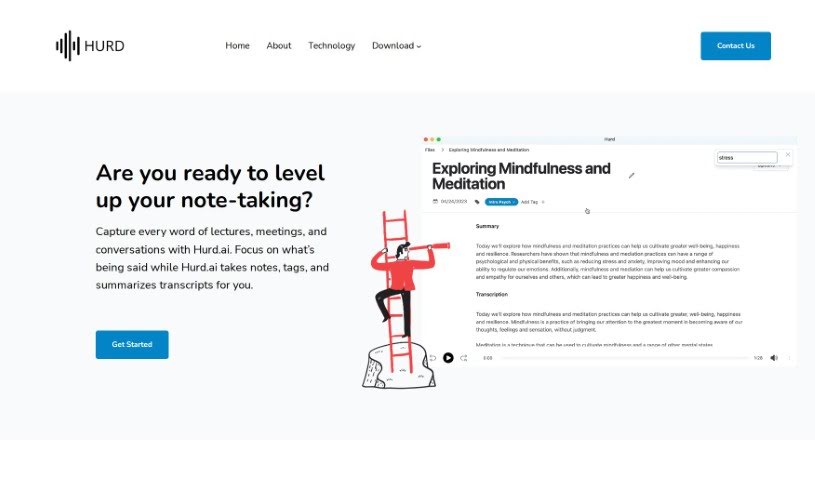
What is Hurd AI?
Hurd AI.ai is a handy tool designed to capture and transcribe your audio recordings, whether they’re from lectures, meetings, or just everyday conversations. It really aims to make note-taking much easier. How? By automatically turning your audio files into text that you can easily search through. Plus, you can highlight, filter, and group these transcripts. One of the standout features of Hurd AI.ai is its ability to summarize transcripts for you, which honestly saves a ton of time and energy. The tool is pretty flexible, supporting a bunch of different audio and video file formats. It also lets you edit transcripts right there, and importantly, it keeps your personal audio files and transcripts strictly on your local machine, so your data stays private. Hurd AI.ai is super user-friendly, handles multiple languages, and makes it a breeze to export your transcripts to places like Apple Notes or CSV files.
Who created Hurd AI?
“Hurd” was actually created by Paul. He’s got a solid background in software development and knows his way around a lot of programming languages. Before starting Hurd.ai, Paul made some pretty significant contributions at companies like Sendoso and Quid. Hurd.ai itself launched on March 29, 2023. It’s a tool built to capture and transcribe audio from lectures, meetings, and conversations. The main idea is to improve how we take notes by automatically transcribing, organizing, and summarizing discussions. This lets users actually focus on listening, rather than scribbling notes. The tool also uses AI machine learning for quick data synthesis, supports various audio and video formats, and really prioritizes your data privacy by keeping all your personal files and transcripts local to your device.
What is Hurd AI used for?
Hurd AI is great for a variety of tasks:
- Capturing and transcribing audio recordings of lectures, meetings, and conversations.
- Automatically taking notes from your transcribed content.
- Tagging and summarizing transcripts automatically, saving you time.
- Converting audio files into searchable text, making information easy to find.
- Highlighting, filtering, and grouping text within your transcripts for better organization.
- Enhancing your overall note-taking process.
- Making sure you don’t miss any important information.
- Saving you time and energy by automatically titling, tagging, and summarizing transcripts.
- Supporting various audio and video file formats so you can use what you have.
- Offering inline editing tools to help you enrich your transcriptions.
- Providing audio playback so you can revisit specific moments.
- Supporting multiple languages for broader usability.
- Allowing you to export transcripts to different formats like Apple Notes or CSV files.
- Helping you stay present and attentive during recording sessions.
Who is Hurd AI for?
Hurd AI is a valuable tool for a wide range of professionals and students:
- Software development professionals.
- Individuals in technical leadership roles.
- Product Management specialists.
- Data Science experts.
- Engineering teams.
- Business professionals attending meetings.
- Lecturers and educators.
- Transcriptionists looking for efficient tools.
- Language interpreters needing accurate transcriptions.
- Professionals in academia, including lecturers and researchers.
- Business professionals like meeting attendees and managers.
- Language professionals such as translators and interpreters.
- Medical professionals, including doctors and healthcare providers.
- Legal professionals, like lawyers and paralegals.
- Lecture attendees who want to review material.
- Meeting participants who need to recall discussions.
How to use Hurd AI?
Using Hurd.ai effectively is straightforward. Just follow these simple steps:
- Capture Audio Recordings: Begin by recording your lectures, meetings, or conversations directly with Hurd.ai.
- Automatic Transcription: Hurd.ai will then automatically transcribe your audio into text. This makes reviewing and referencing the content much easier.
- Organize and Summarize Transcripts: The tool helps organize and summarize your transcribed content. This means you can concentrate on actively listening during discussions, rather than worrying about taking notes.
- Import Your Files: You can easily import various audio and video files, like MP3, MP4, WAV, AVI, and M4A, to get them transcribed.
- Use Playback Features: Need to revisit a specific part of the conversation? Use the audio playback function to replay sections directly within the transcript.
- Cross-Device Compatibility: If you’re an iPhone user with iCloud enabled, you can import files with just a single click, making it super accessible.
- Language Support: Hurd.ai is great for global users, supporting many languages including Arabic, English, Chinese, French, German, Japanese, Korean, and Spanish, among others.
- Preview and Edit: You can use the handy inline editing tool to make any adjustments to the transcribed text right as you review it.
- Privacy First: You can rest easy knowing that your personal audio files and transcripts are kept secure and private on your local machine.
- Export Your Work: Once you’re happy, you can easily copy transcripts, export them directly to Apple Notes, or download them as CSV files for whatever you need them for.
Hurd.ai’s interface is really easy to use, its AI transcription is top-notch, and its focus on data privacy makes it an excellent tool for capturing, transcribing, and managing your audio content efficiently.