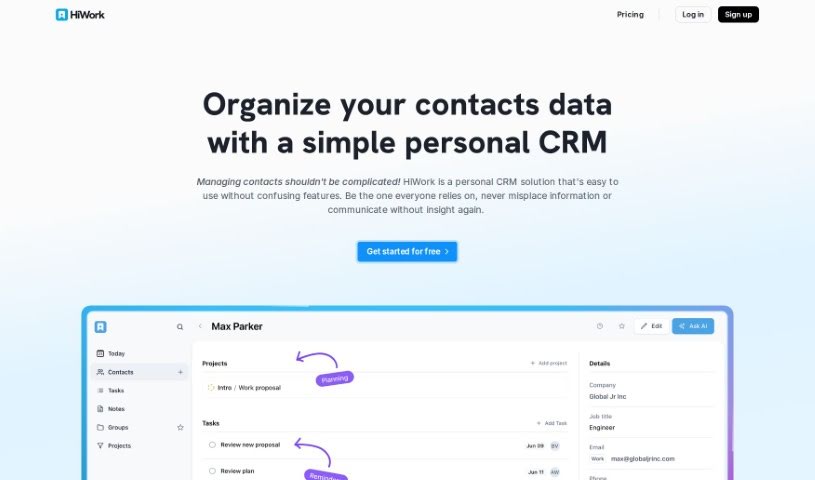
Screenshot of Hiwork

Hiwork

Discover what Hiwork is and how to use it effectively in 2025. We'll explore its features and see how it stacks up against other CRM tools.

Screenshot

What is Hiwork?

HiWork is a personal CRM designed to make your everyday interactions, both for business and personal life, much simpler. It was actually created because there was a real need for a CRM that’s lightweight, easy to customize, and secure, but still powerful enough for individuals and teams alike. HiWork includes features like managing your contacts, taking notes, creating tasks, and even has AI assistance. You can get AI-generated summaries for your contacts, helpful conversation tips, gift ideas, and suggestions for following up. These features are meant to boost your networking skills and make your communication more efficient. The CRM is really user-friendly, letting you create tasks quickly, manage your goals effectively, handle different processes flexibly, improve how your team works together, and gives you a dashboard for a clear overview of what’s important. HiWork really focuses on keeping things simple, boosting productivity, and encouraging team collaboration, making it a great tool for anyone, whether you’re working alone or with a team.

Who created Hiwork?

Sonia B., the co-founder of HiWork LLC in Florida, US, created HiWork. She developed the CRM because she personally needed a tool that was both simple and effective for managing her interactions. HiWork is a modern, lightweight, and customizable CRM that works well for both personal use and teams. It offers features like contact management, note-taking, task creation, AI assistance, and project organization. The company is committed to helping its customers succeed by providing security, reliability, and a user-friendly experience. You can get it through a monthly subscription or an annual payment option.

What is Hiwork used for?

  • It has a user-friendly interface.
  • It helps improve your productivity.
  • It’s great for managing your contacts.
  • It’s a personal CRM powered by AI, letting you manage your daily interactions and improve how you network.
  • It helps manage contacts, tasks, projects, and notes.
  • It provides AI contact summaries.
  • It offers AI conversation tips.
  • It gives you AI gift ideas.
  • It suggests AI follow-up ideas.
  • It helps you handle multiple projects.
  • It offers secure scaling.
  • You can create tasks quickly.
  • It allows for flexible process handling.
  • It improves team coordination.
  • It has an overview dashboard.
  • It helps you build valuable connections.
  • You can create tasks in seconds.
  • Stay productive and gain efficient control over your goals.
  • Be dynamic and handle multiple processes flexibly.
  • Improve team coordination of information through team collaboration.
  • See an overview of what’s relevant to you on the dashboard.
  • Manage contacts, tasks, projects, and notes.
  • Stay productive by efficiently gaining control over your goals.
  • Be dynamic by handling multiple processes in a flexible way.
  • Enhance team coordination through team collaboration.
  • View an overview of what matters most to you on the dashboard.

Who is Hiwork for?

  • People who use personal CRMs, individuals, and professionals looking to manage their daily interactions and improve their networking style.
  • Busy Professionals.
  • Teams looking for better collaboration.
  • Client service agents.
  • Freelancers.
  • Sales Representatives.
  • Business professionals.

How to use Hiwork?

Hiwork is a really versatile tool, perfect for both personal and business use, and it offers a user-friendly experience packed with powerful features. To get the most out of Hiwork, just follow these simple steps:

  1. Sign Up and Get Started:
    • Begin by signing up for a Hiwork account. The onboarding process is quick and easy.
    • You can try it out for free for 14 days, no credit card needed.
  2. Add Contacts and Notes:
    • Easily import your contacts and manage them efficiently using Hiwork’s straightforward interface.
    • For each contact, create detailed notes so you can stay organized and remember all the important details.
  3. Manage Tasks and Projects:
    • You can create tasks in just seconds and organize them by contact, making them easy to find.
    • Hiwork lets you manage multiple projects without a hassle, helping you stay in control of your goals efficiently.
  4. Use the AI-Powered Features:
    • Get quick insights into your contacts with AI-generated summaries.
    • Take advantage of AI conversation tips, gift ideas, and follow-up suggestions to really boost your networking skills.
  5. Work Together with Teams:
    • Make teamwork better by sharing information smoothly within the platform.
    • Improve how your team coordinates by using Hiwork’s collaboration features.
  6. Check the Dashboard Overview:
    • Get a complete picture of all the important information through the dashboard.
    • Stay informed and organized with an overview of what matters most to you.
  7. Subscription and Pricing:
    • Pick a subscription plan that fits your needs. The pricing is straightforward with no hidden costs.
    • You’ll also get features like unlimited import and export for a really smooth experience.

By following these steps, you can really make the most of Hiwork, whether you’re organizing your personal life or collaborating with a team. You’ll be able to improve your communication skills, stay productive, and build valuable connections without any extra effort, all thanks to this powerful CRM tool.

Related AI Tools

Discover more tools in similar categories that might interest you

Stay Updated with AI Tools

Get weekly updates on the latest AI tools, trends, and insights delivered to your inbox

Join 25,000+ AI enthusiasts. No spam, unsubscribe anytime.