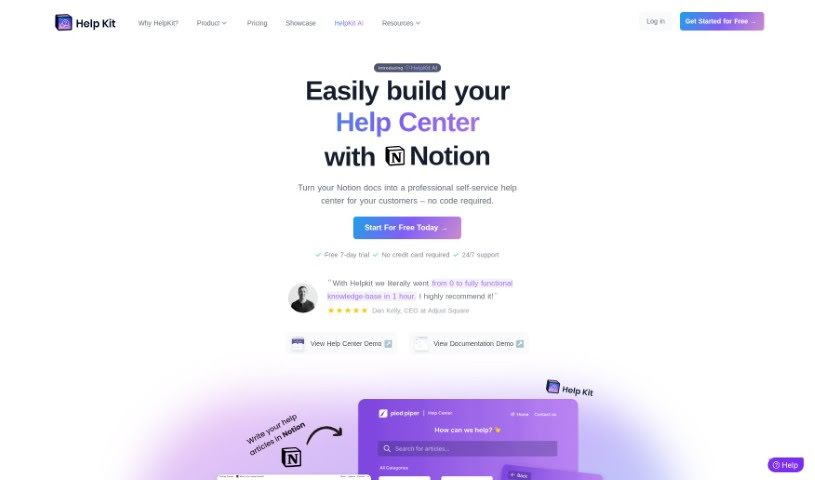
Screenshot of HelpKit

HelpKit

Discover what HelpKit is and how to use it effectively in 2025. We'll explore its features and see how it stacks up against other customer service tools.

Screenshot

What is HelpKit?

HelpKit is your go-to tool for quickly building a fantastic knowledge base. You just write your help articles right in Notion, and HelpKit takes care of making them look polished and professional everywhere, on any device. It even lets you connect your own custom domain, has a built-in search that works really well, and plays nicely with other systems you might already use, like Slack or live chat widgets. Plus, it’s designed to be found easily by search engines (SEO-friendly) and you can even lock down certain content if you need to control who sees it.

What’s really cool is that HelpKit is super serious about your privacy. They don’t share or sell your user data to anyone. All your knowledge base content stays safely in your own Notion workspace.

And if you want to take customer support to the next level, there’s HelpKit AI. This add-on feature turns your Notion knowledge base into an AI-powered chatbot. It offers smart insights into how people are using it, lets you customize the look and feel to match your brand, and is often a much more cost-effective way to handle support than traditional methods.

Who created HelpKit?

HelpKit was actually built by an indie software company. The founder, Dominik, launched it on August 2, 2023. This company focuses on making it easier to create knowledge bases using Notion. They offer neat features like AI chatbots and really prioritize keeping customer data private and secure.

What is HelpKit used for?

HelpKit is incredibly versatile, helping you:

  • Build a knowledge base super fast: Get your help content up and running in no time.
  • Answer common questions: Easily provide answers to frequently asked questions about your products or services.
  • Solve problems: Offer clear solutions for issues your users might encounter.
  • Share tutorials: Embed videos that guide users on how to use your products or services.
  • Boost customer support: Save time and improve your support with an AI chatbot.
  • Give instant answers: Provide precise, 24/7 responses to user queries.
  • Convert Notion to Chatbot: Turn your Notion pages into a chatbot experience in seconds.
  • Link to more info: Include clickable references that point to relevant help articles.
  • Understand your users: Get smart insights into what users are asking and how satisfied they are.
  • Match your brand: Customize the chatbot’s interface to reflect your brand’s specific language and behavior.
  • Create content quickly: Use Notion to write articles, and HelpKit handles the rest.
  • Provide FAQs: Cover all the common questions users have.
  • Offer video guidance: Include tutorials for easy user learning.
  • Improve content: Use analytics and search intent data to make your help articles even better.
  • Protect your content: Control access to your knowledge base information.
  • Customize the user experience: Use analytics and SEO to make your site shine.
  • Integrate with other tools: Connect with Slack, live chat widgets, and more.
  • Get found online: Optimize your content for search engines like Google and Bing.
  • Enhance support with AI: Use the AI chatbot to make customer support even better.
  • AI Chatbot from Notion: Transform your Notion knowledge base into an AI chatbot, much like ChatGPT, for superior customer support.
  • Precise, instant answers: The AI assistant provides quick and accurate answers to user questions around the clock.
  • Ask the AI: Users can ask product-related questions, and the AI will respond promptly with contextually relevant answers.
  • Smart usage insights: Understand user questions and satisfaction levels through detailed usage data.
  • Brand-aligned chatbot: Customize the chatbot’s language and behavior to perfectly match your brand.
  • Interface options: Choose between a slide-over design or a search command bar for your AI chatbot.
  • Cost-effective AI support: Use the AI assistant for engaging customer support that’s more affordable than traditional methods.
  • Competitive pricing: Add the AI chatbot to any plan with competitive pricing.
  • Free trial: Try it out for 7 days free, no credit card needed.
  • Fastest knowledge base creation: Get your help content ready in record time.
  • All-in-one information: Centralize FAQs, common issues, solutions, and tutorials.
  • AI chatbot integration: Boost customer support and save time with the HelpKit AI chatbot.
  • Better customer experience: Offer precise, instant answers to user queries.
  • Semantic answers: Index your Notion content using OpenAI™ for answers that truly understand the meaning.
  • Relevant article links: Include links that take users directly to related help articles.
  • Customizable chatbot: Tailor the chatbot’s interface to match your brand’s voice and style.
  • User-friendly AI: Provide an engaging and easy-to-use AI chatbot for your customers.
  • Seamless integration: Connect with various systems and tools for smooth operation.

Who is HelpKit for?

HelpKit is a great tool for a wide range of professionals who deal with customer information and support:

  • Customer Support Representatives
  • Customer Service Managers
  • Product Managers
  • Content Creators
  • Knowledge Management Professionals
  • Marketing Professionals
  • Documentation Specialists
  • Customer Success Managers
  • Marketing Managers
  • Sales Representatives
  • Product Marketing Managers
  • Marketers in general
  • Software Developers
  • Customer Support teams
  • Technical Support staff
  • Content Management specialists
  • Product Marketing professionals
  • Entrepreneurs
  • Technical Writers

How to use HelpKit?

Getting started with HelpKit is straightforward. Just follow these simple steps:

  1. Write Your Articles in Notion: Start by composing your help articles using Notion’s easy-to-use editor. You can take advantage of all the different block types it offers to make your content clear and engaging.
  2. Connect to HelpKit: Once your articles are ready in Notion, connect your Notion page to HelpKit. HelpKit will then take over, managing how your knowledge base is displayed and how it functions for your users.
  3. Customize Your Look: Make your knowledge base truly yours by tailoring the design to match your brand’s identity. You can even connect a custom domain to give it a more professional and branded appearance.
  4. Boost Searchability: Enhance the user experience by enabling the full-text search feature. This allows visitors to quickly find exactly the information they need without any hassle.
  5. Use Engagement Tools: Get valuable feedback on your content’s performance by using tools like Article Reactions and Search Intents. This data helps you optimize your articles for better results.
  6. Secure Your Content: If you need to control access, you can set up password protection or restrict access to specific email lists, making it great for selling access or sharing internal-only content.
  7. Add the AI Chatbot: For even better customer support, you can optionally integrate HelpKit AI. This chatbot, powered by OpenAI™, can provide instant, precise answers to user questions, acting like a virtual assistant.
  8. Track and Optimize: Keep an eye on how users interact with your knowledge base using analytics. You can also customize meta tags to improve your visibility in search engines.
  9. Try it Free, Then Subscribe: You can explore all of HelpKit’s features with a free 7-day trial. After that, choose from various subscription plans designed to fit your specific needs.

By following these steps, you’ll be able to efficiently set up and manage a comprehensive knowledge base with HelpKit, significantly improving your customer support and engagement.

Related AI Tools

Discover more tools in similar categories that might interest you

Stay Updated with AI Tools

Get weekly updates on the latest AI tools, trends, and insights delivered to your inbox

Join 25,000+ AI enthusiasts. No spam, unsubscribe anytime.