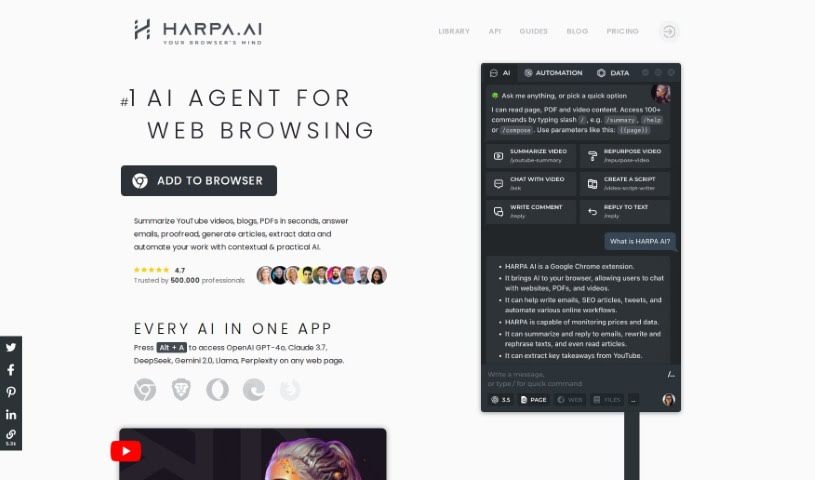
What is HARPA AI?
HARPA AI is a browser extension that uses a smart AI engine. It combines different AI models, like GPT (ChatGPT, Gemini, ClaudeAI), with web automation to help you get things done. It is your digital assistant for tasks like writing copy, managing emails, searching the web, pulling out data, and keeping an eye on websites. HARPA can actually read, understand, and act on what’s on a webpage. It can also navigate sites, grab data, and then run it all through powerful Large Language Models. It’s like having a virtual assistant or a whole digital team working for you, bringing AI capabilities to any website and working with pretty much any online service or app you use. There’s a free basic version, and if you want more, the premium features start at $12 a month for the S plan. It’s built for speed and doesn’t hog your computer’s resources when it’s just sitting there.
People really seem to like HARPA AI. They often mention its clean design, how easy it is to use, and its impressive power. Some users even say it’s way better than ChatGPT, with incredible features that save a ton of time and effort. For many, it’s become an essential tool for browsing the web.
Beyond just browsing, HARPA AI also includes handy features for learning languages. You can get grammar corrections, explanations, and even create personalized learning plans for any language and skill level. It’s also great at automating all sorts of tasks, like moving around websites, grabbing data, filling out forms, and connecting with other tools like Zapier.
Who created HARPA AI?
HARPA AI was founded by Katerina Jeng. The company’s main goal is to create tools that boost productivity using AI. Katerina herself has a background in neuroscience, and she’s used that knowledge to build innovative technologies at Harpa AI. The company is dedicated to pushing AI forward to solve real-world problems and make things more efficient across different industries.
What is HARPA AI used for?
Here are just some of the things HARPA AI can help you with:
- Writing marketing copy
- Handling your emails
- Searching the web quickly
- Extracting data from online sources
- Keeping track of website activity
- Writing blog posts
- Reviewing resumes and job postings
- Planning out your trips
- Monitoring competitor pricing and search engine results pages (SERPs)
- Developing learning plans
- Drafting and responding to emails, comments, and direct messages in a flash
- Summarizing and interacting with content on webpages, YouTube videos, and PDF documents
- Finding and researching SEO keywords
- Creating social media content schedules and prompts for image generators like Midjourney
- Automating the process of filling out forms
- Reviewing resumes, job offers, and even legal documents
- Tracking competitors, prices, and SERP pages
- Writing and replying to emails
- Posting comments and direct messages
- Summarizing and ‘chatting’ with webpages, YouTube videos, and PDF documents
- Creating social media content plans and Midjourney prompts
- Quickly writing and replying to emails, posting comments, and sending direct messages
- Summarizing and ‘talking to’ webpages, YouTube videos, and PDF documents
- Writing and replying to emails quickly
- Summarizing and ‘talking to’ webpages, YouTube videos, and PDF documents
Who is HARPA AI for?
HARPA AI is a great tool for a wide range of professionals and individuals, including:
- Copywriters
- Email Managers
- SEO Specialists
- Social Media Managers
- Bloggers
- Recruiters
- Productivity Managers
- Language Learners
- Web Researchers
- Content Creators
- Data Analysts
- SEO Professionals
- Content Creators (like bloggers and article writers)
- Website Monitors
- Web Developers
- Content Writers
- Marketers
- E-commerce Managers
- Productivity Experts
- Programmers
- HR Professionals
- Email Marketers
- SEO Strategists
- Digital Marketers
- Developers
- Human Resources Professionals
How to use HARPA AI?
Here’s a simple guide to get the most out of Harpa AI:
- Get Started: First, install the Harpa AI browser extension. It’s a powerful tool that brings together GPT and Web Automation.
- Accessing Harpa AI: You can quickly open Harpa AI in your Chrome browser by pressing Alt + A.
- Key Features:
- Automate Tasks: Use it to automate things like writing copy, managing emails, searching the web, extracting data, and monitoring websites.
- Multifunctional: It can help you write emails, post comments, summarize content, pull out keywords, create content plans, write articles, review documents, and much more.
- Web Page Interaction: Harpa is designed to navigate websites, grab data, and interact with them smoothly.
- Privacy: Harpa AI takes your privacy seriously. It doesn’t store your conversations and follows GDPR rules.
- Custom Commands: You can create your own commands. Use built-in parameters like {{page}} or {{transcript}}, or set up your own custom ones like {{p1}} or {{p2}} to tailor your interactions.
- Language Settings:
- Response Language: You can set the language for the AI’s answers in the app settings. Or, just include a {{language}} parameter with your prompt to get a response in a specific language.
- UI Language: Right now, the user interface is only in English, but they are planning to offer it in other languages soon.
- Plans and Pricing:
- Free Tier: Harpa offers a basic free version, and you can try out the premium features before you buy.
- Pricing: The S plan starts at $12 per month when billed annually. This includes CloudGPT connection and access to more features.
- Advanced Functions:
- Power Messages: You can send AI commands in chats, though there are daily limits on the free tier.
- Spaces: Keep your tasks organized with Spaces, a feature that helps manage your AI interactions effectively.
- Utilize Tools:
- Email Assistant: This tool helps you sort emails, draft replies, and manage your inbox efficiently.
- Web Page Monitor: You can automatically keep track of updates on specific web pages.
- Additional Capabilities:
- Writer: It can learn your writing style and mimic it for emails, social media posts, and articles.
- SEO Boost: Improve your SEO with audits, keyword extraction, and help creating content calendars.
By following these steps, you can really make the most of Harpa AI for all sorts of automation and AI-powered tasks.