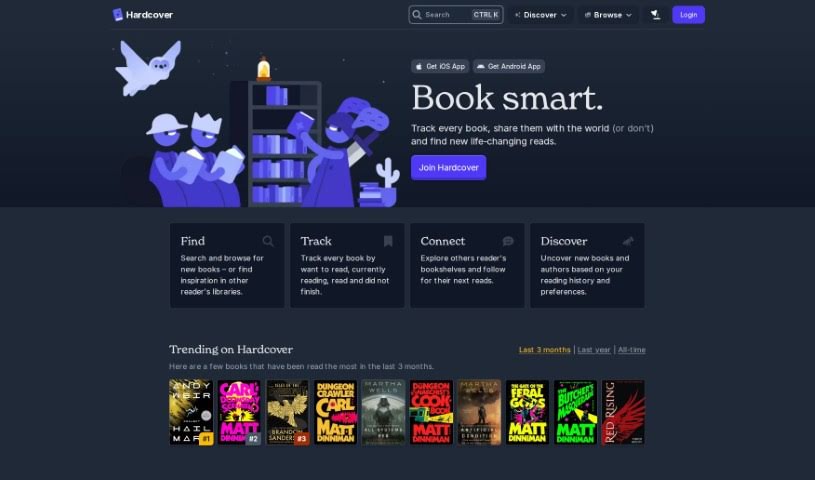
Screenshot of Hardcover

Hardcover

Discover what Hardcover is and how to make the most of it in 2025. We'll explore its features and see how it stacks up against other author tools.

Screenshot

What is Hardcover?

Hardcover is your personal AI librarian, named Jules. It’s a tool from Hardcover, an online spot designed to help you find, keep track of, and dive into books that really make an impact. Jules is great at giving you book suggestions that are just right for you, based on what you like. Plus, you can ask it pretty much anything about books, and it’ll give you helpful answers. The site also has a “Home Library” section to organize your books and an “Explore” page to see what’s trending. Hardcover uses AI to make finding books easier and generally improve your whole reading adventure.

Who created Hardcover?

Jules, the AI librarian tool from Hardcover, officially launched on August 1, 2024. It was created by the same team that started Hardcover back in 2021. They’re a small, passionate group who bootstrapped the project. Their big goal? To build the ultimate social network for readers and really empower book lovers everywhere. Jules is their way of helping users find personalized book recommendations and get answers to their book questions, making the whole experience on Hardcover even better.

What is Hardcover used for?

  • Getting book recommendations just for you
  • A helpful companion for discovering new books
  • Getting answers to your literary questions
  • Keeping track of your book collection
  • Finding out which books are currently popular
  • A search tool to find specific books or authors
  • Making your browsing experience smoother (thanks to cookies!)
  • Helping you find books more effectively
  • Improving your overall reading experience
  • Checking out other readers’ libraries and seeing what they’re reading next
  • Supporting you throughout your reading journey

Who is Hardcover for?

  • Anyone who loves to read
  • Book enthusiasts

How to use Hardcover?

Want to use Ask Jules on Hardcover for book help and recommendations? It’s pretty straightforward:

  1. First, log in to the Hardcover platform. Accepting cookies will help make your browsing experience even better.
  2. Once you’re in, head over to the “Ask Jules” feature.
  3. Now, you can use Jules, your AI librarian, to get personalized book suggestions based on what you like and what you’re interested in.
  4. Got a question about a book? Just ask Jules! You’ll get helpful answers.
  5. Feel like browsing? You can look for new books or check out what other readers have in their libraries using the search and browse functions.
  6. It’s also a great way to keep track of books: mark what you want to read, what you’re currently reading, what you’ve finished, or even what you didn’t finish.
  7. Want to connect with other readers? You can follow their bookshelves to see their reading habits.
  8. Discover new literary paths with the platform’s cool stats and tools, including those AI recommendations – they really help!
  9. If you’ve already got book collections elsewhere, like on Goodreads or StoryGraph, or even just a CSV file, you can import them easily.
  10. Get involved with the Hardcover community! Join in on prompts and discussions to share your favorite books and contribute to the reading world.

By following these steps, you’ll be able to get the most out of Ask Jules and Hardcover for a really rewarding book discovery and reading experience.

Related AI Tools

Discover more tools in similar categories that might interest you

Stay Updated with AI Tools

Get weekly updates on the latest AI tools, trends, and insights delivered to your inbox

Join 25,000+ AI enthusiasts. No spam, unsubscribe anytime.