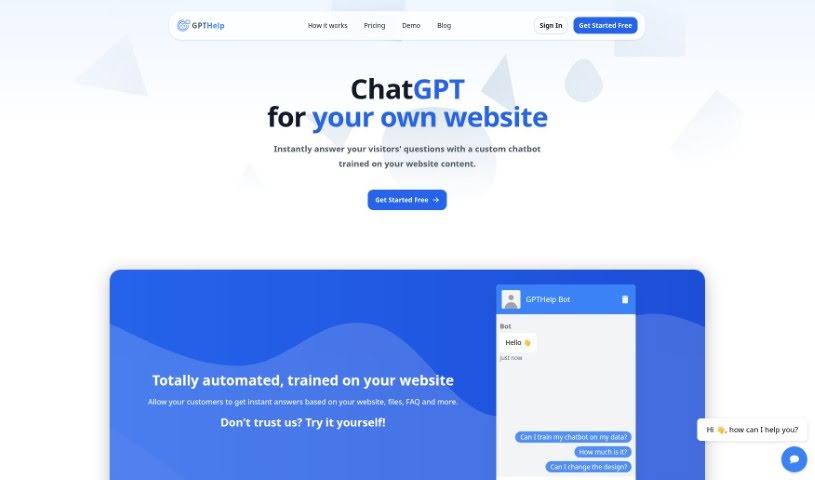
Screenshot of Gpthelp

Gpthelp

Discover what Gpthelp is and how to use it effectively in 2025. We'll explore its features and see how it stacks up against other chatbots.

Screenshot

What is Gpthelp?

Gpthelp is a neat AI tool that lets you build chatbots for your website. It works by learning from your site’s content and frequently asked questions. It can automatically grab pages from your site for training, and you get to customize how the chatbot looks, how it acts, and even keep an eye on the conversations. Plus, it can connect with different ticketing systems and speaks multiple languages. Gpthelp uses OpenAI models for training, and enterprise clients can even tweak things further. How long it takes to train depends on how much content you have, and they offer a whitelabel option if you want your own branding. Basically, it’s a fully automated chatbot trained on your website’s info, and you can even feed it different file types to help it learn.

Who created Gpthelp?

Gpthelp was actually started by one person, Cody Mitchel. He launched it on November 7, 2023. The platform relies on OpenAI models to do its thing. Cody created this service so people could easily customize chatbots, connect them with other tools, and set up unique customer service helpers for their websites. The company trains the chatbots using your website’s content and also provides options for custom integrations and whitelabeling.

What is Gpthelp used for?

  • Instantly answer visitor questions: Your custom chatbot, trained on your website’s content, can handle this.
  • Instant customer answers: Let customers get quick replies based on your website, files, and FAQs.
  • Automated chatbot creation: It’s trained on your website content automatically.
  • Customizable design: You can tweak the color, size, and icons to match your site.
  • Behavior modification: Adjust the AI’s personality, decide when to hand off to a human, and customize data collection.
  • Monitor conversations: Keep an eye on how it’s performing and step in when needed.
  • Fetch website content automatically: It grabs all your website pages for training.
  • Train on website content: The AI learns from your site to answer related questions.
  • Easy conversation takeover: You can jump in and change the AI’s answers if necessary.
  • Unique customer service tool: Create something specific to your website’s needs.
  • AI chatbot for website visitors: Help them get instant answers from your website, files, and FAQs.
  • Automated training: Just give it your website URL, and it trains itself on the content.
  • Design customization: Change the chatbot’s color, size, and icons.
  • AI behavior settings: Pick a name, role, and attitude for your chatbot.
  • Performance monitoring: Watch conversations, evaluate performance, and intervene.
  • File uploads for training: Train it using CSV, TXT, PDF, DOCX, PPTX, and MD files.
  • Ticketing platform integration: Connect with Zendesk, Intercom, Freshdesk, Hubspot, especially for Enterprise clients.
  • View chat history: See all interactions and the full chat history with your visitors.
  • Collect user details: Gather visitor info based on your settings.
  • Fully automated responses: The chatbot answers based on its training.
  • Instant website answers: Your custom chatbot handles visitor questions.
  • Automated training on content, files, and FAQs: Get instant responses ready.
  • Match website aesthetics: Customize the chatbot’s design.
  • Tailor AI personality: Choose a name, role, and attitude.
  • Evaluate and intervene: Monitor conversations and step in when needed.
  • Autonomous answering: The chatbot can answer queries on its own.
  • No manual FAQs needed: Content is fetched automatically.
  • Automated support system: Implement an AI-powered support system.
  • Personalized interactions: Collect user details for tailored experiences.
  • Human support handover: Escalate complex queries and potentially collect user info.
  • Instant answers from various sources: Website, files, FAQs, and more.
  • Simplified creation: Train on website content automatically.
  • Design tweaks: Customize color, size, and icons.
  • Conversation monitoring and intervention: Keep an eye on performance.
  • Fetch website content: Train the AI by inputting the URL.
  • Takeover and modify: Jump into conversations and adjust responses.
  • Handle FAQs: Train the chatbot on fetched content.
  • More sources for answers: Website, files, FAQs, and beyond.
  • Unique customer service: Train on website content for a custom tool.
  • Automatic content fetching: Simplify creation by inputting the URL.
  • Easy conversation management: Take over and modify responses.
  • Autonomous answering: The chatbot handles queries independently.
  • Training on multiple sources: Website content, files, and FAQs.
  • Design customization: Adjust color, size, and icons.
  • AI behavior settings: Name, role, and attitude.
  • Performance monitoring and intervention: Evaluate and step in.
  • User detail collection: Gather info based on settings.
  • Website-specific tool: Create a unique customer service solution.
  • Simplified creation: Automatic content fetching via URL.
  • FAQ handling: Train the chatbot on them.

Who is Gpthelp for?

  • Customer Support Representatives
  • Web Developers
  • Content Creators
  • Small Business Owners
  • Enterprise Customers
  • Website Owners
  • Companies needing AI Chatbot Support
  • Customer Support Agents
  • Chatbot Developers
  • Customer Service Representatives
  • Customer Support Teams
  • Customer Service Managers
  • Guides for Website Visitors
  • Companies needing customer service tools
  • Anyone requiring automated support systems for website visitors

How to use Gpthelp?

Want to create a chatbot for your website with Gpthelp? It’s pretty straightforward. Here’s how:

  1. Give it your website’s address: Just pop in your website’s URL.
  2. Let it train: Gpthelp will automatically go through all your website pages to train the AI.
  3. Tweak the design: You can change things like the color, size, and icons to make it fit your brand perfectly.
  4. Adjust the AI’s behavior: Pick a name, decide on a role, and choose an attitude for your chatbot.
  5. Keep an eye on conversations: Check how the chatbot is doing, look at the chat history, and make changes to responses if needed.

Remember, you’re not limited to just your website content. You can also train the chatbot using files like CSV, TXT, PDF, DOCX, and more. If you need custom integrations, want a whitelabel option, or have other advanced needs, you can always reach out to Gpthelp. To get started, just head over to the Gpthelp website and enter your website’s URL to begin training your own AI chatbot for better customer service.

Related AI Tools

Discover more tools in similar categories that might interest you

Stay Updated with AI Tools

Get weekly updates on the latest AI tools, trends, and insights delivered to your inbox

Join 25,000+ AI enthusiasts. No spam, unsubscribe anytime.