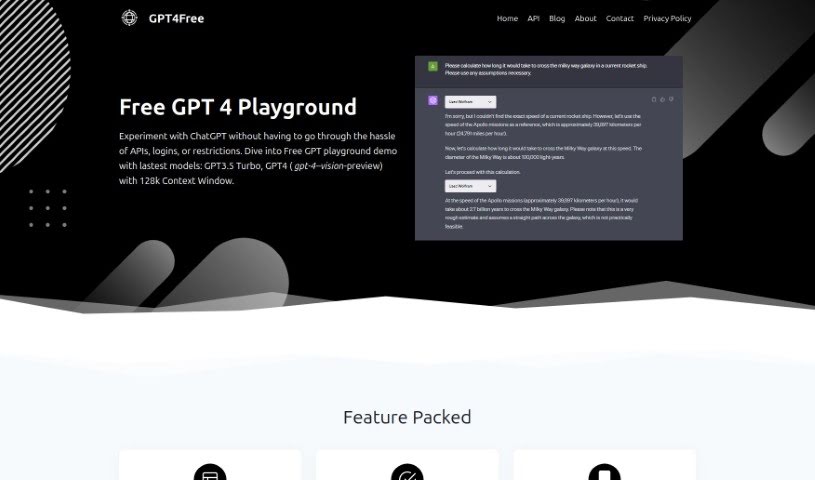
What is GPT4Free?
GPT4Free is a really user-friendly platform that lets you chat with GPT AI and ChatGPT models without any hassle. You don’t need to worry about API integrations, logging in, or hitting user limits. It’s got a neat playground demo where you can try out models like GPT3.5 Turbo and even GPT4, which includes a vision-preview version with a massive 128k context window. Just pick a language, type in your prompt, and get an instant reply! Plus, there are Pro Features that are pretty handy: you can bypass geographical restrictions, use a big library of prompts, keep your chats organized with folders and color-coding, and easily import or export your chat data. GPT4Free also lets you tweak custom model parameters and supports multiple languages, making it great for users all over the world.
Who created GPT4Free?
GPT4Free was actually built by a team of developers who are super into AI and big fans of open-source projects. They all share this passion for making advanced AI tech available to everyone, no matter if you’re a tech whiz or just starting out, or if you’re on a tight budget. Their goal with this platform is to give you totally unrestricted access to lots of different AI models, really breaking down the usual barriers to this kind of cutting-edge technology. The team’s core mission comes from a deep belief in democratizing technology and empowering people by giving them free access to the latest AI tools.
What is GPT4Free used for?
GPT4Free is incredibly versatile! Here’s a rundown of what you can do with it:
- Global Access: It removes geographical limitations, so you can access ChatGPT from anywhere in the world.
- Prompt Library: You get access to a built-in library of prompts specifically designed for GPT4 conversations.
- Organized Chats: Keep your conversations tidy with a chat organization feature that uses color-coded folders.
- Data Control: You can manage your chat data yourself, with easy options to import and export it.
- Customization: Tailor your experience by customizing GPT model settings to fit your needs.
- Experimentation: Play around with GPT AI and ChatGPT models without the usual complexities of API integration, logins, or user restrictions.
- Playground Demo: Access a demo playground that features the latest models, including GPT3.5 Turbo and GPT4.
- Vision Preview: Use the vision-preview variant, which comes with a huge 128k context window.
- Reverse Proxy API Keys: These keys allow for smooth interaction with AI models no matter where you are globally.
- AI Model Access (Pro): You can access AI models with flexible billing options, like paying per use or based on tokens.
- Simple ChatGPT Interaction: Just pick a language, type your prompt, and get an instant response.
- Optimized Interactions (Pro Features): Make your interactions with GPT AI even better by bypassing geographical limits, using the prompt library, organizing chats with folders and color-coding, and importing/exporting data for better control.
- Content Creation: Write essays and generate text based on your prompts.
- Coding Assistance: While it can write code snippets, other models might be better suited for more complex coding tasks.
- AI Advancement: It helps advance natural language processing and makes AI more accessible to everyone.
Essentially, it’s about making powerful AI tools easy and free for everyone to use and explore.
Who is GPT4Free for?
GPT4Free is a fantastic tool for a wide range of people, including:
- Developers: Whether you’re seasoned or just starting out, it’s great for integrating AI capabilities or testing.
- AI Enthusiasts: If you’re passionate about artificial intelligence, this is a playground for you.
- Open-Source Advocates: It aligns perfectly with the spirit of making technology freely available.
- Students: A valuable resource for learning and research in AI and language processing.
- General AI Technology Enthusiasts: Anyone curious about the latest in AI will find it engaging.
- Curious Individuals: If you’re simply interested in seeing what AI can do, GPT4Free offers easy access.
- Technology Enthusiasts: It’s a great way to stay updated and experiment with new tech.
Basically, if you’re interested in AI and want to explore its capabilities without barriers, GPT4Free is for you!
How to use GPT4Free?
Using GPT4Free is pretty straightforward. Here’s a simple guide to get you started:
- Head over to the GPT4Free website and jump right into the platform.
- Pick your language: Choose the language you want to communicate in.
- Enter your prompt: Type in your question or prompt to start chatting with ChatGPT.
- Get your response: The AI model will give you an instant reply.
- Explore the features: Don’t forget to check out all the cool things it offers, like:
- Bypassing geographical restrictions so you can use ChatGPT globally.
- Accessing a handy prompt library for GPT4 conversations.
- Organizing your chats with fun color-coded folders.
- Importing and exporting chat data to keep your conversations in your control.
- Customizing GPT model parameters to make the experience just right for you.
- Check the FAQs: If you have questions, the platform has an FAQ section that can help with common queries about GPT4Free.
- Privacy Matters: Keep in mind that GPT4Free saves conversation data, but they follow strict privacy guidelines.
- Enjoy Free Access: You get unrestricted access to multiple AI models without needing sign-ups or paying any fees.
- Content Creation Tip: While GPT4Free is great for writing essays and generating text, it’s always a good idea to give it a human review and edit for the best quality.
- Join the Community: Jump into the GPT4Free community! It’s a great place to explore, learn, contribute your own ideas, and help shape how AI accessibility develops in the future.
Ultimately, GPT4Free is all about making AI technology more user-friendly and accessible to everyone. It offers some really innovative features and relies on a community-driven approach to engaging with AI models.