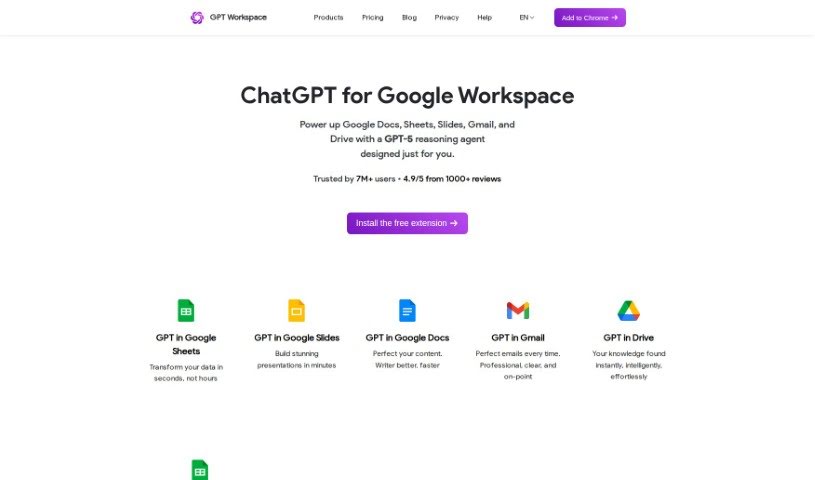
Screenshot of GPT Workspace

GPT Workspace

Discover what GPT Workspace is and how to use it effectively in 2025. Explore its features and see how it stacks up against other project management tools.

Screenshot

What is GPT Workspace?

GPT Workspace is a handy productivity tool that uses GPT technology to help you get more done. It’s designed to boost your productivity, help you make accurate predictions, and offers customization options that can be tailored to exactly what your business needs. It is a cost-effective, future-ready technology that saves you time and effort, all while keeping you in the loop with the latest tech trends.

When it comes to privacy, GPT Workspace is built with respect for your data. It doesn’t access your personal data or your Google Drive files. The information it does need to work includes your email address, your name for payment identification (if you’re a paying customer), and some metadata like how many prompts you’ve used, when you sent them, and the document names. All of this is stored securely on Google’s servers.

Plus, GPT Workspace is fully compliant with the European General Data Protection Regulation 2016/679 (GDPR). This means you have rights to access, correct, or even remove your personal data. Managing your subscription is straightforward too. Just open GPT Workspace, go to the settings, and click on ‘Subscription.’ You can cancel anytime, and if you have a Premium subscription, you can get a full refund if you cancel within 30 days of your purchase.

Essentially, GPT Workspace lets you bring ChatGPT into your favorite Google Workspace apps – Docs, Sheets, Slides, Drive, and Gmail. You can generate content, summarize long texts, create slide decks, and a whole lot more, all to help you be more productive. It’s categorized as a productivity tool and uses GPT4, GPT3.5, and other AI technologies to power these helpful features across your Google apps.

Who created GPT Workspace?

A company called GPT Space developed GPT Workspace. This platform is designed to let you easily integrate ChatGPT into your Google Workspace applications, including Docs, Sheets, Slides, Drive, and Gmail. It uses technologies like GPT4, GPT3.5, and AI. GPT Space’s main focus is on improving productivity, enabling accurate predictions, and offering solutions that you can customize. They also emphasize respecting user privacy and adhering to GDPR regulations.

What is GPT Workspace used for?

  • Using GPT in Google Sheets
  • Using GPT in Google Docs
  • Using GPT in Google Slides
  • Using GPT in Gmail
  • Using GPT in Google Drive

How to use GPT Workspace?

Here’s how you can get the most out of GPT Workspace:

  1. Boost Your Productivity: GPT Workspace helps you make accurate predictions and offers customized solutions to fit your specific needs. It’s a cost-effective and forward-thinking technology that saves you time and effort, ensuring your business stays current with the latest tech trends.
  2. Privacy Matters: GPT Workspace respects your privacy by not accessing your personal data or Google Drive files. The information it needs to function includes your email address, your name for payment identification (if you’re a paying customer), and metadata like the number of prompts you’ve used and document names. The tool is fully compliant with GDPR regulations.
  3. Manage Your Subscription: You can easily manage your subscription by opening GPT Workspace, navigating to the settings, and clicking on “Subscription.” You have the flexibility to cancel your subscription at any point. If you cancel early, you can continue using your plan until the end of your current subscription period.
  4. Refund Policy Details: If you decide to cancel your Premium subscription within 30 days of purchasing it, you’re eligible for a full refund. Please note that for pay-per-usage plans, any usage beyond the plan limit isn’t refundable.
  5. Integration Possibilities: GPT Workspace makes it simple to integrate Chat GPT directly into Google Docs, Sheets, Slides, Drive, and Gmail. This integration allows you to generate content, summarize text, create presentations, and much more, all by leveraging the power of Chat GPT 3.5 or Chat GPT-4 to significantly increase your productivity.

By following these straightforward steps, you can effectively use GPT Workspace to enhance your productivity and streamline your daily workflows.

Related AI Tools

Discover more tools in similar categories that might interest you

Stay Updated with AI Tools

Get weekly updates on the latest AI tools, trends, and insights delivered to your inbox

Join 25,000+ AI enthusiasts. No spam, unsubscribe anytime.