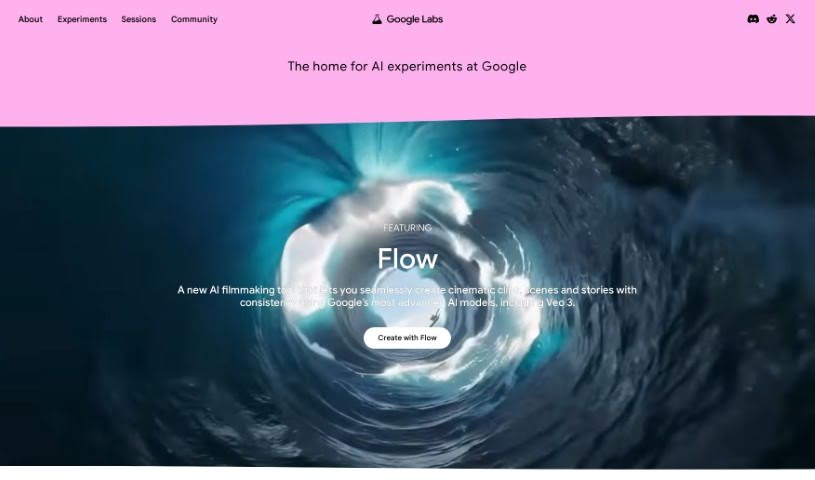
What is Google Labs?
Google Labs, now officially called Google’s Latest Experiments in Labs, is essentially a playground for Google’s newest ideas. It’s a place where you can get your hands on early-stage tech experiments and, importantly, give feedback that helps shape where these technologies go. It is a special preview area for AI-powered features that are still being developed across Google’s various products. You might find new ways to search within Google Search itself, or perhaps some really neat collaboration tools for Google Workspace. By jumping in and sharing your thoughts, you’re directly helping Google make its tech even better and more innovative. It really gives you a peek at what’s coming next, offering these cutting-edge AI experiences to a select group of users.
Who created Google Labs?
Google Labs was launched by Google on May 11, 2023. While the specific founder isn’t detailed in the information I have, it was definitely a Google initiative aimed at testing and releasing new, innovative products and features. It was set up as a space for experimentation, letting people try out beta services and then share their feedback with Google. Unfortunately, I don’t have any specific details about who exactly founded it.
What is Google Labs used for?
Google Labs is a fantastic place to explore a variety of AI-powered tools and experiments. Here are just a few examples of what you can find and do:
- Learn anything: Dive into conversational AI that helps you learn any topic at your own pace.
- Audio discussions from papers: Illuminate can transform academic papers into AI-generated audio discussions, making complex research more accessible.
- Personalized AI collaborator: Food Mood acts as a personalized AI collaborator, built on trusted information to help you with your needs.
- Shape future tech: Engage in experimental AI collaborations with innovators who are actively shaping the future of technology.
- Creative reimaginings: Artists are using tools like Imagen 2 to endlessly reimagine classic stories, such as Alice’s Adventures in Wonderland.
- Creative coding exploration: A NYU professor and creator is exploring AI tools specifically for creative coding projects.
- Memory and fact-checking: A video journalist is trying out NotebookLM for memory retrieval and fact-checking, streamlining their research process.
- AI for writers and artists: A GRAMMY® Award-winning artist is contributing to the development of AI tools designed for writers and rappers.
- Generative AI for music: A composer is creating live performances using generative AI tools, pushing the boundaries of musical creation.
- Easier sign language learning: Students are experimenting with AI to make learning sign language more accessible and intuitive.
Who is Google Labs for?
Google Labs is a valuable resource for a wide range of professionals and creatives who are interested in exploring the latest advancements in AI and technology. It’s particularly useful for:
- Software developers looking to test new tools and integrations.
- Data Analysts seeking innovative ways to process and interpret data.
- Digital marketers exploring AI-driven campaign strategies.
- Project managers aiming to improve workflow efficiency with new technologies.
- Research Scientists investigating the potential of AI in their fields.
- Educators looking for new ways to engage students and enhance learning.
- Content creators experimenting with AI for generating ideas and content.
- Graphic designers exploring AI-powered design tools.
- Business analysts seeking AI insights for strategic decision-making.
- IT Consultants evaluating emerging technologies for client solutions.
How to use Google Labs?
Getting started with Google Labs is pretty straightforward. Here’s a simple step-by-step guide:
- Head to Google Labs: First off, open your preferred web browser and go to the Google Labs website. It’s your gateway to all the experiments.
- Sign In: You’ll need to sign in with your Google account to access the features. If you’re not already logged in, just enter your credentials.
- Browse the Experiments: Once you’re on the Google Labs page, take a look around. You’ll see a variety of experimental features and tools that Google is currently working on.
- Pick Something Interesting: Find a tool or experiment that catches your eye or that you’re curious to try out. Click on it to get more details.
- Read Up on It: Before you dive in, make sure to read the description for the tool. It’ll tell you what it’s for and how it works.
- Turn It On: If you decide you want to give a specific tool a whirl, look for an option to enable it. This might be a simple switch or some on-screen instructions to follow.
- Start Using It: Once the tool is enabled, you can start using it as intended. Any specific tips or guidelines for using it best will usually be provided.
- Share Your Thoughts: Since these are experiments, Google really values your feedback! Let them know what you think about your experience with the tool. It genuinely helps them improve their products.
- Turn It Off If You Want: If you decide you’re done with a particular tool or experiment, you can easily disable it. Just go back to the Google Labs page and follow the instructions to turn it off.
- Keep Exploring: Don’t stop at just one! Feel free to explore all the other tools and experiments available in Google Labs. You might discover something new and exciting.
Remember, the best way to approach Google Labs is with a curious and experimental mindset. You’re getting access to some really cutting-edge tools that might not be part of the main Google products just yet, so have fun with it!