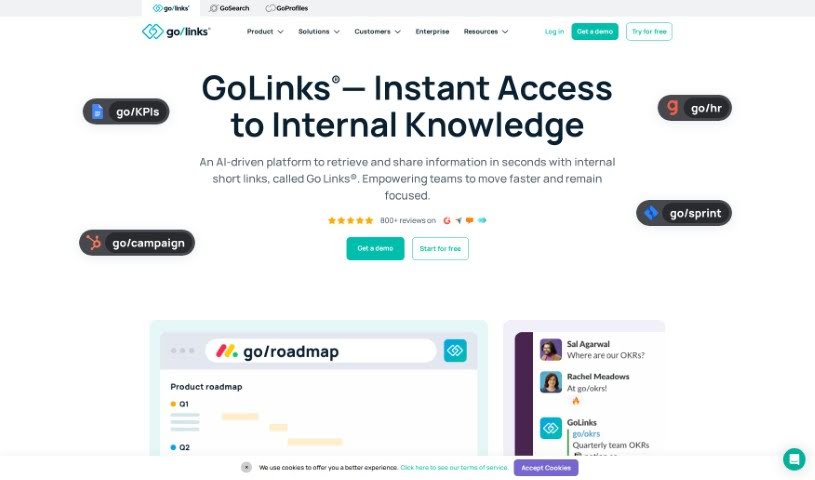
What is GoLinks?
GoLinks is a platform that turns any web address into a memorable short link, often called a go link or go/link. These short links are super easy to type into your browser and can be shared verbally or visually in all sorts of conversations. It is a shortcut that saves you from digging through endless bookmarks or shared drives to find what you need. It really makes sharing knowledge within your company a breeze.
What makes GoLinks stand out are its features: you get those handy short links for instant access to resources, it makes sharing knowledge intuitive, and it even uses AI to suggest information you might be looking for. Plus, it offers enterprise search that works across all your different content hubs. They’ve also got tools like GoLinks Search, which is powered by ChatGPT. This means the system can tackle complex technical questions and even recommend content that could boost your productivity.
Beyond just creating memorable short links, GoLinks packs in some top-notch features. You can create variable go links that change where they send you based on what you type in, unlisted go links for when you need to keep things private, and multi-links to open several links at once. There are also geo-links that send people to different places depending on their location, aliases so you can have different names for the same link, and tags to help you categorize everything easily. The platform even generates QR codes for your go links, shows you how they’re being used, and integrates with your other internal tools. You can get to and share these go links through web browsers or their dedicated mobile apps, making them accessible and easy to use on any device.
Who created GoLinks?
GoLinks was started by Johan Dowdy, who leads IT and IT Security globally. The company’s platform is all about turning web addresses into easy-to-remember short links to make knowledge sharing and teamwork smoother within organizations. GoLinks offers cool features like links that can change their destination, unlisted links for private sharing, multi-links, geo-links, aliases, and a bunch more to make finding and sharing information much more efficient. They’ve also integrated AI-powered search to help people discover content and improve their productivity.
What is GoLinks used for?
- Turning any web address into a memorable short link that’s easy to share and access.
- Making knowledge sharing within teams feel natural and intuitive.
- Helping you discover information with smart suggestions powered by generative AI.
- Providing enterprise search that covers all your content hubs.
- Getting to and sharing information instantly using secure short links.
- Finding and learning about people within your organization.
- Recognizing peers and celebrating accomplishments.
- Organizing go links with tags so they’re easy to find later.
- Getting insights into your personal productivity and how you use your workspace, thanks to analytics.
- Building custom integrations with your internal tools using the GoLinks API and webhooks.
- It’s a tool loved by both big companies and smaller startups.
- Giving everyone in the organization instant access to resources through memorable GoLinks.
- Making knowledge sharing simple and intuitive with short links.
- Helping you find information with AI-powered suggestions.
- Offering enterprise search across all your content hubs from a single search bar.
- Providing ‘people knowledge’ so you can find and learn about individuals in your company.
- Enabling peer recognition and celebrating achievements using GoLinks.
- Boosting employee engagement through easily accessible employee profiles.
- Using AI-powered search for more efficient information retrieval.
- Categorizing go links and setting up different names for them to make organizing resources easier.
- Building integrations with your internal tools using the GoLinks API and webhooks.
- Creating memorable short links for instant resource access that the whole organization can use.
- Facilitating intuitive knowledge sharing through short links.
- Helping you discover information with AI-powered suggestions.
- Providing enterprise search across content hubs with AI-powered results.
- Offering ‘people knowledge’ to find and learn about employees in your organization.
- Giving you instant access to resources using memorable go links.
- Allowing you to search across all your work apps with an AI conversational chat.
- Using AI-powered search for employee profiles and engagement.
- Facilitating peer recognition through GoLinks.
- Transforming how you find and share knowledge by turning any URL into a memorable short link.
- Creating memorable short links for instant resource access.
- Enabling intuitive knowledge sharing.
- Helping you discover information through AI-powered suggestions.
- Providing enterprise search across content hubs.
- Offering ‘people knowledge’ to find and learn about colleagues.
- Creating variable go links that change their destination based on input.
- Setting up unlisted go links that only specific people can access.
- Using multi-links to open several go links with just one link.
- Generating QR codes for your go links.
- Tracking usage trends to see which go links are popular and which are new.
Who is GoLinks for?
- IT professionals
- HR Professionals
- Marketers
- Customer service professionals
- Designers
- Customer support professionals
- Developers
- Product Managers
- Sales professionals
- Software developers
- Knowledge workers
- Marketing professionals
- Engineering professionals
- Finance professionals
- Administrative professionals
- Customer service representatives
- Sales teams
- Engineers
- Project managers
- Operations teams
- Employees in all sorts of roles across different departments
- Anyone who uses a company’s services and resources internally
How to use GoLinks?
To get the most out of GoLinks, just follow these simple steps:
- Get Started with GoLinks: Sign up for free on the GoLinks website to create your account. It’s a quick way to begin.
- Create Your Short Links: Turn any web address into a memorable short link (like go/link) that’s super easy to say or type.
- Install Browser Extensions: Make using GoLinks a seamless part of your browsing with extensions for popular browsers, giving you quick access.
- Boost Your Security: Take advantage of enterprise-grade security, including SOC 2 Type 2 certification, SSO with SCIM, and role-based access control to keep things safe.
- Share Across Domains: Easily share your GoLinks across different domains within your organization.
- Tap into AI Features: Enjoy helpful AI-powered suggestions, enterprise search capabilities, and instant access to the resources you need.
- Explore the GoLinks App: Stay productive no matter where you are by using the GoLinks apps available for both iOS and Android.
- Discover More Features: Don’t forget to explore extras like variable go links, unlisted go links, multi-links, geo-links, aliases, tags, QR codes, usage trends, and analytics.
- Collaborate More Effectively: Share information fast, break down knowledge silos, and work better with your team using these intuitive short links.
- Scale with Confidence: You can implement, roll out, and scale GoLinks with confidence, especially with its integrations into your tech stack and other work tools.
By following these steps, you’ll find it much easier to access knowledge, improve how you collaborate, and boost overall productivity within your organization using GoLinks.