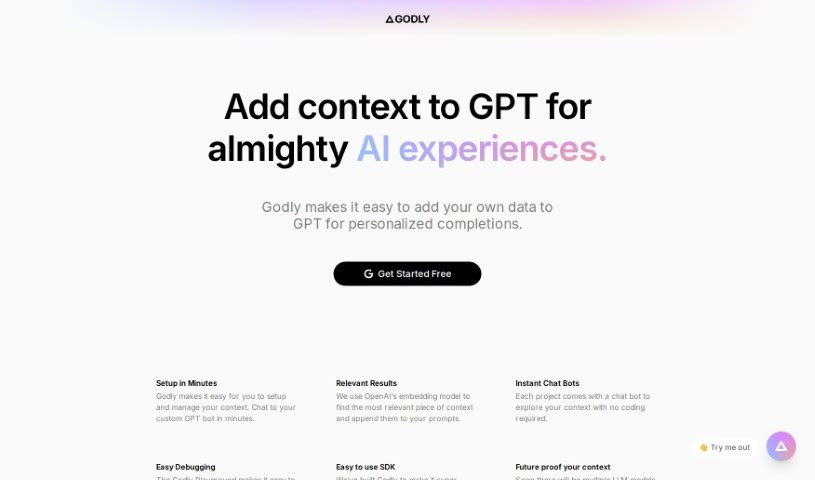
Discover what Godly AI is and how to make the most of it in 2025. We'll dive into its features, compare it to other chatbots, and show you how to integrate your own data for better AI results.

âGodly AIâ is a smart upgrade for GPT-3 models. Itâs designed to make them perform better by adding your own personal touch to the prompts you give them. Essentially, it lets you feed your own data into GPT-3 prompts, which helps the AI give you much more relevant and personalized answers. Itâs pretty straightforward to get started with creating this context. Plus, thereâs an âInstant Chat Botâ feature that lets you play around with your context right away, no coding needed. And if somethingâs not quite right, âEasy Debuggingâ helps you sort out any issues with the contexts that are influencing your prompts.
Godly AI uses OpenAIâs embedding model to figure out what context is most relevant and then weaves it into your prompts. It also comes with a user-friendly SDK, making it simple to integrate. And because the AI world changes fast, Godly AI is built so you can easily swap out different Language Models down the line, keeping your setup up-to-date.
One of the really neat parts is the âInstant Chat Bot.â This feature takes the context youâve created and turns it into a chat interface. You can explore and test your context without having to write any code yourself, which makes understanding how it works much easier.
Then thereâs âEasy Debugging.â This tool is a lifesaver for managing and troubleshooting the contexts that affect your prompts. It helps you pinpoint and fix any problems that might be messing with your results.
All in all, Godly AI really boosts GPT-3âs performance. It does this by making prompts more personal with your data and ensuring you get relevant answers by helping you manage context and debug effectively.
Godly was actually created by a single founder, whose identity hasnât been revealed. The company got its start on March 5, 2023. Their main goal from the beginning was to improve how well OpenAIâs GPT-3 models work. They do this by making it super easy for users to add their own personalized context to prompts. The tool simplifies the whole process of setting up and managing this context. It also includes that handy âInstant Chat Botâ for exploring without coding, and the âEasy Debuggingâ feature for keeping track of the contexts that influence the AIâs responses.
Hereâs a breakdown of what you can do with Godly AI:
To get the most out of Godly, just follow these simple steps:
By following these steps, you can really optimize how you use Godly and make your GPT-3 models perform better by integrating your own personalized context.
Discover more tools in similar categories that might interest you
Get weekly updates on the latest AI tools, trends, and insights delivered to your inbox
Join 25,000+ AI enthusiasts. No spam, unsubscribe anytime.