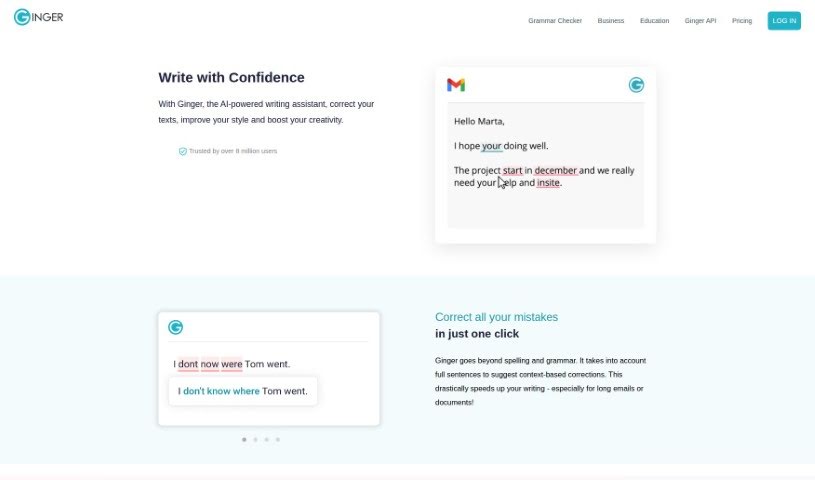
What is Ginger Software?
Ginger Software is a popular writing enhancement platform designed to help you improve your writing skills and communicate more effectively. It offers a variety of features, including grammar checking, sentence rephrasing, translation, and a personal dictionary, all aimed at helping you write more clearly and confidently. Thanks to its user-friendly interface and advanced algorithms, Ginger Software can help you catch and fix grammar mistakes, punctuation errors, and other language issues. It’s a really useful tool for students, professionals, and really anyone who wants to make their written communication shine. Ultimately, Ginger Software wants to give you the tools and resources you need to create written content that’s clear, makes sense, and is completely error-free.
Who created Ginger Software?
Ginger Software was founded back in 2010, and it officially launched on February 11, 2021. The company was started by a team focused on helping people improve their English writing skills using AI-powered tools for grammar and spell-checking. Since they began, Ginger Software has successfully raised $25 million in investments. They’re known for their innovative approach to language technology, which includes using deep learning techniques and advanced language models.
What is Ginger Software used for?
Ginger Software is incredibly versatile and can help you in many ways:
- Broad Platform Support: It works across multiple platforms, so you can use it wherever you write.
- Boost Your English Skills: It’s designed to improve your English writing skills and make you more productive.
- Refine Your Text: It helps you correct and improve your writing, offering suggestions that consider the context.
- Smart Spelling & Grammar: It handles spelling and grammar corrections with suggestions that actually understand the context of your sentences.
- Rephrase Sentences: Need a different way to say something? The ‘Rephrase’ feature offers alternative phrasing options.
- Rich Vocabulary: Its AI-based synonyms tool provides a wide range of synonyms and expressions to enrich your writing.
- Boost Productivity: It can fix multiple mistakes at once, saving you time.
- Handle Large Texts: It’s capable of handling long emails and extensive document corrections.
- Spark Creativity & Style: Get smart alternatives to enhance your creativity and writing style.
- Improve Readability: It helps improve your sentence structure and makes your writing easier to read.
- Expand Your Word Choice: It provides word synonyms and expressions to help you vary your language.
- Integrate Seamlessly: It connects with websites and devices, making it easy to use in your daily workflow.
- Enhance Text Readability: Make your writing clearer and more engaging.
- Speed Up Your Writing: Get through your writing tasks more quickly.
- Contextual Corrections: It offers corrections and suggestions that are aware of the surrounding text.
- Maintain Professionalism: It helps businesses maintain high standards for their English prose.
- Support for Educators: It seamlessly helps students improve their English skills.
Who is Ginger Software for?
Ginger Software is a great tool for a wide range of people, including:
- Students
- Editors
- Authors
- Marketers
- Business professionals
- Content creators
- Copywriters
- Teachers
- Journalists
- Researchers
How to use Ginger Software?
Using Ginger Software is pretty straightforward. Just follow these simple steps:
- Installation: First, you’ll need to download and install Ginger Software onto your device. You can grab it from their official website.
- Registration: Once installed, create an account. You’ll typically need to provide your email address and set up a password.
- Get Familiar with the Interface: Ginger Software has a user-friendly interface, usually featuring a text editor where you’ll do most of your work.
- Input Your Text: Copy and paste the text you want to improve into the editor, or just start typing it out.
- Check Your Grammar: Click on the grammar check feature. Ginger will analyze your text for errors and offer suggestions on how to fix them.
- Check Your Spelling: Use the spell check function to find and correct any spelling mistakes in your writing.
- Explore More Enhancements: Don’t stop there! Check out other features like sentence rephrasing, translation, and vocabulary tools to really polish your text.
- Review the Suggestions: Take a look at the suggestions Ginger provides. You can apply the corrections by simply clicking on them.
- Save and Export: Once you’re happy with your edits, you can save your work or export it into a document format that suits you.
- Share Your Thoughts: If you have any feedback on the corrections or ideas for future improvements, Ginger Software welcomes it!
By following these steps, you can really make the most of Ginger Software to improve the quality and accuracy of your writing.