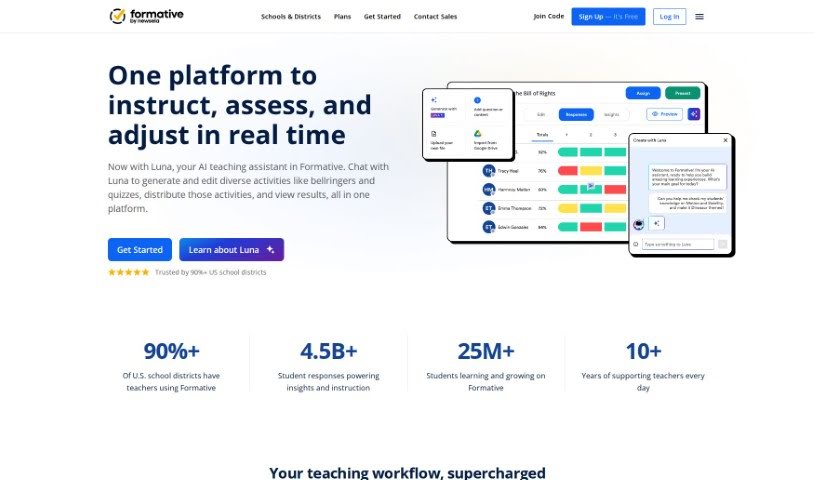
Screenshot of Formative

Formative

Discover what Formative is and how to use it effectively in 2025. We'll explore its features, compare it to other teacher tools, and show you how to get the most out of it.

Screenshot

What is Formative?

Formative is a fantastic educational tool designed to really boost how teachers teach and how students learn. It helps by creating new questions, lessons, and assignments, making things much simpler for educators. For instance, it can automatically generate questions that line up with educational standards, and even offer helpful hints. Formative also really cares about using AI ethically, providing resources to help users steer clear of AI bias. You can give students feedback right away, keep an eye on their progress, work with other teachers, and use it for subjects like math, science, and social studies. Getting started is easy – just sign up for a free account, or check out the paid plans if you’re looking for more for your school or business.

Who created Formative?

Formative, a company focused on education technology, got its start on July 5, 2024. Darin B. founded it, and it’s since become a top partner with Google Classroom, landing a spot in the top 10 add-ons. Formative offers a bunch of useful features for teachers and school leaders. You can turn documents into quizzes that grade themselves, give instant feedback, team up with colleagues, and connect with other educational platforms. Plus, Formative AI is built right into the platform to make teaching and learning even better by generating questions and assignments that match educational standards.

What is Formative used for?

  • You can easily turn a PDF or Google Doc into a quiz that grades itself.
  • Present slides with questions built right in to guide lessons at a good pace.
  • Make reading passages more engaging by adding questions.
  • Help students take charge of their learning and think about their own thinking using Strikethroughs.
  • Add a YouTube video and ask questions tied to specific moments in the video.
  • Let students show off their creativity by recording audio or video responses.
  • Give feedback to students much faster than you could before.
  • Combine your favorite tools by embedding another learning app right into Formative.
  • Keep track of how students are growing against learning standards over time.
  • Work together with colleagues and co-teachers on lessons and assessments.
  • You can ask all sorts of questions, like graphing, drag-and-drop, and more.
  • It can even help detect if students are copying and pasting answers.

Who is Formative for?

  • Teachers
  • Educators
  • School leaders

How to use Formative?

To really make the most of Formative, here’s a simple guide:

  1. Creating Assessments:
    • It’s super easy to turn a PDF or Google Doc into a quiz that grades itself automatically. You can also set up lessons with slides that have questions built right in, helping you pace the learning experience. To make reading passages more engaging, just add questions, and you can even use features like Strikethroughs to help students actively participate. Want to make learning more interactive? Just add a YouTube video and pop in questions at specific timestamps.
  2. Enhancing Creativity and Feedback:
    • Encourage students to get creative by letting them record audio or video responses. You can give feedback to your students much faster and more effectively than ever before. Plus, the tool can help you spot if students are copying and pasting answers, which helps maintain academic integrity.
  3. Monitoring Student Progress:
    • Keep a close eye on how your students are growing against learning standards over time. You can also collaborate with your colleagues, share data within your Professional Learning Communities (PLCs), and access reports for common assessments.
  4. Advanced Features for School Leaders:
    • For school leaders, Formative enables strong collaborations among faculty and secure assessments using the Respondus LockDown Browser. It also supports Learning Tools Interoperability (LTI) with popular platforms like Canvas and Schoology. You can access banks of questions aligned with standards and generate reports based on student data from your Student Information Systems (SIS), even broken down by demographics.
  5. Community Engagement and Support:
    • You’re not alone! Formative has a dedicated Success & Support Team ready to help. You can also connect with a vibrant community of educators to share best practices and find helpful resources like webinars and training centers.
  6. Getting Started:
    • Ready to dive in? Just sign up for a free account, or explore the paid plans if your institution needs them. You’ll find a wealth of resources, training materials, and a help center to guide you every step of the way.

Formative really offers a complete package of features for creating engaging assessments, giving feedback, tracking progress, and working with colleagues. It’s a super valuable tool for any educator looking to make teaching and learning experiences even better.

Related AI Tools

Discover more tools in similar categories that might interest you

Academic Help Free Essay Generator

Education Academic Writing
Learn More

Stay Updated with AI Tools

Get weekly updates on the latest AI tools, trends, and insights delivered to your inbox

Join 25,000+ AI enthusiasts. No spam, unsubscribe anytime.