What is Focusdoro?
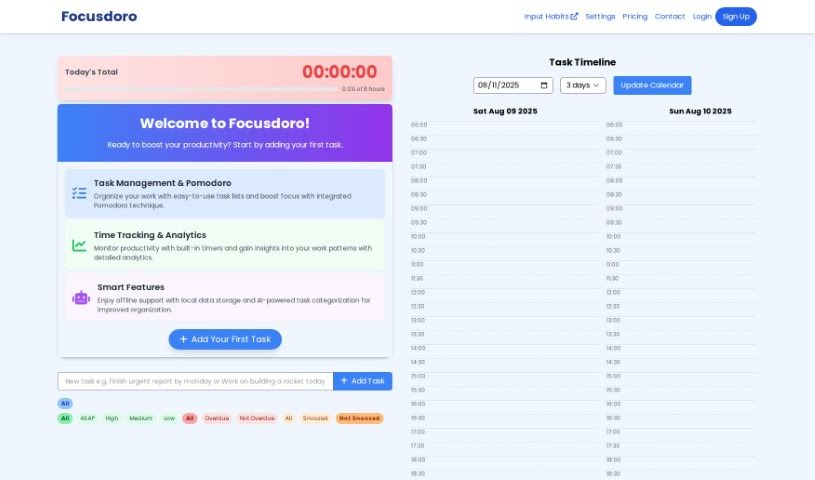
FocusDoro is a handy tool that combines a task list with a timer, plus some AI smarts, all designed to help you get your tasks done more efficiently. You can easily organize what you need to do, decide what’s most important, guess how long each task will take, and then use timers to keep track of your progress and remember to take breaks. It’s got features like setting task priorities, breaking down your schedule, and even AI that can create your daily plan for you. You can sort tasks into different categories, mark them as finished, and move them around whenever you need to. With its easy-to-use design and AI help, FocusDoro really aims to boost your productivity and keep you organized day-to-day.
Who created Focusdoro?
Focusdoro was actually brought to life by a forward-thinking team who wanted to make productivity better with smart task management tools. They launched it on September 19, 2023. Focusdoro offers some great features, like helping you prioritize your tasks, manage your timers, and break down your schedule with AI. These tools are all about helping you work smarter. The platform itself is really user-friendly, and its AI capabilities are there to help you handle your daily tasks without a hitch.
What is Focusdoro used for?
Focusdoro is great for a bunch of things:
- Getting your tasks in order: You can decide what’s most important.
- Keeping an eye on progress: See how you’re doing.
- Managing your time: Use timers to stay on track.
- Smart scheduling: Get AI help to break down your day.
- Organizing your to-dos: Create and sort tasks by project.
- Setting priorities: Mark tasks as high, medium, or low importance.
- Estimating task times: Figure out how long each job might take.
- Tracking your work: Use timers to see your progress.
- Taking smart breaks: Step away for 5 or 15 minutes when you need to.
- AI-powered daily plans: Let the AI help you map out your day.
- Categorizing tasks: Group tasks by when they’re due.
- Easy task management: You can drag and drop tasks to rearrange them.
- Planning your day: Use AI to generate a schedule that fits your needs.
- Keeping track of what’s done: Mark tasks as complete.
Who is Focusdoro for?
Focusdoro is a helpful tool for:
- Project Managers
- Freelancers
- Students
- Entrepreneurs
- Creative Professionals
How to use Focusdoro?
To really get the most out of FocusDoro, here’s a simple way to approach it:
- Create Your Tasks: First things first, add all your tasks into the tool. You’ll want to pick the right projects for them, set their priority level (whether it’s high, medium, or low), and then make a good guess at how long each one will take to complete.
- Manage Your Time with Timers: Use the built-in timer to keep track of how you’re progressing on each task. Don’t forget to take breaks! You can choose between 5-minute or 15-minute breaks to help you stay refreshed and focused.
- Get Smart Help from AI: Take advantage of features like “Plan the day using AI.” This is super useful because it can help generate a daily schedule tailored to your input, making your planning much more efficient.
- Organize Your Tasks Smartly: You can categorize your tasks based on their due dates, which really helps. Plus, you can easily manage them by just dragging and dropping them into the order that makes the most sense for you. Make sure to mark tasks as done so you can clearly see your progress.
- Give Your Productivity a Boost: FocusDoro is really built to help you be more productive. It does this by helping you prioritize tasks, manage your time with timers, and break down your schedule with AI assistance. The goal is to help you plan and manage your daily tasks in a way that really works.
- Enjoy the User-Friendly Interface: The tool has a really nice, easy-to-use interface. This makes it simple to navigate and make the most of all its different features, leading to a much smoother workflow.
By following these steps, you’ll be able to use Focusdoro effectively to improve how you manage your tasks and boost your productivity.