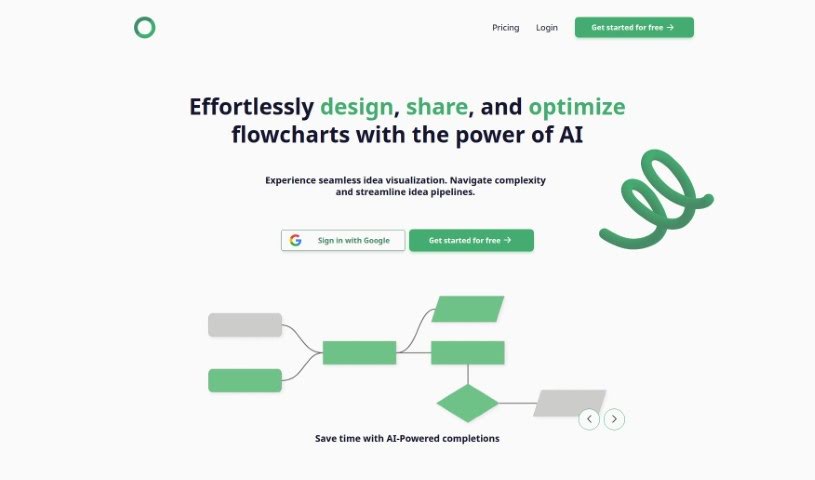
Screenshot of Flowsage

Flowsage

Discover Flowsage in 2025! Learn what this AI-powered flowchart tool is, how to use its features effectively, and how it stacks up against other project management tools.

Screenshot

What is Flowsage?

Flowsage is a platform packed with AI-powered tools that make designing, sharing, and optimizing flowcharts a breeze. You can really save time thanks to AI completions, work with your team in real-time, and fine-tune your flowcharts for maximum efficiency. Plus, you get helpful Flowchart assistants and seamless project management tools all in one place. Flowsage offers a few different pricing options, like Flowsage Lite, Flowsage Plus, and Flowsage Pro, each giving you access to different features and capabilities. It’s built to be super easy for beginners, but it also packs in advanced features for those who know their way around, so anyone can create and collaborate on flowcharts without a hitch.

Who created Flowsage?

Cameron Park is the individual behind Flowsage. He launched it on April 1, 2024, with a clear goal: to create a platform where designing, sharing, and optimizing flowcharts could be done effortlessly using AI. The company’s mission is to simplify how ideas are visualized, save valuable time with AI-powered completions, allow for real-time teamwork, make flowcharts more efficient, and provide smooth project management solutions. Flowsage is designed to be user-friendly for newcomers and offer robust functionalities for experienced users, making it accessible and beneficial for a wide range of professionals.

What is Flowsage used for?

  • Design Flowcharts Easily: Create, share, and optimize flowcharts with AI assistance, saving you time with smart completions.
  • Real-Time Collaboration: Work together with your team on flowcharts as ideas develop.
  • Boost Efficiency: Fine-tune your flowcharts to spot bottlenecks and make processes smoother.
  • Get AI Help: Use AI-driven chat support for instant guidance and suggestions while you work.
  • Manage Projects: Keep your projects on track by organizing tasks and timelines all within Flowsage.
  • Cloud Access: Reach your flowcharts from any device, anywhere, thanks to the cloud-based platform.
  • Better Teamwork: Improve communication and project coordination with built-in team collaboration features.
  • Secure Data: Your data is protected with robust security measures on the Flowsage Cloud.
  • Cross-Device Compatibility: Access and work on your flowcharts seamlessly across different devices.
  • Advanced AI: Make the most of advanced AI features using AI credits.
  • Process Streamlining: Optimize flowcharts to make your processes more efficient.
  • Project Organization: Manage projects effectively by organizing all your tasks.
  • Central Project Hub: Use Flowsage as the main place for all your project management needs.
  • Time Savings Goal: Be part of Flowsage’s mission to help 10,000 professionals reclaim their time.

Who is Flowsage for?

Flowsage is a great tool for:

  • Professionals in project management, data visualization, and task organization.
  • Anyone focused on flowchart design.
  • Project managers.
  • Data Analysts.
  • Team collaborators and leaders.
  • Creative professionals.
  • Business analysts.
  • Process Analysts.
  • Entrepreneurs.

How to use Flowsage?

Here’s a simple guide to getting started with Flowsage:

  1. Design with Ease: Begin by designing, sharing, and optimizing flowcharts using Flowsage’s AI capabilities. You’ll find that AI-powered completions make creating flowcharts much faster and more intuitive.
  2. Collaborate Seamlessly: Take advantage of Flowsage’s real-time collaboration features. Invite your team, share feedback instantly, and watch your ideas come together with synchronized updates.
  3. Optimize for Efficiency: Let Flowsage help you analyze and improve your flowcharts. It can identify bottlenecks and streamline processes, ensuring your visualizations are as efficient as possible.
  4. Get Instant Assistance: Whenever you need a hand, Flowsage’s AI-driven chat support is there to offer guidance, suggestions, and tips to make your flowcharting experience even better.
  5. Centralize Project Management: Use Flowsage as your go-to hub for managing projects. Organize tasks, set timelines, and track milestones easily to keep everything on schedule and your team informed.
  6. Work Anywhere: Enjoy the freedom of accessing your flowcharts from any location, at any time, thanks to Flowsage’s cloud-based platform. You can edit, collaborate, and create on the move.
  7. Choose Your Plan: Select the plan that best fits your needs, from the free Flowsage Lite with its core features to Flowsage Pro for unlimited access. You can always upgrade if you need more advanced capabilities.

Remember, Flowsage is designed for everyone, whether you’re just starting out or you’re an experienced user. It offers user-friendly features alongside advanced functionalities. You’ll benefit from secure cloud storage and smooth team collaboration. Plus, you can access your flowcharts from different devices and adjust your subscription as needed. Embrace Flowsage to make your flowcharting smoother and your productivity soar.

Related AI Tools

Discover more tools in similar categories that might interest you

Stay Updated with AI Tools

Get weekly updates on the latest AI tools, trends, and insights delivered to your inbox

Join 25,000+ AI enthusiasts. No spam, unsubscribe anytime.