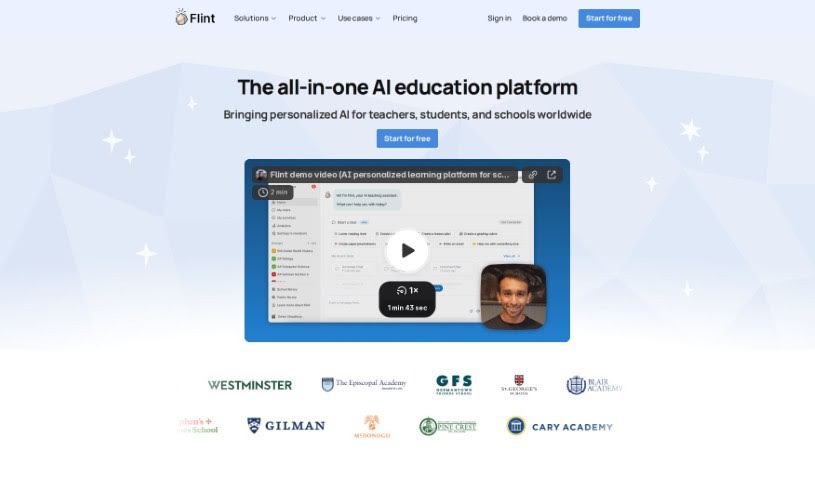
Screenshot of Flint

Flint

Discover what Flint is and how K-12 educators can use it effectively in 2025. We'll explore its features, compare it to other teacher tools, and show you how to get started.

Screenshot

What is Flint?

Flint is an AI-powered tool designed specifically for K-12 educators. It is your personal assistant for creating all sorts of customized educational materials. Need activities, worksheets, quizzes, or handouts? Flint can whip them up for you. What’s really neat is that it makes sure these materials line up with important educational standards, like the Common Core or NGSS. The whole idea is to make creating content that’s just right for your students much simpler, saving you precious time.

Flint really shines because it can tailor content for different reading levels, ensuring everyone in your class can understand it. Plus, it aligns everything with educational standards and boasts a super user-friendly interface. You can customize activities easily. Ultimately, Flint aims to boost your classroom instruction by meeting diverse student needs, acting as a helpful teaching aid, and cutting down hours of manual work.

Who created Flint?

Flint was developed by a team of experts, with Harry Thompson leading the charge. This AI tool officially launched on July 5, 2024. Its main goal is to help K-12 educators create classroom materials that are perfectly aligned with educational standards like Common Core and NGSS. The company behind Flint offers a few different pricing plans to fit various needs. You can start with a free plan that has some creation limits, or opt for an individual teacher plan for unlimited creations at just $10 per month. They also have a department license that covers up to ten teachers for $80 per month.

What is Flint used for?

Here’s a breakdown of what you can do with Flint:

  • Create a variety of classroom materials: This includes things like engaging activities, helpful worksheets, informative quizzes, and useful handouts.
  • Align materials with standards: Flint ensures your content matches educational benchmarks such as the Common Core or NGSS.
  • Adjust reading levels: You can easily tweak the reading difficulty of materials to better suit your students’ abilities.
  • Generate custom content quickly: It lets you create tailored educational materials efficiently.
  • Automate content creation: Flint takes care of the repetitive tasks involved in making classroom materials.
  • Save valuable teacher time: By automating content creation, it eliminates the need for hours of manual work.
  • Enhance classroom instruction: It helps you create content that’s well-aligned and perfectly tailored for your students.
  • Differentiate instruction: Flint makes it easy to create content for various reading levels.
  • Flexible pricing: You can choose from a free plan, an individual teacher plan, or a department license.

Who is Flint for?

  • Anyone teaching in K-12 settings.
  • Teachers looking for a smarter way to create materials.

How to use Flint?

Using Flint, that specialized AI tool for K-12 educators, is pretty straightforward. Just follow these steps:

  1. Generate Your Materials: Flint is great at creating classroom materials like activities, worksheets, quizzes, and handouts. It also makes sure they align with educational standards, such as Common Core and NGSS.
  2. Customize for Your Students: You can easily adjust the reading levels of the materials. This ensures the content is understandable and inclusive for all your students.
  3. Create Efficiently: Take advantage of Flint’s AI technology to quickly generate materials that are perfectly tailored. This frees you up to focus more on teaching and less on prep work.
  4. Meet Standards: Flint helps align your content with educational benchmarks, so you know it’s relevant and meets curriculum requirements.
  5. Navigate with Ease: Flint has a user-friendly interface. It makes it simple to select standards, create custom activities, and generally automate the process, really streamlining things for you.
  • Choose Your Plan: You’ve got options! There’s a free plan with some limits, an individual teacher plan for unlimited creations, and a department license if you need it for multiple users.
  • Get Support: All plans come with 24/7 customer support via call, text, and email. Depending on your plan, you’ll also get access to various AI features and creation capabilities.
  • Boost Your Teaching: Flint saves you time by automating material creation. It also enhances your classroom instruction by providing personalized content and effectively supporting diverse student needs.

By following these steps, you can really make the most of Flint. It’s a great way for educators to efficiently create customized, standards-aligned educational materials that are perfect for their students. This ultimately makes the whole teaching experience better.

Related AI Tools

Discover more tools in similar categories that might interest you

Academic Help Free Essay Generator

Education Academic Writing
Learn More

Stay Updated with AI Tools

Get weekly updates on the latest AI tools, trends, and insights delivered to your inbox

Join 25,000+ AI enthusiasts. No spam, unsubscribe anytime.