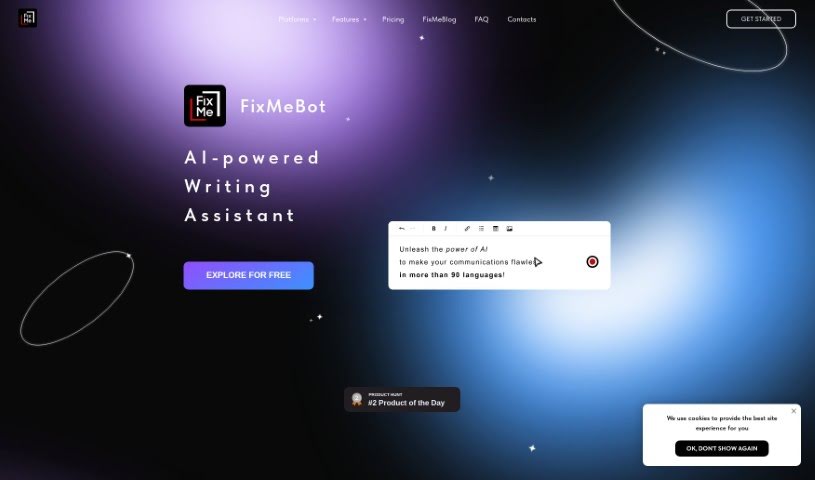
Screenshot of Fixmebot

Fixmebot

Discover what Fixmebot is and how to use it effectively in 2025. Explore its features, compare it with other writing tools, and learn how it can boost your writing and translation efforts.

Screenshot

What is Fixmebot?

FixMeBot is an AI-powered language assistant that’s really good at helping you fix up your texts, rephrase sentences, and translate content quickly. It’s packed with features: you can correct mistakes, paraphrase what you’ve written, translate into over 90 languages, change how long your text is, add emojis and hashtags, get explanations, and even use a special “Magic Mode” for extra help. You can pick a subscription plan that fits what you need, from Basic all the way up to Pro. If you want to give it a spin first, the Free plan lets you try everything with 5,000 characters. Got questions or need help with payments? Just shoot an email to FixMeBot. You can use it right in your web browser or directly through Telegram. Basically, FixMeBot is designed to break down language barriers and clear up writing errors, offering a smart AI solution to make your communication much smoother.

Who created Fixmebot?

The exact creator of FixMeBot isn’t mentioned in the details we have. What we do know is that FixMeBot is an AI-powered Language Assistant built to help with text correction, rephrasing sentences, and translating across more than 90 languages. The company behind it offers different subscription plans to suit everyone’s needs, and you can access it through web browsers or messaging apps like Telegram.

What is Fixmebot used for?

FixMeBot is incredibly versatile! Here’s a breakdown of what it can do:

  • Boost your writing quality: Make your words shine and sound more professional.
  • Translate content: Break down language barriers by translating into over 90 languages.
  • Fix grammar: Catch and correct those pesky grammar mistakes.
  • Rephrase sentences: Find new ways to say things, making your writing more engaging.
  • Improve writing and translations: Get AI-powered suggestions to make everything sound better.
  • Learn from AI: See how the AI suggests improvements and translations to help you learn.
  • Check messages instantly: Review your chats before you send them, right within the app.
  • General Text Correction: Fix any errors in your writing.
  • Rephrasing: Give your sentences a fresh new angle.
  • Voice to Text: Turn your spoken words into written text.
  • Instant AI Suggestions: Get immediate feedback and corrections.
  • Revise Text: Make necessary edits to polish your writing.
  • Telegram Integration: Use it seamlessly within your Telegram chats.
  • Punctuation Correction: Ensure your punctuation is spot on.
  • Correcting Texts: A general catch-all for fixing any writing errors.
  • Voice to Text Transformation: Convert your speech into written words.
  • Instant AI-Generated Suggestions and Corrections: Get real-time help.
  • Available in over 50 languages: (Note: The main description mentions over 90, so this might be a slight discrepancy or an older detail. We’ll stick to the 90+ for consistency.)
  • Enhancing writing quality and translations: A core function to make your communication clearer.
  • Avoid Manual Proofreading: Save time by letting AI handle the checks.
  • Telegram Integration: Easy access directly in your favorite messaging app.
  • Paraphrasing Text: Reword sentences to avoid repetition or improve clarity.
  • Spelling Correction: Catch and fix any spelling errors.
  • Identify and Correct Mistakes: A comprehensive check for grammar, punctuation, and spelling.
  • Translation Support: Handles over 90 languages, making global communication easier.
  • Unique Phrase Generation: Get help creating original ways to express yourself.
  • AI-Powered Suggestions: Improve your writing and translations with smart input.
  • Telegram Language Assistant: A helpful tool right in your chats.
  • Browser Support: Works in various web browsers too.
  • Personal AI Assistant: Acts like a smart helper that can answer questions.
  • Grammar, Punctuation, and Spelling: Fixes all these common text issues.
  • Translation Assistance: Supports over 90 languages.
  • Paraphrase Text: Make your writing more interesting or clearer.
  • Phrase Variations: Explore different ways to express your thoughts.
  • Enhance Writing Quality: A key benefit for all users.
  • Use in Browser or Telegram: Flexible access options.
  • Subscription Plans: Offers features like Mistakes Correction, Paraphrasing, Translation, Length Adjustment, Emojifying, Hashtagifying, and Explanation.
  • Magic Mode: Provides different attempts based on your subscription.
  • Free Plan: Includes 5,000 trial characters to test everything.
  • Personal AI Assistant: Helps answer your questions.
  • Correction Services: Fixes grammar, punctuation, and spelling.
  • Translation Help: Supports over 90 languages.
  • Unique Phrase Generation: Assists with creative wording.
  • Subscription Options: Plans tailored to different user needs.
  • Replaces Manual Proofreading: Streamlines the editing process.
  • AI Suggestions: Get smart input for your writing.
  • Language Support: Available in over 90 languages.

Who is Fixmebot for?

FixMeBot is a great tool for anyone who works with text or languages. This includes:

  • Writers: To polish their articles, stories, or blog posts.
  • Translators: To ensure accuracy and fluency in their translations.
  • Language Learners: To practice and improve their grammar and vocabulary.
  • Business Professionals: For clear and effective communication in emails, reports, and presentations.
  • Note and Writing Apps: Developers can integrate its capabilities.
  • Messaging Apps: Like Telegram, for real-time text enhancement.
  • AI Chatbots: To improve their conversational abilities.
  • Writing Assistants: As a supplementary tool for enhanced functionality.

How to use Fixmebot?

Using FixMeBot is pretty straightforward. Just follow these simple steps:

  1. Get Access: You can either head over to the FixMeBot website or use it directly within Telegram.
  2. Pick a Plan: Decide which subscription plan works best for you. Options include Basic, Standard, Premium, or Pro, depending on the features you want.
  3. Explore Features: Dive into features like Mistakes Correction, Paraphrasing, Translation, Length Adjustment, adding Emojis and Hashtags, getting Explanations, and using the helpful Magic Mode.
  4. Try the Free Trial: If you’re not sure, the Free plan gives you 5,000 trial characters so you can test out all the features.
  5. Contact Support: If you have any questions, need special help, or run into payment issues, don’t hesitate to email FixMeBot at [email protected].
  6. Integrate It: You can use FixMeBot easily in your favorite browser or directly on Telegram for maximum convenience.

By following these steps, you’ll be able to make the most of FixMeBot’s AI-powered language assistance and really boost your writing and communication skills!

Related AI Tools

Discover more tools in similar categories that might interest you

Stay Updated with AI Tools

Get weekly updates on the latest AI tools, trends, and insights delivered to your inbox

Join 25,000+ AI enthusiasts. No spam, unsubscribe anytime.