What is FinePixel?
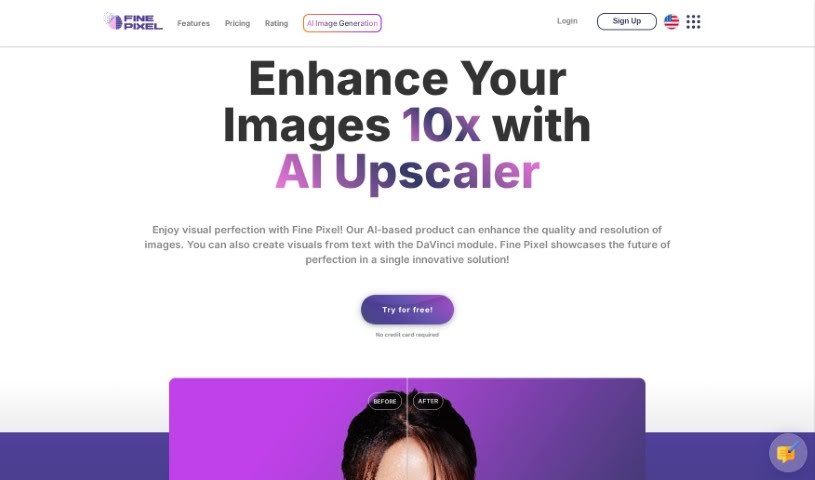
FinePixel is an AI-powered tool designed to seriously boost your images’ quality and resolution. It is a digital artist’s assistant! It can upscale your images by up to 10 times their original size, and it’s got special tech to make faces look even better. Plus, you can pick the exact format you need for your final image. There’s also the DaVinci module, which is pretty neat – it lets you create visuals just by typing in a description. You can use FinePixel to give old photos a new lease on life, make real estate shots pop, enhance landscapes, sharpen logos, or polish product visuals, all with AI precision. The DaVinci module specifically lets you turn text into images in a flash, create eye-catching visuals for all sorts of projects, and even edit photos using other images as a guide (that’s the Image to Image feature). FinePixel offers a few different subscription plans, so you can pick what fits your needs best, from a free option for personal projects to more advanced plans for serious users and even enterprise-level solutions.
Who created FinePixel?
While the specific founder isn’t mentioned in the details I have, Fine Pixel was created by someone focused on AI-driven image enhancement. The company specializes in making images better using artificial intelligence. They offer cool products like the DaVinci module, which is great for turning text into images, and their upscaling tools. Fine Pixel has a range of subscription plans, starting with a free tier for personal use and going up to enterprise packages designed for businesses.
What is FinePixel used for?
FinePixel is incredibly versatile! Here’s a breakdown of what you can do with it:
- Boost Image Quality: Make your images sharper and higher resolution.
- Text-to-Image Magic: Use the DaVinci module to create visuals simply by describing what you want.
- Revive Old Photos: Turn those vintage shots into stunning digital art.
- Professional Polish: Enhance real estate photos, landscapes, logos, and product shots with AI’s precision.
- Quick Enhancements: Improve low-quality images in seconds.
- Perfect Resizing: Get crisp, clear images sized just right for both web and print.
- Pro-Grade Quality: Elevate any image to a professional 300+ DPI standard.
- Instant Visuals: Turn your ideas into images right away with the powerful AI Text-to-Image tool.
- Business & Personal Graphics: Create eye-catching visuals for marketing, business needs, or personal projects.
- Social Media Content: Make your social posts stand out with creative and engaging visuals.
- Image Upscaling: Increase image resolution by up to 10x.
- Facial Enhancement: Improve the details in faces within your photos.
- Format Flexibility: Choose the output format that best suits your needs.
- AI Photo Editing: Add or remove elements from photos using the AI-powered Image to Image tool.
- Rapid Transformations: Turn your photos into magnificent visuals in just seconds.
Who is FinePixel for?
FinePixel is a fantastic tool for:
- Artists
- Photographers
- Designers
- Marketers
How to use FinePixel?
Using Fine Pixel is pretty straightforward. Just follow these steps:
- Sign Up: First, you’ll need to create an account on the Fine Pixel website.
- Pick Your Plan: Choose the subscription that best fits what you need. There’s a Free plan for personal projects, a Basic plan for more detailed personal use, a Professional plan for advanced personal use, and an Enterprise plan if you’re a company. Each plan comes with different features and benefits, so pick wisely!
- Get Familiar with the Layout: Take a moment to explore the platform. Get a feel for where everything is and how the interface works.
- Upload Your Images: Ready to enhance? Use the image upscale feature to boost your images’ resolution by up to 10x. Don’t forget to try out the facial enhancement technology too!
- Choose Your Output: Fine Pixel lets you select from various output formats, so you can get exactly what you need for your project.
- Dive into the DaVinci Module: This is where the magic happens for advanced features. Use it to instantly turn text into images or transform photos using AI tools.
- Save and Download: Once you’re happy with your enhancements or transformations, save your work in your preferred format.
- Need Help? Depending on your plan, you might have access to technical support if you run into any questions or issues.
- Play Around and Have Fun: Go ahead and use Fine Pixel to create high-quality visuals for whatever you need – personal projects, business marketing, social media, and more!
By following these steps, you’ll be able to make the most of Fine Pixel’s AI capabilities to enhance your images and create amazing visuals without a fuss.