Eightify (Social Media)
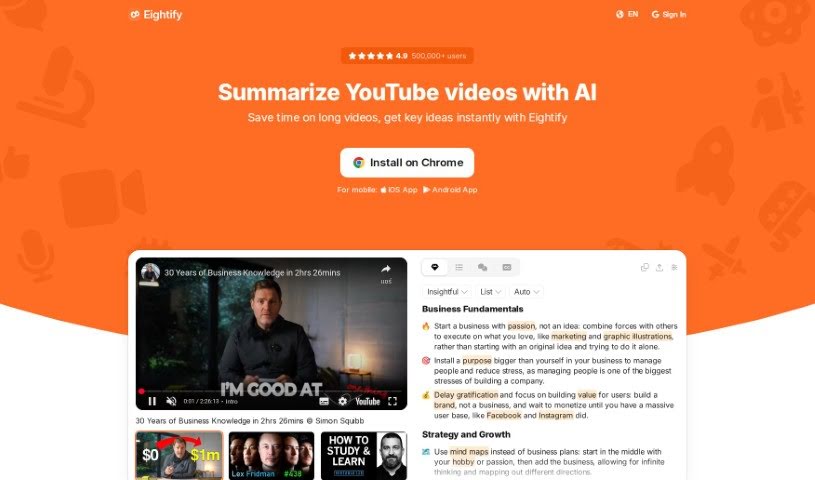
Screenshot of Eightify

Eightify

Discover Eightify, an AI tool that summarizes YouTube videos into key points with smart navigation, transcriptions, and multilingual support.

Screenshot

What is Eightify?

Eightify is an AI tool that summarizes YouTube videos. It pulls out the main points of long videos, offers navigation so you can jump to the topics that matter, provides a rundown of top comments, and generates video transcriptions that are often more accurate than YouTube’s own subtitles. It supports many languages, makes sharing summaries easy, and helps you clear out your watchlist by learning from concise summaries. It’s useful for anyone who uses YouTube for learning or research.

Who created Eightify?

Eightify was created by Max, whose company offers this AI-powered tool for summarizing YouTube videos. The goal is to help users save time by quickly grabbing the key ideas from videos. More than half a million users worldwide rely on it, including professionals, students, content creators, teachers, and journalists.

What is Eightify used for?

  • Summarize YouTube videos with AI: Get the gist of any video instantly.
  • Save time on long videos: Grasp key ideas without watching the whole thing.
  • Smart Navigation: Jump directly to specific topics within a video, with timestamped summaries.
  • Better transcriptions: Access text versions that often beat YouTube’s subtitles.
  • Easy Sharing: Turn summaries into shareable articles with one click.
  • Content selection: Skim summaries to decide which videos are worth your time.
  • Research: Content creators can streamline their research process.
  • Lesson prep: Educators can prepare lessons and keep students engaged.
  • News: Journalists can extract key information from news reports.

Who is Eightify for?

Busy professionals, students, content creators, educators, journalists, and casual viewers.

How to use Eightify?

  1. Install the Eightify Chrome extension.
  2. Watch a YouTube video as usual and use the extension to get a summary broken down into 8 key ideas.
  3. Use the summary to decide whether a video is worth watching — especially helpful for business education, podcasts, interviews, news, and lectures.
  4. Use Smart Navigation to jump to specific topics via timestamped summaries.
  5. Check the Top Comment Overview to see how other viewers reacted.
  6. Access transcriptions that are generally more accurate than YouTube’s own.
  7. Get summaries and translations in over 40 languages.
  8. Share summaries as articles with one click.

Related

Related AI Tools

Discover more tools in similar categories

AI Carousels

Social Media Social Media Management
Learn more

New tools, in your inbox.

Weekly picks of the best AI tools we've researched and added — no spam, unsubscribe anytime.

Join 25,000+ AI enthusiasts. No spam, unsubscribe anytime.