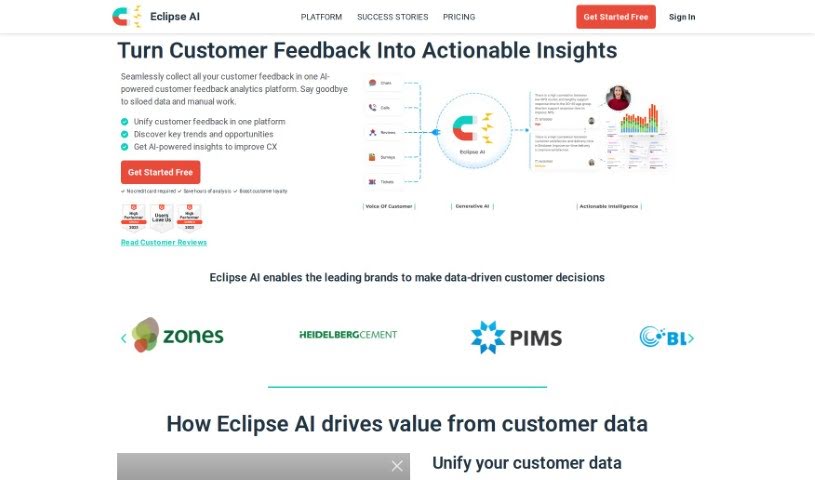
Screenshot of Eclipse AI

Eclipse AI

Discover what Eclipse AI is and how to use it effectively in 2025. We'll explore its features and see how it stacks up against other Customer Service Tools.

Screenshot

What is Eclipse AI?

Eclipse AI got its start in 2021, founded by Bill and Saad, who previously worked as CX management consultants, alongside technologist Munib. This platform uses generative AI to help businesses with multiple locations bring together their voice-of-customer data from various channels and sites. It then transforms this data into practical insights that can boost customer loyalty. Eclipse AI is built specifically for franchise operations and businesses that have many locations. Its main goal is to make it easier to analyze customer data and improve customer experiences on a large scale.

The platform offers features like consolidating and analyzing customer feedback from all channels, making sure your brand message stays consistent and helping you keep customers. It also provides real-time, AI-generated insights that are tailored to your business’s specific situation. By automating manual analysis tasks, Eclipse AI saves businesses time, allowing them to focus on customer-centric strategies that can increase retention and revenue.

Who created Eclipse AI?

Meet the Founders and Get an Overview of Eclipse AI:

Eclipse AI was founded in 2021 by Bill Bates, Saad Irfani, and Munib Tahir, who all have backgrounds as CX management consultants. They created the platform, which uses generative AI, because they were tired of how much time and effort traditional data analysis took. Their mission is to help businesses with multiple locations by making customer data analysis simpler and by providing actionable insights to build stronger customer loyalty. Today, well-known customer-focused companies around the world use Eclipse AI, giving them a real advantage in their respective markets.

What is Eclipse AI used for?

Eclipse AI helps you:

  • Bring all your Voice-of-Customer data together: Centralize your customer feedback analysis.
  • Discover insights specific to each location: Unlock location-specific insights.
  • Make smarter decisions with AI: Make AI-powered decisions.
  • Save tons of time on analysis: Save endless hours of manual analysis.
  • Stay updated with trends: Get real-time trend alerts.
  • Work together effectively: Collaborate using a Kanban board.
  • Connect with review sites: Integrate with online and app review sites.
  • Link up your customer feedback: Connect voice-of-customer data.
  • Create unlimited surveys: Build as many surveys as you need.
  • See everything on dashboards: Analyze data through clear dashboards.
  • Get notified about new trends: Receive real-time trend alerts.
  • Manage tasks with your team: Collaborate through a Kanban board and assign tasks to users.
  • Connect with other tools: Integrate with online and app review sites, Zendesk, and other systems.
  • Get fast help when you need it: Enjoy priority customer support with quick responses.
  • Unify your customer data: Connect voice-of-customer data for analysis.
  • See all your feedback in one place: Use a consolidated dashboard to link reviews and surveys.
  • Analyze all sorts of feedback: Analyze data from reviews, surveys, calls, and CSV files.
  • Get actionable insights from AI: Receive AI-generated actionable insights from various data sources.
  • Simplify analysis for multiple locations: Centralize voice-of-customer analysis for businesses with many locations.
  • Focus on AI-driven decisions: Save time on manual analysis and make AI-powered decisions.
  • Organize your workflow: Collaborate using a Kanban board.
  • Connect with more platforms: Integrate with online and app review sites, Zendesk, and more.
  • Get quick support: Enjoy priority customer support with fast responses.
  • Understand trends instantly: Get AI-generated actionable insights and trend alerts.
  • Visualize your data: Use data analysis dashboards for reviews, calls, and surveys.
  • Use your data elsewhere: Export survey responses for further analysis.
  • See all customer interactions: Centralize customer interactions for analysis.
  • Get insights tailored to each location: Gain location-specific insights and make AI-powered decisions.
  • Manage projects with your team: Collaborate with a Kanban board for task management.
  • Connect to other systems: Integrate with various review sites and access API for custom connections.
  • Understand your customers better: Connect voice-of-customer data for analysis and insights.
  • Get expert help and insights: Provide customer support with priority support and real-time insights.
  • Analyze survey data further: Export survey responses for further analysis.
  • Improve customer loyalty: Get AI-generated actionable insights for customer retention.
  • Get a complete view of your customers: Achieve Unified Customer Intelligence for multi-location businesses.
  • Get expert guidance: Receive hands-on consulting support for designing, developing, and delivering results.
  • Track progress over time: Analyze aggregate data or trends over time.
  • Compare different results easily: Use a split dashboard view to compare results side by side.
  • Export data for Excel: Easily download results into MS Excel for analysis.
  • Understand customer feelings: Analyze sentiment and sentiment trends associated with free-text survey responses.
  • Analyze call recordings: Analyze audio/video call transcripts and associated sentiment.
  • Get AI summaries of calls: Analyze AI-generated call summaries.
  • Filter your data precisely: Filter results by date, customer, agent, sentiment, plus other custom tags.
  • Spot key phrases and trends: Identify critical phrases and trends with associated sentiments.
  • Identify important topics: Identify key topics and trends with associated sentiments.
  • Get survey data in Excel: Export survey responses in MS Excel format.

Who is Eclipse AI for?

Eclipse AI is designed for:

  • Chief Experience Officers
  • Franchise Administrators
  • Chief Customer Officers
  • CX management consultants
  • Franchise Administrators (again, for emphasis!)
  • Chief Customer Officers (also, for emphasis!)

How to use Eclipse AI?

To get the most out of Eclipse AI, just follow these steps:

  1. Dive into Data Analysis:
    • Look at your overall data or track trends as they happen over time.
    • Use the split dashboard to easily compare different results side-by-side.
    • You can download your results directly into MS Excel if you want to dig deeper.
  2. Understand Sentiment:
    • Analyze how customers feel and track changes in sentiment within your free-text survey responses.
  3. Explore the Calls Dashboard:
    • Review transcripts from audio or video calls, along with the sentiment expressed.
    • Check out the AI-generated summaries for calls.
    • You can filter your call data by date, customer, agent, sentiment, and other custom tags.
  4. Use the CSV Data Dashboard:
    • Customize your dashboard by picking the charts and filters you want to see.
    • Filter and segment your data to get a really detailed look.
  5. Export Your Findings:
    • Export survey responses directly in MS Excel format.
    • Get real-time insights from all your data sources, generated by AI.
  6. Stay Informed with Real-time Alerts:
    • Receive email alerts when new trends emerge or when there are red flags that need your attention.
  7. Boost Team Collaboration:
    • Use the Kanban board to manage your tasks and workflow.
    • You can add up to 5 users and set specific permissions for each.
  8. Connect Your Tools:
    • Integrate with various online and app review sites.
    • Use the full API to create custom integrations with your existing workflow tools.
  9. Get Top-Notch Customer Support:
    • Benefit from priority support that offers quick answers to your questions.
  10. Explore Custom Packages:
    • We can design custom packages tailored to your specific needs and budget.
  11. Access Our Services:
    • Get hands-on consulting help to design, develop, and deliver the results you’re looking for.

To really make the most of Eclipse AI, use its features for analyzing data, understanding customer sentiment, collaborating with your team, and integrating with other tools. This will help you improve customer experience and drive your business forward.

Related AI Tools

Discover more tools in similar categories that might interest you

Stay Updated with AI Tools

Get weekly updates on the latest AI tools, trends, and insights delivered to your inbox

Join 25,000+ AI enthusiasts. No spam, unsubscribe anytime.