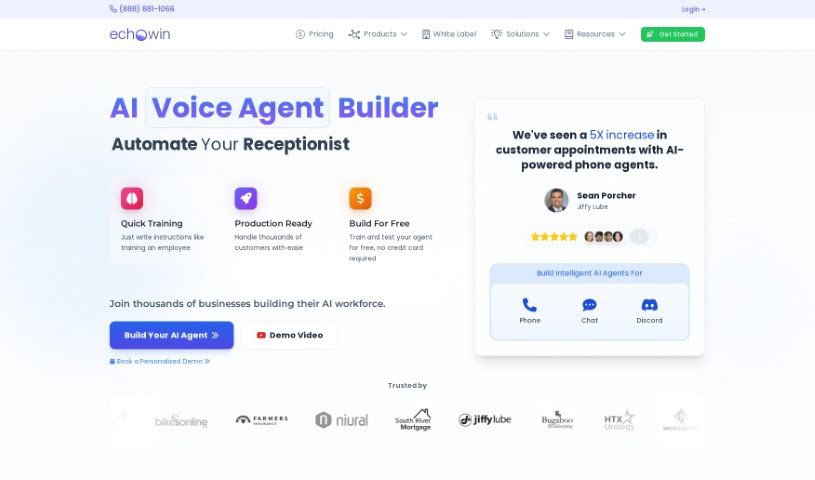
Screenshot of Echowin

Echowin

Discover what Echowin is and how to use it effectively in 2025. We'll explore its features and see how it stacks up against other customer service tools.

Screenshot

What is Echowin?

Echowin is a really smart AI call answering platform that’s designed to make handling your business calls much smoother. It uses artificial intelligence to answer phone calls automatically, and it does it in a way that sounds very much like a real person talking. Echowin comes packed with features like AI call answering, automated workflows, live transcripts of calls, automatic contact management, and smart analytics. All of these are aimed at helping you connect better with your customers and make your processes run more efficiently. It’s easy to use on your phone, it’s always being updated, and it’s great for everyone, whether you’re just starting out or you’re already an expert. Lots of different industries trust Echowin to improve their customer interactions, including law firms, parking companies, hospitality businesses, e-commerce stores, and digital media agencies.

Who created Echowin?

Echowin was actually started by Kaushal Subedi and a few other co-founders. Their big idea was to make AI technology accessible to small businesses everywhere. They began by building a prototype of an AI voice agent that could automate tasks, and this eventually led to the launch of Echowin in 2022. Echowin is really changing the game for customer service by offering this AI-powered platform, making advanced AI tools available to businesses of all sizes.

What is Echowin used for?

Echowin helps with a bunch of things:

  • Smart Analytics: Get insights and create reports about your calls and how customers interact with you.
  • Workflow Automation: Streamline tasks like transferring calls or processing refunds, and connect with many other apps.
  • AI Call Answering: Your AI agent talks to customers naturally, answering questions and providing information just like a human would.
  • Live Transcripts: See what’s being said in real-time, so you can understand and respond to customers better.
  • Contact Management: Automatically add new customers to your contact list, complete with Caller ID and a record of your conversations.
  • Customer Analytics: Understand your customers and their interactions better.
  • Powerful Workflow Automation: This is a big one – it helps you manage things like call transfers and refunds smoothly, and it connects with tons of other apps.
  • Automatic Contact Management: When someone calls, their info gets added to your contacts, along with notes from the conversation.
  • Streamlining call transfers and refunds: Makes these common tasks much simpler.
  • Real-time transcriptions for better understanding and response to customer needs: You can follow along and react quickly.
  • Adding customers to contact lists with automatic Caller ID and conversation tracking: Keeps your customer data organized effortlessly.
  • Gaining insights and generating reports on calls and customer interactions: Helps you see what’s working.
  • Prompt, personalized responses to improve customer relationships: Makes customers feel valued.
  • AI Call Answering: This feature means your AI agent can handle calls, answer questions, and give information in a natural, human-like way.
  • Powerful Workflow Automation: It simplifies processes like call transfers and refunds, and it works with lots of other business applications.
  • Live Transcripts: You get a live text version of the call, which is super helpful for understanding and responding to customers.
  • Automatic Contact Management: Echowin automatically saves caller information and conversation details to your contact list.
  • Smart Analytics: This helps you dig into your call data, find patterns, and create useful reports.
  • It connects with over 6000 business applications, including major CRM systems, so it fits right into your existing tools.
  • Your agent can follow specific scripts, whether you give it instructions, examples, or rules.
  • It offers cool features for both people who are new to AI and those who are more experienced.
  • Industries like law firms, parking management, hospitality, e-commerce, and digital media agencies rely on it to transform how they engage with customers.
  • It’s really versatile and can be used for many different business types, from law firms to e-commerce.
  • Integrate with CRM systems: Connects easily with your customer relationship management tools.
  • Follow scripts provided in the form of instructions, examples, or rules: You can guide the AI’s responses precisely.
  • Create scenarios tailored to business needs: Design custom conversations for your specific situations.
  • Access interactive templates for quick workflow setup: Get started fast with pre-built templates.
  • Gain insights and reports on calls and customer interactions: Understand your performance better.

Who is Echowin for?

Echowin is a great fit for:

  • Law firms
  • Parking management companies
  • The hospitality industry
  • E-commerce businesses
  • Digital media agencies

How to use Echowin?

Here’s a straightforward guide to getting started with Echowin:

  1. First, sign up for an account on the Echowin platform. You can pick a plan that best suits what your business needs.
  2. You can use the platform on any device you like, as it’s designed to be mobile-friendly and is always being updated with new improvements.
  3. Training your AI agent is quick and easy, usually taking just minutes. The platform is intuitive and offers options for different skill levels, so you can train it just right.
  4. You can create custom conversation scenarios that fit your specific business needs. If you’re on the Pro or Ultra plans, there’s no limit to how many scenarios you can create!
  5. Echowin provides helpful interactive templates that you can use to set up your workflows really fast.
  6. You can easily connect Echowin with over 6000 business applications, including all the major CRM systems you might already be using.
  7. Take advantage of its key features like AI Call Answering, Workflow Automation, Live Transcripts, Automatic Contact Management, and Smart Analytics.
  8. You can customize your AI agent to follow specific scripts, which you can provide as simple instructions, examples, or clear rules.
  9. Use the Smart Analytics feature to get valuable insights and generate reports on all your calls and customer interactions.
  10. You’ll find that Echowin’s AI system can save you money and boost efficiency because it works 24/7 without any overtime costs.

By following these steps, you can really improve your business communication, automate your workflows, and give your customers an outstanding experience with Echowin’s innovative platform.

Related AI Tools

Discover more tools in similar categories that might interest you

Stay Updated with AI Tools

Get weekly updates on the latest AI tools, trends, and insights delivered to your inbox

Join 25,000+ AI enthusiasts. No spam, unsubscribe anytime.