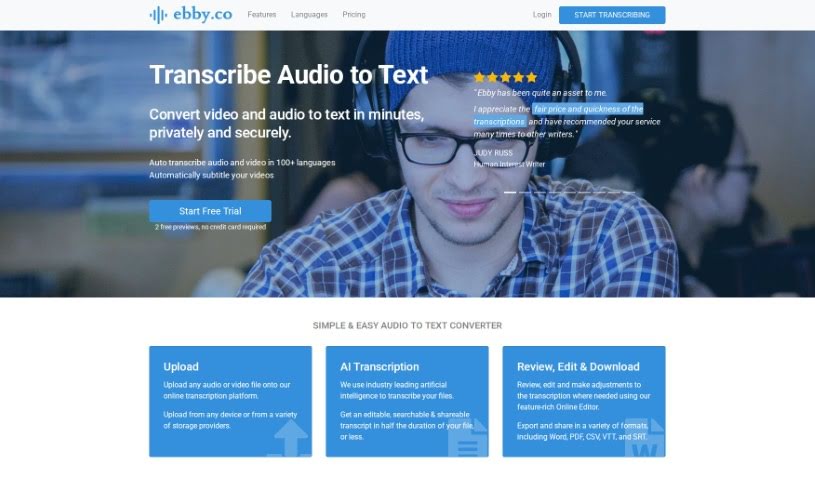
Screenshot of Ebby

Ebby

Discover Ebby, your go-to AI transcription tool for 2025. Learn how to use its features, compare it with other transcription services, and see how it can simplify your workflow.

Screenshot

What is Ebby?

Ebby.co is a smart transcription software that uses AI to turn your audio and video files into text. It’s pretty versatile, supporting over 100 languages and even creating automatic captions for videos. What’s really handy is its easy-to-use online editor, perfect for tweaking your transcripts. You can export them in all sorts of formats too – think Word, PDF, CSV, VTT, and SRT. Plus, Ebby makes sharing and collaborating on transcripts simple, giving others editing permissions if you choose. They also take data security and privacy seriously, automatically label speakers, and handle a wide variety of audio and video file types.

This platform is a great fit for transcribing things like interviews, podcasts, meetings, and even phone calls. Need captions for a video? Ebby can handle that. If you’re working with confidential material, Ebby supports that too, and you’ve got plenty of editing options to make sure everything’s just right. Remember, you can get your transcriptions out in formats like Word, PDF, CSV, VTT, and SRT, and the team collaboration and automatic speaker labeling features are real time-savers.

When it comes to pricing, Ebby offers a straightforward pay-as-you-go model. There are no hidden fees or subscriptions, which is fantastic if you only need it for occasional projects. You can even try it out with a free trial – no credit card needed to get started. The whole idea behind Ebby is to speed up transcription while keeping your files accurate and private.

Who created Ebby?

Ebby, the AI transcription software we’ve been talking about, first launched on November 10, 2020. The company behind it was actually founded by Dreu Austin, who also happens to be the Chief Marketing Officer (CMO) at Nutrisail. Their main goal with Ebby? To make transcription simple, accurate, fast, and affordable for everyone, whether you’re a journalist, a student, a podcaster, or a researcher.

What is Ebby used for?

Ebby can help you with a whole range of tasks:

  • Transcribing lectures
  • Transcribing interviews
  • Transcribing podcasts
  • Transcribing meetings
  • Transcribing phone calls
  • Transcribing video chats
  • Transcribing voice notes
  • Transcribing documentaries
  • Working with your team on transcriptions
  • Creating automatic video captions
  • Generating captions for your videos
  • Collaborating on transcripts with your team
  • Getting automatic speaker labels on your transcriptions
  • Quickly transcribing audio files
  • Generating subtitles for videos
  • Integrating transcription into your existing workflow with other apps

Who is Ebby for?

Ebby is a great tool for a variety of professionals and students:

  • Journalists
  • Podcasters
  • Legal firms
  • Students
  • Professional transcriptionists
  • Documentary makers
  • Marketers
  • Authors
  • Higher education professionals
  • Researchers
  • Media Producers

How to use Ebby?

Using Ebby for transcription is pretty straightforward. Here’s a quick rundown of the steps:

  1. Upload Your Files: First, just upload your audio or video file directly to the Ebby online platform. You can do this from any device or connect it to your storage provider.
  2. Let the AI Work: Ebby uses its AI technology to transcribe your files. It’s designed to be quick and accurate.
  3. Review and Edit: Once the AI has done its part, you can use the user-friendly online editor. This is where you can review the transcript, make any necessary edits, and customize it to your liking.
  4. Export Your Transcript: After you’re happy with the edits, you can export the transcription. Ebby offers several popular formats like Word, PDF, CSV, VTT, and SRT.
  5. Collaborate with Others: Need to share your work? You can easily share the transcript with colleagues. You can choose to give them read-only access or allow them to make edits too.
  6. Get Automatic Subtitles: If you’re working with video, Ebby can automatically generate subtitles for you. This really helps make your content more accessible and engaging for a wider audience.
  7. Trust Your Data’s Security: Ebby is built with security and privacy in mind. They have multiple layers of protection to keep your data safe.
  8. Try it Free: Want to see how it works? You can start with a free trial. Upload a couple of files and get two previews to test out Ebby’s capabilities without any commitment.

Following these steps should help you get the most out of Ebby for all your transcription needs, making the process efficient and accurate.

Related AI Tools

Discover more tools in similar categories that might interest you

Stay Updated with AI Tools

Get weekly updates on the latest AI tools, trends, and insights delivered to your inbox

Join 25,000+ AI enthusiasts. No spam, unsubscribe anytime.