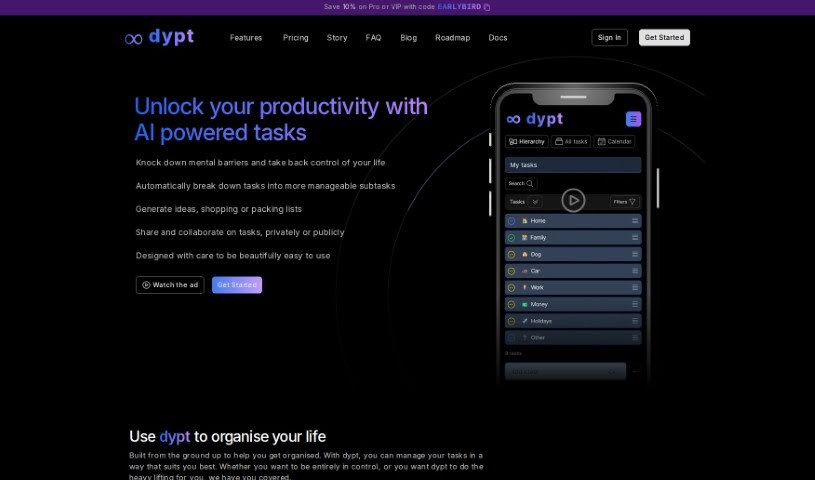
What is Dypt?
Dypt is an AI-powered task manager built to help you get organized. It works by breaking down big, complex tasks into smaller, more manageable subtasks. It is a tool that lets you divide tasks infinitely. It also offers AI-assisted planning, works across all your devices, makes sharing tasks super intuitive, and sends you scheduled summaries. You can even collaborate with others and get daily and weekly email reports to keep you in the loop on your progress. The creator, Dane, actually built Dypt because he was struggling with task management himself. The name “Dypt” comes from the Norwegian word for “deeply,” which really captures how the app helps you dive into all the layers of your tasks.
Who created Dypt?
Dane, who transitioned from being a chartered accountant to a full-time developer, is the person behind Dypt. He found that managing tasks was a real challenge when he was a senior leader and also running startups. This personal struggle inspired him to create Dypt, an AI-powered task manager specifically designed to efficiently break down tasks into smaller, more manageable pieces. The company is based in the UK, and they offer both free and premium plans. These plans come with a variety of features aimed at boosting productivity and organization for everyone, no matter their background.
What is Dypt used for?
Here’s a look at what you can do with Dypt:
- Break Down Tasks: Easily split your tasks into smaller, more manageable subtasks.
- AI Assistance: Use artificial intelligence to help create subtasks and even generate ideas or lists.
- Cross-Platform Access: Manage your tasks smoothly on any device, thanks to its cross-platform accessibility.
- Intuitive Sharing: Share tasks publicly or collaborate privately with others using easy-to-use task sharing features.
- Stay Updated: Get daily and weekly email summaries of your tasks without needing to open the app.
- Recurring Tasks: Set up tasks that automatically repeat on a daily, weekly, monthly, or yearly basis.
- Add Notes: Capture context or extra details by adding notes to your tasks.
- Flexible Reordering: Reorder and move tasks within the hierarchy as needed.
- Multiple Views: See your tasks in either a list or calendar format, complete with reminders and deadlines.
- Time Management: Track estimated and actual time spent on tasks for better time management.
- Mobile-Friendly: Manage tasks seamlessly on any device with Dypt’s mobile-friendly platform.
- Community Inspiration: Share tasks publicly or collaborate privately, and even draw inspiration from what others are doing.
- Set Deadlines & Reminders: Assign deadlines to tasks and set up reminders for push notifications on your device.
- Prioritize Tasks: Assign low, medium, or high priority levels to your tasks.
- Keyboard Navigation: Navigate through Dypt easily using keyboard support.
- Theme Options: Choose between a light or dark mode for a comfortable user experience.
- Filtering & Sorting: Filter and sort your tasks to find what you need quickly.
- Collaboration Options: Work on tasks privately or publicly, and share or copy tasks from the Dypt community.
Who is Dypt for?
Dypt is a great tool for:
- Students: Keep track of assignments, study schedules, and project deadlines.
- Professionals: Organize work projects, manage client tasks, and improve team collaboration.
- Stay-at-home parents: Juggle household chores, family schedules, and personal projects with ease.
How to use Dypt?
To get the most out of Dypt, here’s a simple step-by-step guide:
- Pick Your Plan: Dypt offers a range of plans, from free to VIP, so you can choose the one that best fits your needs and budget. Take a moment to select the plan that aligns with what you’re trying to achieve.
- Master Task Management: Start by breaking down your tasks into multiple layers. This is key to organizing your workflow efficiently. You can also use Dypt’s AI to help you break down tasks and even estimate how long they might take to complete.
- Leverage AI Integration: Depending on the plan you choose, you’ll have access to different amounts of AI credits. Use these to boost your task management and overall productivity.
- Collaborate with Others: Dypt makes it easy to share tasks, whether publicly or privately, so you can work together effectively. You can collaborate with a set number of people, depending on your plan.
- Customize Your Tasks: Make tasks work for you by setting deadlines, adding reminders, and assigning priorities. You can also track the time you spend on each task and apply low, medium, or high priorities as needed.
- Set Up Recurring Tasks: If you have tasks that need to be done regularly, you can set them up to repeat daily, weekly, monthly, or yearly. Dypt will automatically create these tasks for you based on the schedule you set.
- Enjoy Accessibility: Access Dypt from any device using a web browser. Plus, you can switch between a comfortable light mode and a sleek dark mode based on your preference.
- Stay Informed with Email Reports: Get daily or weekly email reports that update you on your tasks, deadlines, and priorities. This means you can stay on top of things without even needing to log into Dypt.
- Navigate with Ease: Experience smooth navigation thanks to Dypt’s excellent keyboard support. You can move through the app efficiently without needing to use a mouse.
By using Dypt, you can manage your tasks more efficiently, collaborate smoothly with others, and take advantage of AI integration to really boost your productivity. Just pick the plan that suits you, customize your tasks, and explore all the features Dypt offers to make your workflow much smoother.