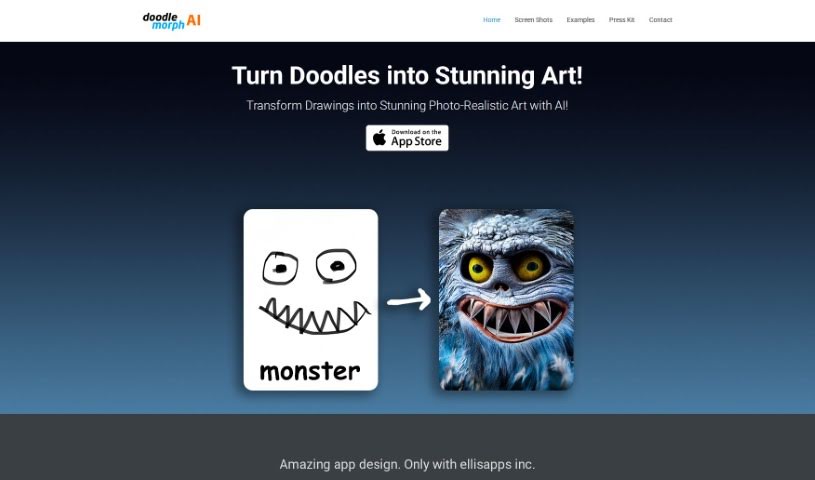
Screenshot of Doodle Morph AI

Doodle Morph AI

Discover Doodle Morph AI in 2025! Learn what it is, how to use its features effectively, and how it stacks up against other drawing generators.

Screenshot

What is Doodle Morph AI?

Doodle Morph AI is a neat AI-powered app from EllisApps Inc. that lets you turn your sketches, doodles, and drawings into really high-quality, photo-realistic digital art. It uses some pretty advanced artificial intelligence to do the magic. The app is super easy to use, processes your inputs as you draw, and even has good audio and visual features. Plus, they’ve got security measures in place to keep your creations safe. You can grab the Doodle Morph AI app right from Apple’s App Store and start transforming your sketches into amazing digital artworks.

Who created Doodle Morph AI?

Doodle Morph AI was developed by EllisApps Inc. It first came out on June 17, 2024. This application is known for its ability to turn sketches into photo-realistic art, its straightforward interface, and its quality audio and visual capabilities. EllisApps Inc. is the company behind this innovative tool.

What is Doodle Morph AI used for?

  • It’s really easy to use.
  • It turns your sketches into art that looks like a real photo.
  • You get high-quality digital images.
  • It offers different kinds of image categories to choose from.
  • Your artwork is kept safe and secure.
  • They offer solid customer support if you need it.
  • You can even apply for jobs through the app.
  • They’re open to proposals for joint ventures.
  • It provides great audio and visual experiences.
  • It’s a safe place to create your art.
  • It’s all about transforming doodles, sketches, and drawings into stunning, photo-realistic art.
  • You can generate really high-quality digital art images.
  • It makes sure your created images are secure.
  • It processes your inputs in real-time, so you see results quickly.
  • You get a high-quality audio and visual experience.
  • It’s a platform for job applications and joint venture proposals.
  • It clearly maps out how your input becomes output.
  • You can see examples of what the app can create.
  • It really shows off what it can do.
  • It supports job applications.
  • It features a user-friendly interface.
  • It offers high-quality audio and visual capabilities.

Who is Doodle Morph AI for?

  • Artists
  • Digital artists
  • Designers
  • Illustrators
  • Creative professionals
  • Art enthusiasts
  • Graphic designers
  • Art Students

How to use Doodle Morph AI?

Using Doodle Morph AI is pretty straightforward. Just follow these simple steps:

  1. Download the App: First things first, you’ll need to download Doodle Morph AI from Apple’s App Store.
  2. Input Your Sketch: Once you have the app, upload your sketch or doodle. You can draw it directly in the app or upload an existing one.
  3. AI Transformation: Now for the magic! The app uses advanced AI algorithms to look at your input and create a high-quality digital art image from it.
  4. Explore Features: Take some time to explore everything the app offers. It has a user-friendly interface, processes things in real-time, and provides great audio and visual experiences.
  5. View Examples: Want to see what’s possible? Check out the examples of images that Doodle Morph AI has generated on the company’s website.
  6. Customer Support: If you have any questions or need help, you can easily send an email using the form on their website.
  7. Security: Rest assured, Doodle Morph AI is designed to provide a safe and secure environment for you to create your art.
  8. Innovation: This app is truly innovative in how it transforms simple doodles into high-quality digital artworks.
  9. Category Options: You can explore various categories within the app, like Voice, White Noise, Lullabies, and even a Flashlight Mode.
  10. Joint Ventures & Job Applications: If you’re interested in joint ventures or want to apply for a job, you can send your proposals via email through the website.

By following these steps, you’ll be able to effectively use the Doodle Morph AI app to turn your sketches into amazing, photo-realistic art.

Related AI Tools

Discover more tools in similar categories that might interest you

123RF AI Image Generator

Creative Image Generation
Learn More

Stay Updated with AI Tools

Get weekly updates on the latest AI tools, trends, and insights delivered to your inbox

Join 25,000+ AI enthusiasts. No spam, unsubscribe anytime.