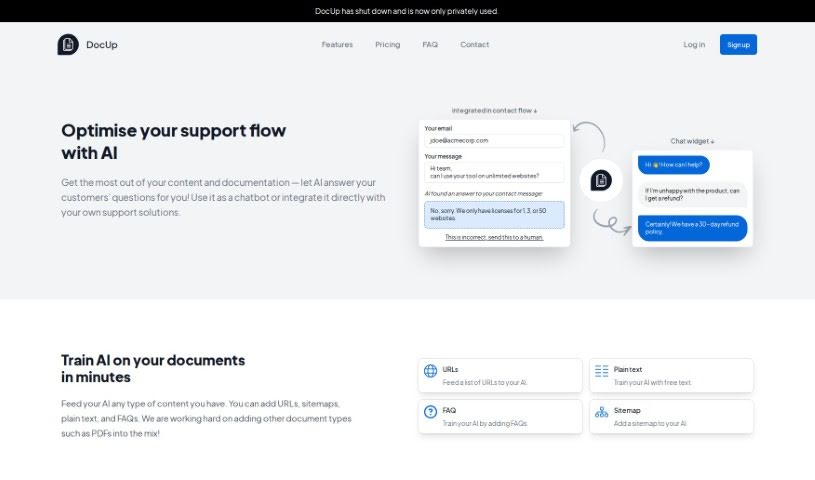
Screenshot of Docup

Docup

Discover what Docup is and how to make the most of it in 2025. We'll dive into its features, compare it to other customer service tools, and show you how to get started.

Screenshot

What is Docup?

Docup is an AI tool built to make business support smoother. It automatically handles customer questions by using your company’s own content and documentation to provide answers. It is a smart chatbot that can either work on its own or fit right into your current customer support setup. How does it work? Docup uses machine learning to give customers instant replies. It learns from all sorts of content you give it, like website links, sitemaps, plain text files, and FAQs. Right now, it doesn’t handle PDF files, but they’re planning to add that feature soon. The chatbot part of Docup is great for giving immediate answers directly on your website, and it knows when to guide customers to contact human support, really improving how customer service runs.

When it comes to pricing, they have a few options: a ‘Startup’ plan for $19 a month, a ‘Growth’ plan at $39 a month, and a ‘Pro’ plan for $99 a month. Each plan comes with different features, like API access, chatbot capabilities, and varying limits on how much content you can upload and how many sources you can use.

Who created Docup?

Docup was developed by a dedicated team of developers and AI specialists. It officially launched on August 2, 2023. The company behind Docup offers several pricing tiers: the ‘Startup’ plan at $19 per month, the ‘Growth’ plan for $39 per month, and the ‘Pro’ plan costing $99 per month. This tool is designed to provide automated customer support, offering instant replies to customer queries. It can also integrate seamlessly with your existing support solutions and functions as a chatbot. You get access to both the API and the chatbot, and there’s even a free plan available, plus a 30-day refund policy to ensure you’re happy. Docup relies on machine learning algorithms to deliver these immediate, automated responses by learning from various content types, including URLs, sitemaps, plain text, and FAQs.

What is Docup used for?

  • It offers chatbot functionality.
  • It provides automated customer support.
  • It integrates with your website.
  • It gives instant replies to customer queries.
  • It can be integrated with your existing support solutions.
  • It helps speed up responses to customer questions.
  • It streamlines your overall support flow.
  • It boosts operational efficiency.
  • It handles automated replies before a human needs to step in.
  • It guides customers toward human help when necessary.
  • It integrates smoothly with your support and documentation processes.
  • A free plan is available for trying it out.
  • It includes a live chat widget for real-time customer interaction.
  • It integrates with your website to offer immediate responses.
  • It optimizes the support flow and increases overall efficiency.
  • It provides access to both an API and a chatbot.
  • It features a live chat widget.

Who is Docup for?

  • Customer Support Representatives
  • IT professionals
  • Content managers
  • Customer Service Managers
  • Customer service agents
  • Business Support Professionals
  • Customer support professionals
  • Developers
  • Business owners
  • Customer service representatives
  • Technical Writers
  • Customer Success Managers
  • Small Business Owners
  • Technical Support Specialists
  • Documentation Specialists

Beyond these specific roles, Docup is a great fit for businesses and professionals across many industries, especially those focused on customer support, content creation, and managing documentation.

How to use Docup?

Here’s a straightforward guide to using DocUp effectively:

  1. Get to Know DocUp: First off, understand that DocUp is an AI tool designed to make customer support much easier. It does this by giving automated answers based on your company’s content and documentation, either as a chatbot or by fitting into your current support systems.
  2. Train the AI: You’ll need to train DocUp by feeding it different kinds of content. This includes website links (URLs), sitemaps, plain text files, and your FAQs. This training helps the AI give accurate answers to customer questions.
  3. Use the Chatbot: DocUp’s chatbot can provide instant answers to customer questions right on your website. This means less waiting for customers and better overall support efficiency.
  4. Integrate It: You can either plug DocUp directly into your existing support workflow or use it as a chatbot on your website. Either way, it provides automated replies before customers even need to reach out to a person.
  5. Choose a Plan: DocUp offers several pricing tiers to suit different needs: ‘Startup’ at $19/month, ‘Growth’ at $39/month, and ‘Pro’ at $99/month. Each plan gives you different features, such as API access, chatbot access, and varying limits on collections and sources.
  6. Try the Free Plan: There’s a free plan available, and you don’t even need a credit card to start. Plus, they offer a 14-day refund policy to ensure you’re happy with it.
  7. Refunds: If you’re not satisfied with the service for any reason, you can get a refund within 30 days.
  8. Live Chat Widget: Make sure to use the live chat widget to connect with customers in real-time on your website. It’s a good way to engage them and direct them to more help if they need it.
  9. Quick AI Training: You can train DocUp on various content types in just minutes. This includes URLs, plain text, FAQs, and sitemaps, all of which help the AI provide effective responses.
  10. What’s Next?: DocUp is actively working on adding support for PDF files, which will expand its capabilities even further by allowing it to train on a wider range of document types.

Remember to explore all of DocUp’s features and pick the pricing plan that best matches your business. This will help you run your customer support operations more efficiently. Make sure to use the features provided, engage with the live chat options, and ensure it integrates smoothly with your current support systems to keep your customers happy.

Related AI Tools

Discover more tools in similar categories that might interest you

Stay Updated with AI Tools

Get weekly updates on the latest AI tools, trends, and insights delivered to your inbox

Join 25,000+ AI enthusiasts. No spam, unsubscribe anytime.