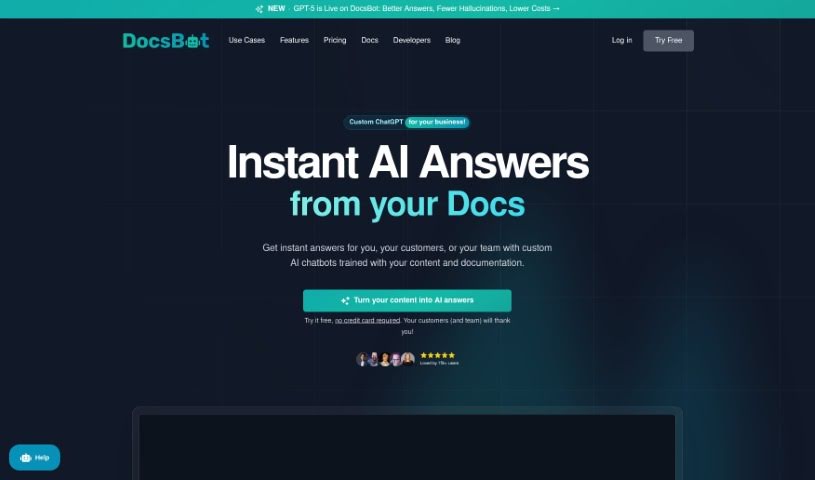
What is DocsBot AI?
DocsBot AI is a personalized chatbot service that uses OpenAI’s ChatGPT, including the latest GPT-4 model, to really boost customer support, pre-sales efforts, and other business tasks. It does this by automatically answering those common, repetitive questions. You train these AI chatbots on your own specific content, which helps cut down on your team’s workload and makes customers happier. Big-name brands trust DocsBot AI, and it works with all sorts of content. Plus, it offers great integrations, like with Zapier. Whether your business is big or small, DocsBot AI has pricing plans to fit, even a free option for personal use. The main idea is to save you time and money while making your business more productive and your customers more satisfied.
Who created DocsBot AI?
DocsBot AI was started by a team who are really passionate about using OpenAI’s ChatGPT, including the newest GPT-4, to create personalized chatbots. Their focus is on improving customer support, presales, and other business functions by training AI chatbots on specific content and documentation. DocsBot AI makes it easy to connect with different types of content and offers powerful tools like Zapier. They also have a range of pricing plans to suit various business needs. Ultimately, the service is designed to help businesses save time and money, while also improving the customer experience and boosting staff productivity.
What is DocsBot AI used for?
- Custom ChatGPT-Powered Bots: These are trained specifically on your content and documentation, so they can give accurate, detailed answers to customers.
- Embeddable Widgets: You can easily add these chatbots to your website. Just add a script tag or use a WordPress plugin.
- Custom Copywriting: The AI can help you create high-quality content that really understands your products and services.
- Support Ticket Automation: Get automated responses to support tickets by training the AI on your past support interactions and documentation.
- Internal Knowledge Bots: Give your staff instant access to an internal knowledge base to answer their questions quickly, saving them search time.
- Question/Answer Bots: Make your documentation interactive. A Q&A bot can provide detailed, direct answers about your products, even including code examples and formatted output.
- API Integration: You can integrate DocsBot with an API to connect it to your websites or applications, adding more functionality.
- Language Support: It works with many languages, not just English. It can read text, documents, and URLs to create chatbots in different languages.
- Automated Source Updates: You can set it up to automatically update your sources, ensuring the chatbot’s information is always current.
- Privacy Protection: DocsBot takes strong privacy measures to keep your user data safe while providing AI chatbot services.
- Custom ChatGPT-Powered Bots: These are trained specifically on your content and documentation for accurate, detailed customer support.
- Embeddable Widgets: Easily integrate chatbots onto your websites using a script tag or a WordPress plugin.
- Custom Copywriting: The AI assists in generating high-quality content that’s knowledgeable about your products and services.
- Support Ticket Automation: Automate responses to support tickets by training on your previous support history and documentation.
- Internal Knowledge Bots: Provide instantly accessible internal knowledge for your staff to answer queries, saving them search time.
- Question/Answer Bots: Make your documentation interactive with a Q&A bot that offers detailed and direct answers about your product.
- API Integration: A powerful API is available for integration, allowing you to connect DocsBot to websites or applications and enhance functionality.
- Automated Update of DocsBot Sources: The capability to automatically update content sources ensures your chatbots stay current with the latest information.
- Multilingual Support: It works with languages beyond English, and can create chatbots in various languages by reading text, documents, and URLs.
- Privacy Protections: Strong privacy protections are in place to safeguard user data.
- Question/Answer Bots: Make your documentation interactive with a Q&A bot for detailed and direct answers about your product.
- API Integration: A powerful API lets you integrate AI chat into your own products, providing answers to your users.
- Content Indexing: Your content is indexed to keep the chatbot updated with the latest information.
- Documentation Processing: Your documentation is used to enhance customer support and presales.
- AI Chatbots: These personalized chatbot services automate responses to repetitive inquiries.
Who is DocsBot AI for?
- Customer Support Representatives
- Content writers
- Technical Support Specialists
- Marketing professionals
- Developers
- Customer support professionals
- Technical Support Staff
- Business owners
- Documentation Specialists
- Copywriters
How to use DocsBot AI?
Using DocsBot AI is pretty straightforward. Just follow these steps:
- Customized Chatbots: Train your chatbots with your specific content and documentation. This ensures they can provide really detailed customer support.
- Embeddable Widgets: You can easily integrate these chatbots onto your website. Just use script tags or WordPress plugins.
- Custom Copywriting: Need to create content about your products and services? The AI can help you generate high-quality material quickly.
- Support Ticket Automation: Train the chatbot using your support history and documentation. This way, it can automatically respond to new support tickets.
- Internal Knowledge Bots: Help your employees find answers instantly. You can index your internal knowledge base and documentation for them.
FAQs:
- Multilingual Support: DocsBot works with many languages. It can handle text, documents, and URLs.
- Automatic Updates: You can regularly index your content. This keeps the chatbot updated with the latest information.
- Source Pages: This refers to how much content your DocsBot can index.
- API Integration: DocsBot offers an API. You can use it to connect with your website or application.
- Privacy: DocsBot follows strong privacy measures to keep your user data safe.
Pricing: DocsBot AI has different pricing plans to suit various usage needs. There’s even a free option if you just want to use it for personal projects. The goal is to help you save time and money, while also improving customer experience and staff productivity.
By following these steps, you can effectively use DocsBot AI to automate customer support and make your business run more efficiently.