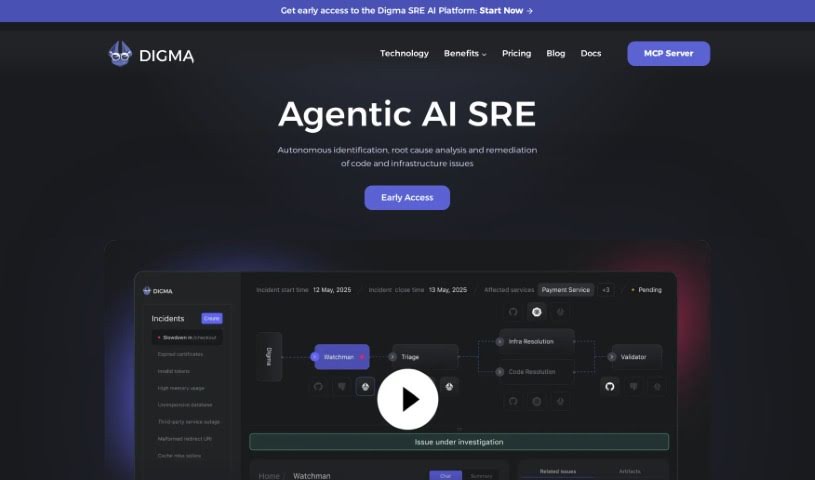
What is Digma?
Digma is a Continuous Feedback platform built to give developers key observability insights right when they need them, throughout the entire development process. It is a smart assistant that helps you spot and fix code performance problems automatically. It does this by profiling your applications whether they’re in development, testing, or even live production. When Digma connects with your development environment and CI pipeline, it points out performance issues directly within your code. This means you can tackle them much more efficiently.
Basically, Digma makes it easier to understand your code, what users actually need, and how your software behaves in the real world. It bridges the gap between developers and users by directly linking to how the code performs in production. By focusing on methods backed by evidence and promoting a fresh approach to software development, Digma aims to equip developers with the tools they need to truly own their code and get production-ready code out the door faster.
Who created Digma?
Digma was founded by Nir Shafrir and Roni Dover. Nir Shafrir is the Co-Founder and CEO, while Roni Dover is the Co-Founder and CTO. Their company is all about providing a Continuous Feedback platform for developers, really emphasizing evidence-based methods and weaving observability right into the development workflow. Digma’s goal is to empower developers by giving them access to crucial observability insights throughout the development cycle. This helps improve software quality by making sure developers understand real-world requirements and how their code actually behaves. Plus, Digma offers performance analysis tools for everyone, from individual developers to larger teams, all designed to boost code quality and make development cycles smoother.
What is Digma used for?
- Spotting performance issues as your code runs.
- Pinpointing bottlenecks, problems with scaling, and issues with database queries.
- Analyzing your code directly within your IDE and other development tools.
- Catching regressions, unexpected changes, and code smells.
- Continuously profiling your applications across development, testing, and production environments.
- Automatically highlighting and prioritizing the most critical problems in your code.
- Integrating with your development environment and CI pipeline so you see issues immediately.
- Speeding up development cycles by providing constant feedback.
- Empowering developers to take ownership of observability and influence how SDLC processes work.
- Making it easier to add notes to code reviews and provide feedback on Pull Requests.
- Offering observability insights at every stage of the development cycle.
- Giving developers continuous feedback to speed up their development cycles.
- Detecting regressions, anomalies, and code smells within your code.
- Profiling code execution to find where performance is slowing down.
- Automatically identifying critical performance issues in various environments.
- Integrating with your GitOps cycle to make Pull Request feedback and code review annotations simpler.
- Empowering developers to truly own their code.
- Cutting down the time it takes to find the root cause of issues and catching problems earlier in the release process.
- Connecting directly to how your code behaves in production.
- Analyzing observability data specifically for developers.
- Helping development teams track down performance issues in their code as it runs.
- Providing ongoing feedback to developers to accelerate their development cycles.
- Integrating into your IDE and dev tools so you can analyze code while you’re actively working on it.
- Detecting regressions, anomalies, code smells, and other issues using telemetry data.
- Helping developers shape the processes of the software development lifecycle.
- Empowering developers to own their code by giving them observability insights.
- Connecting directly to how code behaves in production to close the information gap.
- Automatically identifying code performance issues in dev, test, and prod environments.
- Integrating with development environments and CI pipelines to highlight performance issues right in the code.
Who is Digma for?
- Developers
- Software engineers
- IT professionals
- Programmers
- Those handling operations tasks
- AI Coders
How to use Digma?
Here’s a straightforward guide to using Digma effectively:
-
Understand Its Purpose:
- Remember, Digma is a Continuous Feedback platform designed to help developers improve their code quality and performance.
-
Integration is Key:
- Connect Digma with your Integrated Development Environment (IDE) and other development tools. This allows for real-time analysis as you code.
-
Profile Your Code:
- Digma’s IntelliJ plugin is great for profiling your code’s execution. It helps you find bottlenecks, scaling problems, and issues with database queries.
-
Automatic Issue Detection:
- Digma constantly profiles your applications across development, testing, and production environments. It automatically flags and prioritizes critical issues directly in your code.
-
Seamless IDE Integration:
- Digma fits right into your development environment. You can see performance issues right where they appear in your code.
-
Create a Feedback Loop:
- Use Digma for Teams to connect with your CI/CD or production environments. This gives you comprehensive feedback throughout the entire development cycle.
-
Engage with the Community:
- Join the Digma community! It’s a great place to learn from others, ask questions, and share ideas for making code development even better.
-
Explore Cost-Effective Options:
- You can start with free options if you’re an individual developer. Or, if your team needs more, there are paid plans offering advanced performance analysis and scalability tracking.
-
Keep Learning:
- Check out Digma’s blog regularly. You’ll find valuable insights, best practices, and solutions to common coding challenges there.
-
Consider Further Training:
- If you want to dive deeper into code analysis and performance optimization, think about enrolling in the “Continuous Feedback Udemy Course.”
By following these steps, you can really make the most of Digma’s Continuous Feedback platform. It’ll help you improve your coding experience and speed up your development cycles.