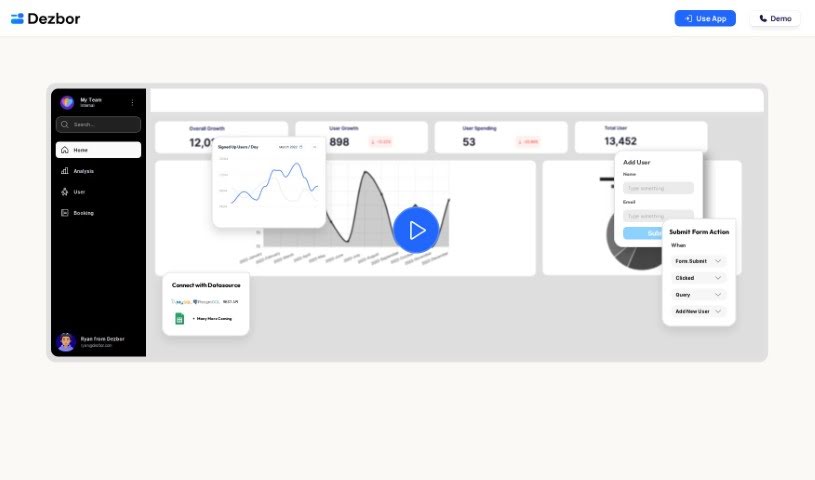
Screenshot of Dezbor

Dezbor

Discover what Dezbor is and how to use it effectively in 2025. We'll dive into its features and see how it stacks up against other data visualization tools.

Screenshot

What is Dezbor?

Dezbor is a really handy no-code tool that lets you build custom dashboards and admin panels without needing to write a single line of code. It’s designed to be super simple, with a drag-and-drop interface that makes creating visually appealing dashboards a breeze. Plus, it connects easily with popular data sources like MySQL, PostgreSQL, Google Sheets, and Airtable. What’s also neat is that Dezbor lets you tweak the logic and actions within your dashboards, makes collaborating with others straightforward, and even offers AI help for suggesting queries and optimizing them on the fly. If you’ve got questions, there’s a thorough FAQ section ready to guide you through getting started.

Who created Dezbor?

Dezbor was actually started by Ryan, a software engineer who saw a real need to make building dashboards and admin panels much simpler. His company, Dezbor Technologies Pte.Ltd, is based in Singapore at 160 Robinson Road, #14-04 Singapore Business Federation Center. They officially launched on June 15, 2023. Ryan’s goal was to help tech startups and other businesses save precious time and resources by offering this no-code solution for creating dashboards and admin panels. The platform really aims to let users build their own custom dashboards easily, without needing any coding skills, and it comes with features like smooth integrations with various data sources and an AI assistant that provides real-time suggestions and helps optimize things.

What is Dezbor used for?

  • Building dashboards without any coding.
  • Creating dashboards and admin panels that you can customize.
  • Connecting easily with popular data sources.
  • Visualizing and analyzing your data.
  • Working with others on dashboard creation and analysis.
  • Getting AI help for query suggestions and optimizations.
  • Finding answers in a comprehensive FAQ section.
  • Turning your data into useful insights, no coding required.
  • Making dashboards for internal use or for your customers.
  • A smart way to manage your data.

Who is Dezbor for?

  • People who work with data (Data Analysts).
  • Software engineers.
  • Tech startups.
  • Businesses in general.

How to use Dezbor?

Getting started with Dezbor is pretty straightforward. Here’s how you can do it:

  1. First, you’ll need to sign up for an account on Dezbor’s platform.
  2. Next, connect your data sources. You can link up things like MySQL, PostgreSQL, Google Sheets, or Airtable to Dezbor.
  3. Then, dive into the easy-to-use drag-and-drop interface to build your custom dashboards. You won’t need any coding skills for this!
  4. Once your dashboards are set up, you can effectively visualize and manage your data.
  5. Feel free to customize the logic and actions within the dashboards to perfectly match what you need.
  6. Collaboration is made simple, so you can work with your team members on creating and analyzing dashboards together.
  7. Make sure to use the AI assistant! It’s there to give you real-time suggestions, help spot any issues, and offer optimization tips.
  8. If you ever get stuck or have common questions, the comprehensive FAQ section is a great resource for guidance.
  9. Finally, use Dezbor to effortlessly turn your data into actionable insights, whether you’re building them for internal use or for your customers.

By following these steps, you can really make the most of Dezbor’s user-friendly design and powerful features. It’s a great way to create insightful dashboards and make your data management tasks much smoother. Ready to join the dashboard creation revolution with Dezbor?

Related AI Tools

Discover more tools in similar categories that might interest you

Stay Updated with AI Tools

Get weekly updates on the latest AI tools, trends, and insights delivered to your inbox

Join 25,000+ AI enthusiasts. No spam, unsubscribe anytime.