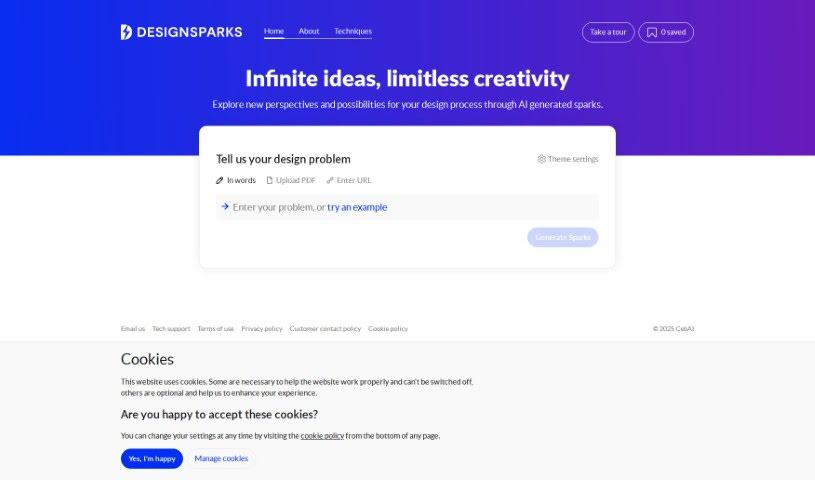
Screenshot of Design Sparks

Design Sparks

Discover Design Sparks, an AI tool for generating design ideas in 2025. Learn its features, how to use it effectively, and how it compares to other design generators.

Screenshot

What is Design Sparks?

Design Sparks is a web application that uses AI to help you come up with and explore design ideas. It combines creative problem-solving methods with artificial intelligence, aiming to boost your creativity and improve your productivity, competitiveness, and critical thinking skills. You can give it your design problems or ideas by typing them out, pasting a link, or even uploading a PDF. This tool is really designed to help designers during the ideation phase, and it also lets you save ideas for later and tweak how it explores different themes.

Interestingly, the development of Design Sparks received funding from Research England. On top of that, City, University of London and over 20 industrial partners also contributed, bringing the total value to £7.6 million.

Who created Design Sparks?

Design Sparks was actually developed by The National Centre for Creativity enabled by AI (CebAI). It first launched on June 17, 2023. As I mentioned, Research England provided funding for its development, with support from City, University of London and more than 20 industrial partners, totaling £7.6 million. The main goal behind Design Sparks is to really boost workforce creativity, productivity, competitiveness, and critical thinking by using AI-powered problem-solving techniques.

What is Design Sparks used for?

Here’s a breakdown of what you can do with Design Sparks:

  • It helps you and others create solutions together.
  • You can input your ideas in many different ways.
  • You get to choose the creative thinking method you prefer.
  • It provides responses tailored specifically to your design problems.
  • You can save ideas so you can use them again later.
  • It’s designed to boost your productivity and competitiveness.
  • It helps sharpen your critical thinking skills.
  • The tool was built with self-funding in mind.
  • It was co-developed with some really prestigious partners.
  • The focus is squarely on improving creativity within the workforce.
  • It’s a great way to refresh your thinking and get new ideas.
  • You can use it to generate all sorts of design ideas.
  • It’s perfect for brainstorming quickly and getting past creative blocks.
  • It helps individuals or teams working on design projects to contribute their ideas.
  • You can generate ideas for brand new services or products.
  • It assists in developing new circular designs and economies.
  • It’s useful for supplementing your thinking during meetings or workshops.
  • It specifically helps you design for circular economies, focusing on products and services that are durable, reusable, repairable, and recyclable.
  • It supports a circular economy by helping you generate ideas that aim for zero waste.
  • You can get ideas specifically for circular solutions.
  • It guides you through the process of generating ideas for circular designs.

Who is Design Sparks for?

Design Sparks is a helpful tool for a variety of people:

  • Designers who need fresh ideas for new services or products.
  • Anyone else involved in design projects who wants to contribute their own ideas.
  • Designers and others looking for inspiration to develop new circular designs and economies.
  • Service, product, and UX/UI designers, as well as other stakeholders.
  • Anyone else who finds themselves involved in design projects.
  • Designers, generally speaking.
  • UX/UI designers specifically.
  • Stakeholders who are part of the design process.
  • Designers who need ideas to develop new circular designs and economies.
  • And, of course, anyone else involved in design projects who wants to contribute ideas.

How to use Design Sparks?

To get the most out of Design Sparks, just follow these simple steps:

  1. Start by describing your design problem. You can do this by typing it out, uploading a PDF file, or pasting a URL.
  2. Next, pick a creative thinking technique from the options you’ll see at the top of the page.
  3. You can then fine-tune how the sparks are generated using the Topic Settings and Extracted topics features.
  4. Take a look through the sparks that are generated to discover new ideas. If you want even more AI-generated ideas, just click on the robot icon.
  5. Don’t forget to save any sparks or ideas you like using the bookmark feature so you can come back to them later.

Essentially, Design Sparks is a web tool that brings together AI and creative thinking techniques to generate design ideas. It’s great for designers and anyone else involved in design projects. You can use it by yourself or with a group to brainstorm ideas quickly, overcome creative blocks, and keep the ideas flowing. The tool gives you control over the artificial intelligence by letting you adjust the description, the technique, and the topic settings. Design Sparks is also really focused on supporting the development of circular designs and economies by providing specific sparks and ideas for those kinds of solutions.

Related AI Tools

Discover more tools in similar categories that might interest you

123RF AI Image Generator

Creative Image Generation
Learn More
Stay Updated with AI Tools

Get weekly updates on the latest AI tools, trends, and insights delivered to your inbox

Join 25,000+ AI enthusiasts. No spam, unsubscribe anytime.