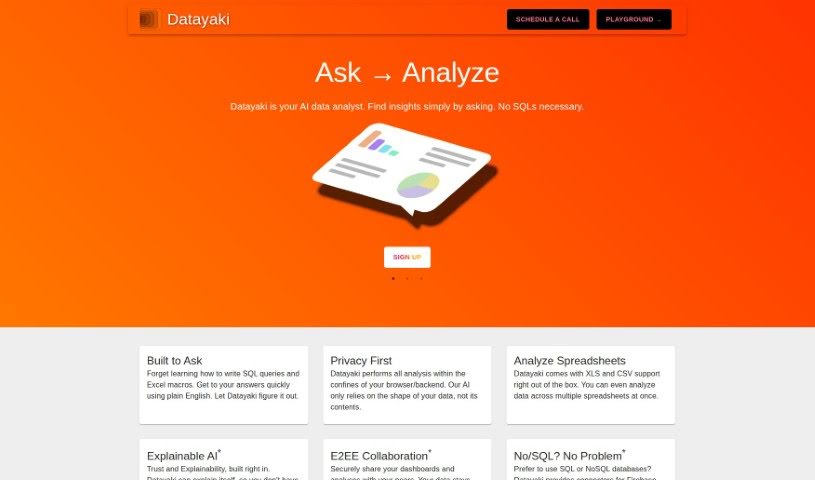
Screenshot of Datayaki

Datayaki

Discover Datayaki, your AI data analyst tool for 2025. Learn how to use its features to analyze data easily, compare it with other tools, and get insights without complex queries.

Screenshot

What is Datayaki?

Datayaki is an AI-powered data analyst tool designed to make data analysis much simpler. Forget about writing complicated SQL queries or fiddling with Excel macros; with Datayaki, you can create useful widgets just by asking questions in plain English. It’s built to keep your data private, running either in your browser or on your backend. This means it only looks at your data’s structure, not its actual content. You can easily analyze different data formats, like XLS and CSV files, even if they’re spread across multiple spreadsheets. Datayaki also includes explainable AI, so you can trust the results and understand how they were reached. Plus, it offers end-to-end encryption for secure collaboration and connects to various SQL and NoSQL databases, including popular ones like Firebase, Postgres, Supabase, Snowflake, and many others.

Who created Datayaki?

Datayaki, a really user-friendly tool for data analytics, was developed with the goal of letting anyone generate helpful widgets simply by asking questions in plain English. It first launched on July 25, 2023. The core idea behind Datayaki was to prioritize simplicity and privacy, ensuring all the analysis happens securely within the user’s own browser or backend environment. While the founder’s name and specific company details aren’t available in the provided information, the tool itself is designed for ease of use.

What is Datayaki used for?

  • Create widgets easily: You can build useful data visualizations and reports just by asking questions, no need for SQL or Excel macros.
  • Privacy-focused analysis: All your data analysis happens securely within your browser or backend, focusing only on data structure, not content.
  • Versatile data support: Works with Excel spreadsheets and SQL databases, handling various data formats effortlessly.
  • Trustworthy insights: Features explainable AI, so you can understand how results are generated and even guide the tool if needed.
  • Secure collaboration: Share dashboards and analyses with confidence thanks to end-to-end encryption.
  • Broad database connectivity: Connects to popular SQL and NoSQL databases like Firebase, Postgres, Supabase, Snowflake, and more.
  • Plain English insights: Get valuable information from your data by simply asking questions in everyday language.
  • Streamlined analysis: Simplifies the entire process of getting insights from your data.

How to use Datayaki?

Datayaki is designed to be super user-friendly, making it easy to get insights from your data by just asking questions in plain English. Here’s a simple, step-by-step guide to using it effectively:

  1. Ask Your Questions: Start by simply asking Datayaki what you want to know. You don’t need to be a tech expert or write complex code; just phrase your questions naturally, like you’re talking to someone.
  2. Let Datayaki Analyze: Once you’ve asked your question, Datayaki will handle the data analysis. It does all of this right in your browser or backend, which is great for privacy because it only looks at your data’s structure, not the actual sensitive content.
  3. Handle Different Data: Datayaki is flexible with data formats. You can analyze Excel files from your computer, and it also works with cloud-based SQL databases. It’s even smart enough to let you analyze data from several spreadsheets at the same time.
  4. Understand with Explainable AI: You can trust the results thanks to Datayaki’s explainable AI. This feature makes the analysis process transparent. If you ever spot something that seems off, you can even guide Datayaki to make corrections.
  5. Collaborate Securely: Need to share your findings? Datayaki makes it secure. It uses end-to-end encryption, so only the people you authorize can see the shared dashboards and analyses.
  6. Connect to Your Databases: If you prefer working with SQL or NoSQL databases, Datayaki has you covered. It offers connectors for popular platforms like Firebase, Postgres, Supabase, Snowflake, and many others, making integration smooth.

By following these steps, you can really make the most of Datayaki. It lets you get insights from your data quickly, without needing advanced technical skills. You’ll benefit from privacy, transparency, and secure collaboration throughout your analysis. Enjoy the ease of data analysis with Datayaki!

Related AI Tools

Discover more tools in similar categories that might interest you

Stay Updated with AI Tools

Get weekly updates on the latest AI tools, trends, and insights delivered to your inbox

Join 25,000+ AI enthusiasts. No spam, unsubscribe anytime.