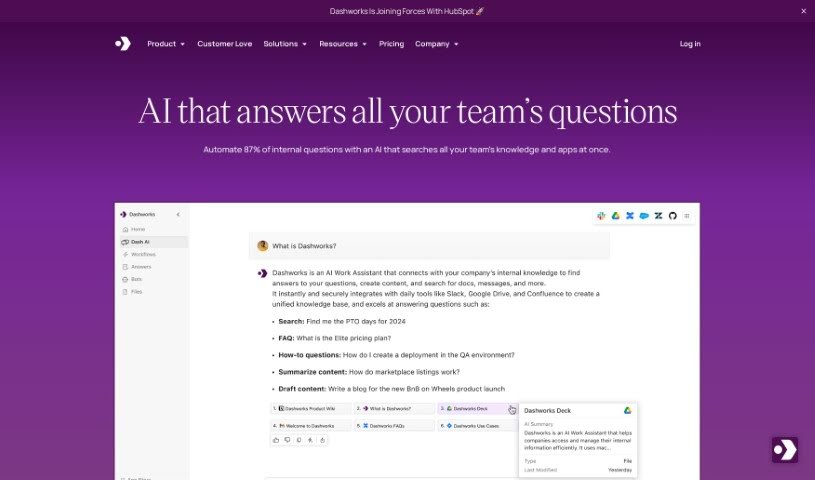
Screenshot of Dashworks

Dashworks

Discover what Dashworks is and how to use it effectively in 2025. Explore its features and see how it stacks up against other automation tools.

Screenshot

What is Dashworks?

Dashworks for Slack is an AI Assistant that connects with Slack, giving you one place to search across all your apps. You can get answers right in Slack, or even set it as your team’s browser homepage. What’s really neat is that Dashworks is known for being accurate and provides references for its answers. Plus, it doesn’t need to index your data for its AI models to work. You can also customize it to build bots for all sorts of things, like helping new hires get started or answering questions about your products. Essentially, Dashworks helps teams fill in the blanks by providing fast, precise answers about products, how things work, company policies, ongoing projects, and much more. The goal is to boost everyone’s productivity by cutting down on how long it takes to get answers, making customers happier, and helping to sort out technical problems quickly.

Who created Dashworks?

Dashworks for Slack was developed by the company Dashworks. While the founder’s name isn’t specifically mentioned in the information I have, Dashworks is an AI Assistant that many leading companies trust. It’s designed to give fast, accurate answers to a wide variety of questions across different tools and platforms. The platform offers features like AI customization, analytics, and integrations with HR systems, serving everyone from fast-growing startups to large Fortune 500 companies.

What is Dashworks used for?

  • You can create one or many bots for whatever you need.
  • It automatically answers questions asked in Slack.
  • It helps sales teams find answers to customer questions on their own.
  • Support reps can get information quickly.
  • It helps engineers solve technical questions faster.
  • You get quicker product insights and fewer team FAQs.
  • It bridges information gaps between different teams.
  • It makes onboarding smoother and speeds up response times for sales and support.
  • You can ask all sorts of questions using natural language, and build workflows and bots.
  • It gives you quick access to information that might be buried in old tickets, support documents, or product wikis.

Who is Dashworks for?

  • Sales Representatives
  • Support Representatives
  • Engineers

How to use Dashworks?

Here’s how you can get started with Dashworks for Slack:

  1. Integration: You can connect Dashworks directly to Slack, or you can set it as your team’s browser homepage so it’s always easy to access.
  2. Customization: Make your assistant your own by creating one or several bots. You can tailor them for different needs, like helping new employees get onboarded or answering specific product questions.
  3. Automatic Responses: Dashworks provides answers and references in real-time, right within Slack. This means your team can find the accurate information they need without delay.
  4. Security: Dashworks takes security and privacy very seriously. It’s compliant with SOC-2 Type 2, GDPR, and HIPAA Type 2, so your data is well-protected.
  5. Quick Setup: You can get up and running in just a few minutes. It offers immediate search capabilities with just a few clicks, so there’s no need for lengthy indexing processes.
  6. Flexible Pricing: The pricing is clear and adaptable, designed to fit your team’s needs, no matter its size.
  7. AI Integration: Dashworks brings together advanced AI models like GPT-4o, Claude, Gemini Pro, and Llama 3 all in one place, which can really boost your AI strategy.
  8. Enhanced Team Productivity: Dashworks helps close information gaps across teams. It offers quick, accurate answers about products, processes, policies, projects, and more.
  9. Improved Customer Support: Give your sales and support teams instant answers. This means shorter response times, happier customers, and faster deal closures.
  10. Technical Support: Encourage your engineering team to use Dashworks to resolve technical issues promptly. They can access codebase, docs, issues, and Slack threads all in one convenient spot.

By following these steps, you can really make the most of Dashworks for Slack. It helps make information access smooth and boosts productivity throughout your whole organization.

Related AI Tools

Discover more tools in similar categories that might interest you

Stay Updated with AI Tools

Get weekly updates on the latest AI tools, trends, and insights delivered to your inbox

Join 25,000+ AI enthusiasts. No spam, unsubscribe anytime.