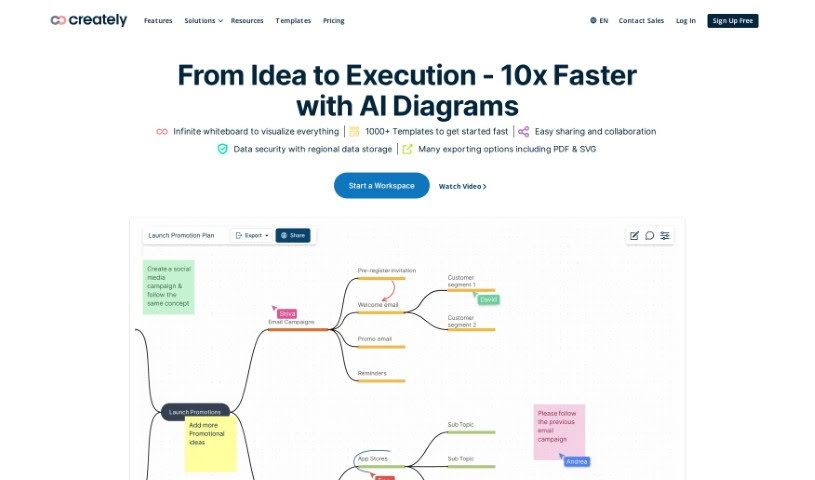
Screenshot of Creately

Creately

Discover what Creately is and how to use it effectively in 2025. We'll explore its features and see how it stacks up against other project management tools.

Screenshot

What is Creately?

Creately is a visual intelligence platform designed to help individuals and teams work smarter. It uses visuals and diagrams to make communication clearer, boost teamwork, and achieve better business results. You can create diagrams, use whiteboards, build data-linked visual apps, and customize everything without needing to code. Plus, Creately has AI features that help you generate visuals quickly, find new ways of looking at things, and automate tasks. The core idea is that visualization is a powerful way to spark ideas, share information, and collaborate, ultimately making you more productive and helping you make better decisions.

Who created Creately?

Creately Viz was founded back in 2008 by a team passionate about making visual tools more effective for companies, teams, and individuals. The company is headquartered in Melbourne, Australia, with its main team based in Colombo, Sri Lanka. It’s part of Cinergix Pty. Ltd. Creately’s mission is to improve communication and collaboration through visuals and diagrams, offering a smart visual canvas for managing work. The company really values growth, staying optimistic, using data to guide decisions, keeping things simple, family, and making sure customers get outstanding value.

What is Creately used for?

  • Knowledge Management: Keep all your important information organized and easy to find.
  • Data Visualization: Turn complex data into clear, understandable charts and graphs.
  • Project Management: Plan, track, and manage your projects from start to finish.
  • Workflow Optimization: Streamline your processes to work more efficiently.
  • Enterprise-Grade Security: Feel confident with robust security measures like ISO 27001, SOC 2 - Type 2, Data Residency, and Up-time SLAs.
  • Diagramming & Whiteboarding: Create any kind of diagram or use a flexible whiteboard for brainstorming.
  • A New Way To Wiki: Centralize your daily tasks, wikis, and resources in one accessible place, making knowledge discovery easier.
  • Integrate & Extend Your Other Apps: Connect data from any app with two-way sync, bringing it all into Creately for visualization.
  • Remote Or Hybrid Work: Collaborate effectively whether your team is in the office, remote, or a mix of both, supporting real-time or asynchronous work.
  • Visual Collaboration: Work together visually to ensure everyone is on the same page.
  • Business Process Modeling: Map out and improve your business processes.
  • Intelligent diagramming and powerful whiteboard collaboration: Use smart tools to create diagrams and brainstorm on a whiteboard.
  • A new way to Wiki with improved knowledge discovery and centralization: Keep tasks, wikis, and resources together for better access to information.
  • Integrated data from any app with 2-way sync in Creately: Connect your existing apps and sync data back and forth.
  • Enterprise-grade security with ISO 27001, SOC 2 - Type 2, Data Residency & Up-time SLAs: Protect your data with top-tier security standards.
  • Real-time or asynchronous work in Remote or Hybrid settings: Collaborate smoothly no matter where your team is.
  • AI-powered visual intelligence for generating visuals and automating tasks: Let AI help you create visuals and handle repetitive tasks.
  • Custom visualization rules, formulas, and access rules in Workflows: Tailor your workflows with specific rules and permissions.
  • Multiple task roles & flows, flexible OKR and goal alignment, personal task management in Workflows: Manage tasks, align with goals, and track personal progress within your workflows.
  • Custom databases for visualizing items in multiple contexts and dynamic search results: Organize and visualize your data in flexible ways, with powerful search capabilities.
  • Visual tools for connecting ideas, people, and data on one platform: Bring everything together visually to see how different elements relate.
  • Remote Or Hybrid Work Collaboration: Work together seamlessly in any setup.
  • A new way to wiki for keeping daily tasks, wikis, resources, and organization needs in one place: Consolidate all your essential information.
  • Integrating and extending other apps by bringing data for visualization with 2-way sync: Connect your apps and visualize the data.
  • Remote or hybrid work capabilities for real-time or asynchronous collaboration: Support flexible team collaboration.
  • Transforming the way teams work with AI-powered visual intelligence: Use AI to enhance how your team operates.
  • Customizing workflows with multiple task roles, OKR alignment, and personal task management: Build workflows that fit your team’s needs.
  • Creating custom databases to visualize items in multiple contexts: Organize and view your data in various ways.
  • Improving knowledge discovery with link and navigation capabilities: Make it easier to find and navigate information.
  • Exposing client-specific views and generating visuals with AI wizardry: Create tailored views and use AI to generate visuals.
  • Data visualization with 2-way sync: Visualize your data and keep it updated.
  • Visual communication for clearer messages: Ensure your messages are understood easily.
  • Custom Databases for multiple contexts: Organize data flexibly.
  • AI-powered visual intelligence: Leverage AI for smarter visuals.
  • A new way to Wiki for keeping tasks, wikis, and resources in one place: Centralize your work and knowledge.
  • Bringing data from any app and visualizing with 2-way sync: Connect and visualize data from all your tools.
  • Remote or hybrid work in real-time or async collaboration: Work together efficiently in any setting.
  • Enterprise-grade security with ISO 27001, SOC 2 - Type 2, and Data Residency & Up-time SLAs: Ensure your data is secure and reliable.
  • Improving knowledge discovery with link and navigation: Make finding information simpler.
  • Centralizing & capturing knowledge: Keep all your important knowledge in one spot.
  • Customizing rules, formulas, and access rules without code: Build custom workflows easily.
  • Connecting ideas to execution with custom databases: Link your concepts to how they’re implemented.
  • Generating visuals, uncovering new perspectives, and automating tasks with AI-powered visual intelligence: Use AI to create visuals, gain insights, and automate work.

Who is Creately for?

  • Business professionals
  • Teams of all sizes
  • Individuals looking to improve their workflow
  • Professionals across various industries
  • Companies seeking better collaboration tools
  • Small Teams needing efficient project management
  • Growing teams scaling their operations

How to use Creately?

Here’s a simple guide to getting started with Creately Viz:

  1. Choose Your Plan: Creately Viz offers a few options: Free, Personal, and Team. Pick the one that best fits what you need.
  2. Explore the Visual Tools: Creately Viz has data-linked visual apps that help you manage tasks from the initial idea all the way to launch. Use these tools to easily connect your ideas, people, and data.
  3. Customize Your Workflows: You can set up your own rules, formulas, and access permissions. The platform also supports multiple task roles, flexible OKR alignment, and role-based data access.
  4. Use Custom Databases: Keep your items visualized in different contexts to ensure everything stays consistent. This feature helps you connect your ideas to how they’re put into action and create dynamic search results.
  5. Get to Know Creately Viz Features: Dive into the AI-powered visual intelligence. You can generate visuals easily, discover new perspectives, and automate tasks using the AI capabilities.
  6. Diagramming and Whiteboarding: Take advantage of the smart diagramming and powerful whiteboard tools. They’re great for improving communication and making sure everyone is on the same page.
  7. Centralize Information Like a Wiki: Use the canvas to bring together your daily tasks, wikis, resources, and other organizational info. This helps you discover knowledge more easily and capture important details.
  8. Integrate and Extend Other Apps: Connect data from various apps and visualize it in Creately with two-way sync. You can also add extra fields and explore how to integrate and enhance data from the front end.
  9. Ensure Enterprise-Grade Security: Rest assured with high-level security standards like ISO 27001, SOC 2 - Type 2, Data Residency, and Up-time SLAs, all designed to keep your data safe.
  10. Work in Real-time or Asynchronously: Collaborate naturally with others, whether you’re working at the same time or at different times. Use visuals for the big picture and notes for the details to keep everyone in sync.

By following these steps, you can really make the most of Creately Viz’s features and tools to improve your visual communication, teamwork, and overall productivity.

Related AI Tools

Discover more tools in similar categories that might interest you

Stay Updated with AI Tools

Get weekly updates on the latest AI tools, trends, and insights delivered to your inbox

Join 25,000+ AI enthusiasts. No spam, unsubscribe anytime.