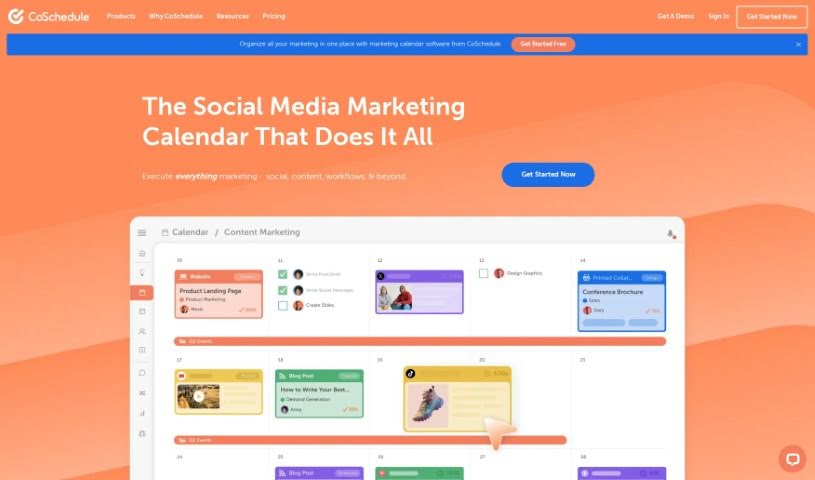
Screenshot of CoSchedule

CoSchedule

Discover CoSchedule, a powerful marketing calendar solution for 2025. We'll dive into its features, compare it with other automation tools, and show you exactly how to use it to supercharge your social media and content marketing.

Screenshot

What is CoSchedule?

CoSchedule is your ultimate marketing command center. It’s a marketing calendar tool built to help marketers like you plan, create, and execute social media and content marketing strategies with real ease. It brings together a whole suite of features, including handy tools for scheduling social media posts, connecting all your social profiles, analyzing your social media performance, and even automating some of your social media tasks. Plus, it offers content creation tools to make your life easier.

One of its standout features is Headline Studio. This is a smart, AI-powered tool designed specifically to help you craft headlines that grab attention and perform well, whether you’re posting on blogs, YouTube, TikTok, or any other platform. You can use its AI headline generators, get an SEO score to see how well your headline might rank, explore keywords, and use its Word Banks to come up with headlines that are not only compelling but also SEO-friendly.

Who created CoSchedule?

CoSchedule was actually started by two guys, Garrett Moon and Justin Walsh. They kicked it off on July 22, 2024, as a side project while they were running their web design and custom app development agency, TodayMade. What started as a simple idea for a blog and social media calendar has really grown over the years. Now, CoSchedule is a Marketing Calendar solution that over 200,000 marketers around the world trust. The company has grown quite a bit, with more than 50 employees, a ton of new features and products, and they offer lots of free marketing resources too. They serve everyone from solo entrepreneurs to huge enterprise teams.

What is CoSchedule used for?

CoSchedule is incredibly versatile, helping you manage almost every aspect of your marketing.

Here’s a breakdown of what you can do with it:

  • Social Media Management: You can create, schedule, publish, and track your social media content all in one AI-powered Social Calendar. It also lets you sync messages posted elsewhere, so you have a complete picture.
  • Project & Campaign Visibility: Get a clear overview of all your tasks, projects, and campaigns in a single, unified Marketing Calendar.
  • Agency & Consultant Needs: If you manage calendars for multiple clients, CoSchedule is perfect for that, offering dedicated calendars for each one.
  • Team Coordination: It helps marketing teams coordinate their processes, projects, and tasks, ensuring everyone is on the same page.
  • Strategic Scheduling: Plan and execute your social publishing schedules perfectly, all within one easy-to-view calendar.
  • Social Profile Integration: Connect your social profiles to easily create, schedule, and publish your messages.
  • Smart Publishing: Automatically publish your messages at the optimal times for maximum engagement across your social platforms.
  • AI Assistance for Social Posts: Use an AI-powered writer to help you craft your social media messages.
  • Content Promotion: Create reusable social sharing schedules to promote different types of content efficiently.
  • Bulk Scheduling: Schedule multiple social media posts at once.
  • Social Approvals: Ensure your social messages get the necessary approvals before they go live.
  • Client Reporting: Create professional, branded social media reports for your clients.
  • Advanced Targeting: Use advanced audience targeting options for your Facebook and LinkedIn messages.
  • Email Marketing Tools: Test your email subject lines to improve open rates.
  • Content Ideation: Get help with content ideas and creation using AI assistance.
  • Marketing Work Management: Organize projects, assign tasks, attach files, and use automation to streamline your workflow.
  • Team Collaboration: Facilitate teamwork with built-in discussions and real-time notifications.
  • Digital Asset Management: Store, preview, and share your digital assets. It offers 1TB of storage and integrates seamlessly with Google Drive, Dropbox, and OneDrive.
  • Security & Privacy: Manage user roles, set custom permissions, use single sign-on, and keep track of access with logs.
  • Support & Training: Get help via email and live chat, access a comprehensive knowledge base, and opt for priority support.

Who is CoSchedule for?

CoSchedule is designed for a wide range of marketing professionals and teams:

  • Marketers in general
  • Marketing Agencies
  • Consultants
  • Marketing professionals at all levels
  • Content creators
  • Social media managers
  • Digital marketers
  • Agency consultants

How to use CoSchedule?

To get the most out of CoSchedule, here’s a simple guide:

  1. Social Publishing: Start by connecting all your social media profiles. Then, you can create your messages and schedule them directly in the social calendar. You can even use the social sync feature to publish messages that were created outside of CoSchedule, keeping everything in one place.

  2. Content Creation: Make content creation easier with the AI Project Assistant for brainstorming ideas and drafting content. For your headlines, use the Headline Studio integration to make sure they’re optimized for maximum impact, and don’t forget the Email Subject Line Tester to boost your email marketing efforts.

  3. Collaboration & Management: Keep your projects and tasks organized using the Projects feature. You can set up tasks that repeat, attach important files, and create task templates you can reuse. Team discussions are also built-in, making collaboration smooth.

  4. Digital Asset Management: Store and preview all your important files with 1TB of storage. CoSchedule supports many file types and integrates easily with popular services like Google Drive, Dropbox, and OneDrive, so your assets are always accessible.

  5. Security & Support: You can manage who has access to what by setting up user roles and custom permissions. Keep track of changes with Security & Access Logs. For help, you can reach out via email or chat, or use the extensive knowledge base for self-service. Priority support is also available if you need it.

By following these steps, you’ll be able to use CoSchedule effectively to streamline your social media, content creation, team collaboration, and digital asset organization in a way that’s both efficient and secure.

Related AI Tools

Discover more tools in similar categories that might interest you

Stay Updated with AI Tools

Get weekly updates on the latest AI tools, trends, and insights delivered to your inbox

Join 25,000+ AI enthusiasts. No spam, unsubscribe anytime.