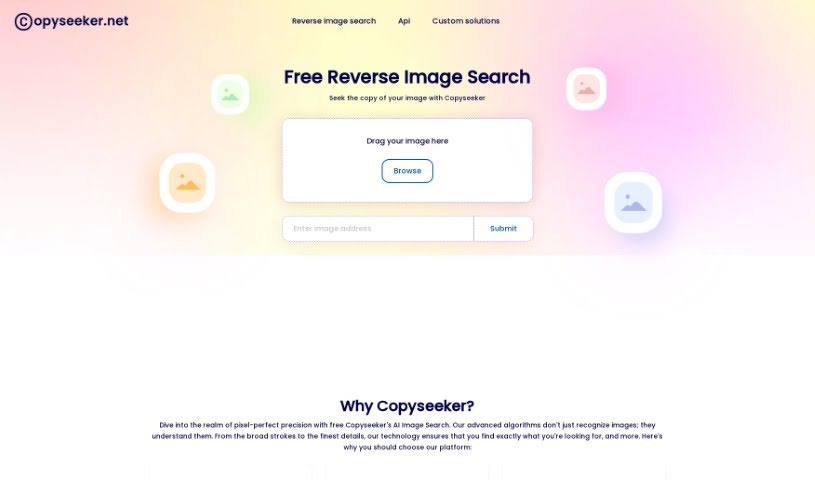
Screenshot of Copyseeker

Copyseeker

Discover what Copyseeker is and how to use it effectively in 2025. We'll explore its features and see how it stacks up against other search engines.

Screenshot

What is Copyseeker?

Copyseeker is your digital guardian for images. It’s a tool built to help you avoid accidentally using copyrighted material. How? By spotting duplicate images online. It uses AI to keep a constant watch over your visuals, checking the web for any exact matches to the images you upload. This really helps you steer clear of copyright trouble and potential legal headaches. Plus, they’ve made it super easy to use with a handy Chrome extension, making image searches quick, straightforward, and efficient.

Who created Copyseeker?

Copyseeker was launched on October 7, 2022, by a founder who prefers to remain anonymous. The company itself focuses on AI Image Search technology. They’re experts at recognizing images precisely, finding duplicates, and protecting you from copyright issues. Their platform uses smart algorithms that really dig into what an image is about, so you can easily find where it originally came from, discover similar pictures, and keep your visual content safe.

What is Copyseeker used for?

Copyseeker is a versatile tool that helps you:

  • Pinpoint exact image sources: Find out precisely where an image originated.
  • Discover related images: Uncover similar visuals that might be useful.
  • Ensure content uniqueness: Make sure the images you use are original.
  • Spot potential duplicates: Catch any images that might already be in use elsewhere.
  • Filter out low-quality sites: Keep your search results clean and relevant.
  • Prevent copyright infringements: Avoid using images you don’t have the rights to.
  • Mitigate legal dispute risks: Reduce the chances of facing copyright lawsuits.
  • Continuously monitor visuals: Keep an eye on your images for unauthorized use.
  • Safeguard visual assets: Protect your valuable images.
  • Advance searches into discoveries: Turn simple searches into meaningful findings.
  • Find precise sources and references: Get to the bottom of where your images come from.
  • Protect users from copyright issues: By identifying duplicate images, it keeps you safe.
  • Prevent legal disputes: Ensuring image uniqueness helps avoid legal trouble.
  • Enhance user experience: Filtering out low-quality sites makes searching better.
  • Monitor and safeguard visuals: It constantly watches for unauthorized use of your images.
  • Improve search experience: The Chrome extension makes everything smoother.
  • Detect duplicates: This helps ensure your content is original.
  • Aid academic research: It acts as a reverse image search tool for studies.
  • Offer free reverse image search: Detect duplicates and related images without cost.
  • Help find precise sources: Get the exact origins and references for your images.
  • Evolve AI algorithms: The system constantly learns to improve accuracy and adapt to what you need.

Who is Copyseeker for?

Copyseeker is a valuable tool for a wide range of professionals and individuals, including:

  • Graphic designers
  • Content creators
  • Researchers
  • Academics
  • Intellectual Property Professionals
  • Image Editors
  • Photographers
  • Web designers
  • Digital artists
  • Marketers
  • Brand managers
  • Digital investigators
  • Academic Researchers
  • Journalists

How to use Copyseeker?

Using Copyseeker’s AI Image Search is pretty straightforward. Just follow these simple steps:

  1. First, head over to the Copyseeker website. Then, simply drag and drop the image you’re interested in right into the designated area.
  2. The tool will then get to work, using its high-precision algorithms to really understand your image in detail.
  3. Copyseeker will give you accurate results, identifying the image and helping you find its exact sources, any references, and even related images.
  4. It’s great for making sure your content is unique, as it can detect potential duplicates and filter out those less reputable, low-quality sites.
  5. The tool also plays a big role in preventing copyright infringements and avoiding legal disputes by constantly monitoring and protecting your visual assets.
  6. For an even better search experience, don’t forget to use the dedicated Chrome extension that Copyseeker offers.
  7. The system is designed to adapt and learn from the data it processes, which helps improve its accuracy over time, making it really good at delivering the specific search results you need.

By following these steps, you can really make the most of Copyseeker’s AI Image Search. It’s perfect for finding where your images came from, ensuring your content is original, and keeping your visual assets safe from copyright issues.

Related AI Tools

Discover more tools in similar categories that might interest you

Stay Updated with AI Tools

Get weekly updates on the latest AI tools, trends, and insights delivered to your inbox

Join 25,000+ AI enthusiasts. No spam, unsubscribe anytime.