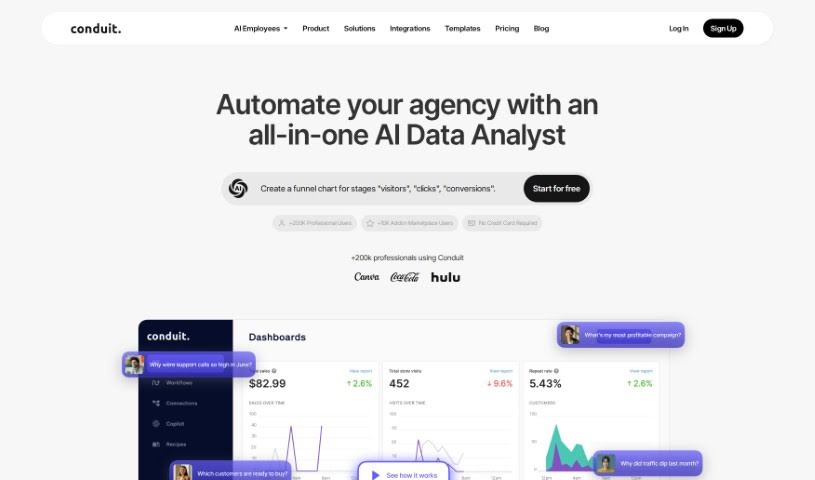
Screenshot of Conduit app

Conduit app

Discover what the Conduit app is and how to use it effectively in 2025. We'll explore its features and see how it stacks up against other Data Analytics Tools.

Screenshot

What is Conduit app?

Conduit app is your AI-powered sidekick for all things data. It’s designed to help you bring data together, understand it, and then present it clearly. What’s really neat is how it pulls information from all sorts of places – like Shopify, Salesforce, HubSpot, Google Analytics, Quickbooks, Zendesk, and Stripe – and brings it right into your Google Sheets. You can then build custom dashboards from this combined data, giving you a clear picture of what’s going on.

One of Conduit’s standout features is its ability to answer your questions about the data in a way that’s easy to grasp, much like you’d get from GPT. Plus, they offer a bunch of free dashboard templates to help you track key performance metrics, analyze tags, understand contact reasons, identify demand drivers, manage service level agreement quality, and get an overview of your accounts. You can even use Conduit directly within your SaaS applications thanks to a handy Chrome plugin, making data analysis and decision-making smoother across different industries.

Who created Conduit app?

Conduit was launched on September 15, 2023, by a founder who prefers to remain anonymous. The company itself focuses on creating AI tools that help with data integration, analysis, and presentation. Their main goal is to make it simple to get data from various systems, including popular ones like Shopify, Salesforce, and HubSpot, into Google Sheets.

What is Conduit app used for?

Conduit is a versatile tool that helps you with a lot of different data-related tasks:

  • Bringing data together: It easily connects with many different systems.
  • Getting AI answers: You can ask questions about your data and get clear, helpful responses, similar to what you’d expect from GPT.
  • Creating custom dashboards: Build dashboards that show your performance metrics exactly how you want them.
  • Analyzing tags: Get insights from your data tags.
  • Tracking contact reasons: Understand why customers are reaching out.
  • Understanding demand drivers: Figure out what’s influencing demand.
  • Controlling quality: Keep an eye on service level agreement quality.
  • Overviewing accounts: Get a clear picture of your accounts.
  • Making better decisions: It helps you make smarter business choices.
  • Simplifying processes: It streamlines important workflows.
  • Generating dashboards: Create dashboards directly within Conduit.
  • Getting AI-driven answers: Receive insights powered by AI.
  • Working within SaaS apps: Use it seamlessly inside your existing software.
  • Monitoring data: Keep track of your data regularly.
  • Getting alerts: Receive notifications via email or Slack when data changes.
  • Using free templates: Take advantage of ready-made dashboard templates.
  • Tracking performance: Monitor how things are performing.
  • Building comprehensive dashboards: Create detailed and personalized dashboards.

Who is Conduit app for?

Conduit is a great tool for:

  • Professionals in many different industries: If you work with data, this tool can help.
  • The Financial Services sector: Useful for managing financial data.
  • The Insurance industry: Helps in analyzing insurance-related data.
  • Anyone needing to make sense of data: If you need to make important decisions based on data from various sources, Conduit is designed for you.

How to use Conduit app?

Using Conduit is pretty straightforward. Here’s a simple breakdown:

  1. Import Your Data: Start by bringing in data from all your different systems – think Shopify, Salesforce, HubSpot, Google Analytics, and many others – directly into Google Sheets.
  2. Build Your Dashboards: Once your data is integrated, you can create custom dashboards that show you exactly what you need to see.
  3. Ask Away: Have a question about your data? Just ask! You’ll get clear, easy-to-understand answers, kind of like talking to GPT, even if you’re not a tech expert.
  4. Stay Notified: Set up notifications so you know right away when important data changes, either through Slack or email.
  5. Grab Free Templates: Need a starting point? Use the free dashboard templates available for tracking performance, analyzing demand, understanding contact reasons, and more.
  6. Use the Chrome Plugin: Want to use Conduit right inside your SaaS applications? The Chrome plugin makes it super easy to get AI-powered insights wherever you work.
  7. Make Smarter Decisions: Ultimately, Conduit helps you analyze data, make your business processes run more smoothly, and make those critical decisions with confidence.

Conduit really simplifies how you work with data. It offers easy integration, AI-powered insights, dashboards you can customize, and notifications to keep you informed, all designed to help you make better, data-driven decisions.

Related AI Tools

Discover more tools in similar categories that might interest you

Stay Updated with AI Tools

Get weekly updates on the latest AI tools, trends, and insights delivered to your inbox

Join 25,000+ AI enthusiasts. No spam, unsubscribe anytime.