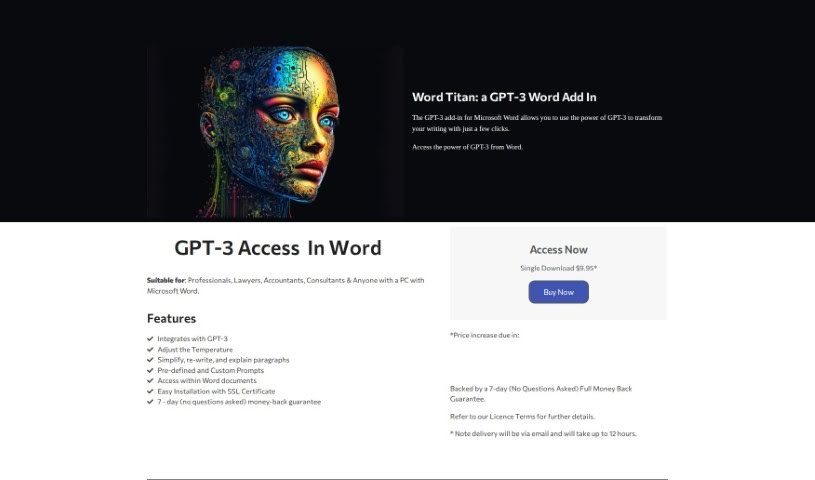
Screenshot of Compliance Quarter Titan

Compliance Quarter Titan

Discover what Compliance Quarter Titan is and how to use it effectively in 2025. We'll explore its features and see how it stacks up against other writing tools.

Screenshot

What is Compliance Quarter Titan?

Compliance Quarter Titan is a handy add-in for Microsoft Word that uses GPT-3 technology to make your writing better. It is a smart assistant right inside your Word documents. It can help you simplify, rewrite, and even explain paragraphs, making your work much smoother. This tool is perfect for professionals who spend a lot of time in Word, offering easy-to-use features through pre-set commands and the ability to create your own. What’s more, every purchase helps support an E-Learning Hub for Aboriginal Communities, providing educational opportunities for young people and helping to combat isolation. Getting started is a breeze – you just need a PC with Microsoft Word and an OpenAI GPT-3 API Key. No coding skills required! Plus, there’s a 7-day money-back guarantee, and your purchase comes with SSL Certification for security. You can grab it for just $9.95 for a single download.

Who created Compliance Quarter Titan?

Compliance Quarter Titan was developed by a company simply called Titan, and it first launched on December 31, 2022. While the founder’s name isn’t specifically mentioned, Titan’s core mission is clear: they’re dedicated to supporting Aboriginal Communities through an E-Learning donation initiative. They integrate powerful AI like GPT-3 to enhance writing directly within Microsoft Word. Their services are designed to simplify and rewrite complex text, making them ideal for professionals who need efficiency and ease of use, without needing any prior programming knowledge.

What is Compliance Quarter Titan used for?

  • It’s designed to help a wide range of users.
  • It can analyze your documents.
  • It’s great for rewriting text that’s hard to understand.
  • It’s a perfect fit for professionals.
  • It supports an E-Learning donation initiative.
  • It’s a tool that can save you valuable minutes.
  • It helps make your writing more effective.
  • Installation is straightforward.
  • It includes SSL Certification for security.
  • You can access its features right within your Word documents.

How to use Compliance Quarter Titan?

Here’s how you can get the most out of Word Titan:

  1. Installation: First, download Word Titan. You’ll also need to get a GPT-3 API key from openai.com. Once you have both, install Word Titan – you’ll be prompted to enter your API key during the setup.
  2. Accessing Word Titan: After installation, Word Titan will appear as an add-in directly within Microsoft Word. This means you can easily access its text simplification, rewriting, and explanation features without leaving your document.
  3. Adjusting Settings: You can fine-tune the GPT-3 settings to control how creative or predictable the output is by adjusting the ‘temperature’ setting.
  4. Using Prompts: There are pre-defined prompts for common tasks, but you can also create your own custom prompts to get exactly the results you need for unique jobs.
  5. Improving Your Writing: To simplify, rewrite, or explain a piece of text, just select it in your document and choose the action you want. This lets you easily tap into GPT-3’s powerful capabilities.
  6. Who It’s For: Word Titan is really aimed at professionals who use Microsoft Word regularly, like lawyers, accountants, and consultants.
  7. Money-Back Guarantee: If you’re not happy with the product within 7 days, you can get a full refund, no questions asked.
  8. Price and Delivery: You can buy Word Titan for $9.95. It’ll be delivered to your email within 12 hours. Keep an eye out, as the price is expected to go up soon.
  9. Making a Difference: Remember, every purchase helps fund an E-Learning Hub for Aboriginal Communities, giving kids access to educational materials and helping to reduce feelings of isolation.

By following these steps, you’ll be able to use Word Titan effectively to boost your writing skills right inside Microsoft Word, taking advantage of GPT-3 and tailored prompts.

Related AI Tools

Discover more tools in similar categories that might interest you

Stay Updated with AI Tools

Get weekly updates on the latest AI tools, trends, and insights delivered to your inbox

Join 25,000+ AI enthusiasts. No spam, unsubscribe anytime.