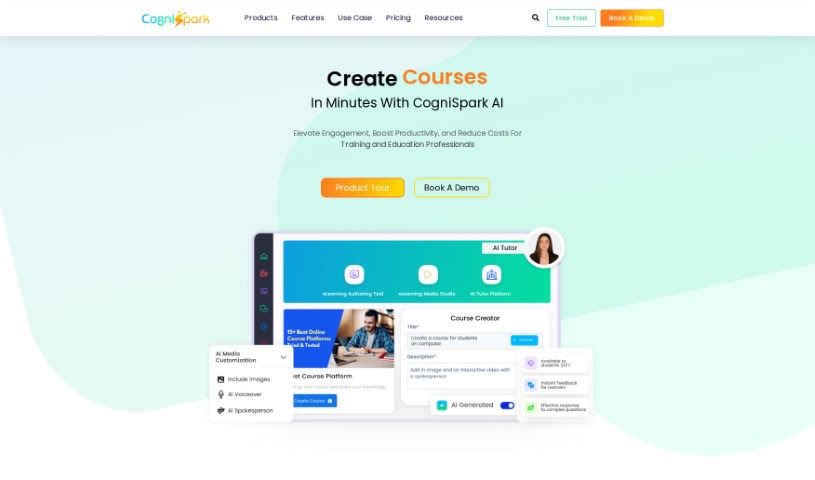
Screenshot of CogniSpark AI

CogniSpark AI

Discover what CogniSpark AI is and learn how to use it effectively in 2025. We'll explore its features and see how it stacks up against other popular Teacher Tools.

Screenshot

What is CogniSpark AI?

CogniSpark is an AI-powered eLearning Authoring Tool designed to boost human capabilities. It uses Artificial Intelligence responsibly and ethically to give you a platform for creating training content that’s both interactive and visually appealing, and it does it all efficiently. Whether you’re building full courses, short micro-learning videos, or other multimedia content, CogniSpark has you covered. It offers a variety of AI tools to help course creators, instructional designers, and educators produce engaging courses and multimedia content quickly and affordably. On top of that, CogniSpark is built on core values like putting clients first, focusing on solutions, ensuring client satisfaction, maintaining high security, and fostering a diverse, collaborative work environment.

Who created CogniSpark AI?

Sach Chaudhari is the mind behind CogniSpark. He’s a real expert when it comes to machine learning models and developing eLearning platforms. Sach also serves as the CEO for both Paradiso eLearning and the CogniSpark eLearning Authoring Tool. CogniSpark officially launched on June 28, 2024, with the company aiming to be a complete, one-stop solution for anyone needing to create eLearning content. Sach himself has a strong educational background, having studied business at Harvard Business School and computer science at the University of Cincinnati. He also holds several patents in software engineering.

What is CogniSpark AI used for?

CogniSpark AI is incredibly versatile, helping you:

  • Boost Productivity: Get more done in less time.
  • Translate Content: Easily translate your materials into multiple languages, really expanding your reach.
  • Create Videos: Produce all sorts of videos, from instructional content to studio-quality productions.
  • Reduce Costs: Make your content creation more budget-friendly.
  • Generate Courses: Build engaging courses, including interactive and gamified learning experiences.
  • Personalize Learning: Tailor video content to individual learner needs.
  • AI Tutor: Offer smart, 24/7 learning support for your students.
  • Streamline Creation: Make the entire process of creating courses and videos much simpler.
  • Enhance Global Reach: Ensure your courses are accessible to a worldwide audience.
  • Improve Completion Rates: Develop content that keeps learners engaged and helps them finish their courses.
  • Support Training: Aid in corporate training with tools like a PowerPoint to SCORM converter, AI translator, AI voiceover, and AI video/image generators.
  • Efficient Delivery: Manage multilingual course delivery smoothly.
  • Manage Tools: Keep all your AI tools organized in one convenient suite.

Essentially, it helps you create a wide variety of courses and multimedia content for eLearning purposes, improving training efficiency and productivity while cutting down on costs.

Who is CogniSpark AI for?

CogniSpark AI is a fantastic tool for:

  • Course Creators: Anyone building educational materials.
  • Instructional Designers: Professionals focused on effective learning experiences.
  • Learning Development Experts: Those in charge of training and skill development.
  • Educators: Teachers and professors looking to enhance their teaching methods.

How to use CogniSpark AI?

Using CogniSpark effectively is straightforward. Just follow these steps:

  1. Create Courses: Start by using the AI content generator. It makes creating engaging eLearning materials a breeze, thanks to artificial intelligence.
  2. Multilingual Support: Want to reach a global audience? Use the AI translator to easily convert your course content into many different languages with just a click.
  3. Interactive Content Creation: Dive into the eLearning media studio to produce high-quality videos and interactive content that really make the learning experience better.
  4. Seamless Integration: CogniSpark plays well with others! You can easily connect it with over 150 popular Learning Management Systems, making content management across platforms super convenient.
  5. Course Conversion: Got PowerPoint presentations? Use the PowerPoint to SCORM converter to turn them into SCORM-compatible formats, perfect for integrating into your eLearning setup.
  6. Leverage AI Tools: Make the most of various AI tools like the AI voiceover, AI video and image generator, screen recorder, and speech-to-text converter. They’re all there to boost your course creation and keep learners engaged.
  7. Who Benefits: CogniSpark AI is designed for course creators, instructional designers, educators, and corporate trainers. Its user-friendly interface means it’s accessible for everyone, no matter their technical skill level.
  8. Support and Resources: Don’t worry if you need a hand. You’ll find comprehensive support, including detailed guides, helpful tutorial videos, and customer support to make sure you can implement CogniSpark solutions effectively.

By following these steps and exploring CogniSpark AI’s many features, you’ll be well on your way to creating effective and engaging eLearning courses that are perfect for all sorts of learning environments and audiences.

Related AI Tools

Discover more tools in similar categories that might interest you

Academic Help Free Essay Generator

Education Academic Writing
Learn More

Stay Updated with AI Tools

Get weekly updates on the latest AI tools, trends, and insights delivered to your inbox

Join 25,000+ AI enthusiasts. No spam, unsubscribe anytime.