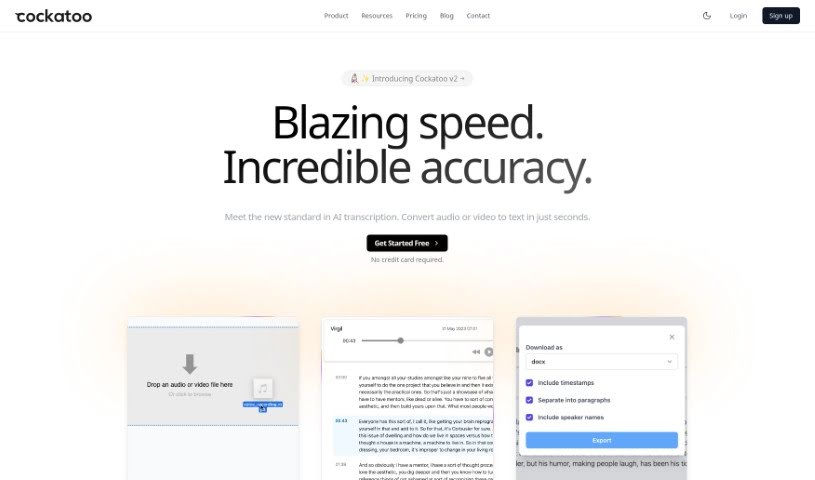
Screenshot of Cockatoo

Cockatoo

Discover what Cockatoo is and how to use it effectively in 2025. We'll explore its features and see how it stacks up against other transcription tools.

Screenshot

What is Cockatoo?

Cockatoo is a transcription service that uses AI technology to accurately and quickly transcribe audio and video files. It supports over 90 languages, offering features like incredibly accurate speech-to-text, super-fast transcription, and flexible export options for formats like PDF, DOCX, TXT, and SRT. Plus, it’s really easy to use with its simple drag-and-drop interface. Cockatoo also prioritizes your privacy and data security; you own your data, and it’s never shared with third parties. People love Cockatoo because it’s accurate, fast, handles various accents well, and has no limits on how much you can transcribe, making it a fantastic tool for everyone, whether you’re an individual or a business.

Who created Cockatoo?

Cockatoo was developed by an independent company that really cares about privacy and security. They make it clear that they’ll never share your data with anyone, and their revenue comes solely from product sales, not from advertising. This service focuses on transcribing audio and video files efficiently and with a strong emphasis on privacy. You’ll find a user-friendly interface and support for more than 90 languages. Key features include high accuracy, quick transcription speeds, multiple export formats, and a straightforward drag-and-drop system. Users around the world appreciate its accuracy, efficiency, and fair pricing, which makes it a popular choice for reliable AI-powered transcription.

What is Cockatoo used for?

Cockatoo is incredibly versatile! You can use it for:

  • Transcribing interviews
  • Transcribing podcasts
  • Transcribing meetings
  • Transcribing sales calls
  • Transcribing legal depositions
  • Transcribing your favorite podcasts (again, because it’s that good!)
  • Transcribing all sorts of conversations
  • Helping with documentary video production
  • Assisting individuals with speech differences or pauses
  • Transcribing content with various accents and background noise
  • Converting audio to text
  • Converting video to text
  • General interview transcription
  • General podcast transcription
  • General meeting transcription
  • Documentary video transcription
  • Converting any audio or video files into text
  • Transcription support for individuals with disabilities
  • Real-time transcribing capabilities
  • Transcribing content featuring different accents
  • Transcribing documentary interviews specifically
  • Transcribing articles
  • Transcribing your own thoughts or notes
  • Transcribing recordings with diverse accents
  • Transcribing recordings in many different languages
  • Providing fast and accurate speech-to-text conversion
  • Supporting over 90 languages for transcription needs
  • Offering various export formats like srt, docx, pdf, and txt
  • Maintaining strict privacy and security for your data
  • Catering to both individuals and businesses with competitive pricing

Who is Cockatoo for?

Cockatoo is a great tool for a wide range of people, including:

  • Podcasters
  • Sales professionals
  • Legal professionals
  • Researchers
  • Journalists
  • Video Producers
  • Anyone who needs transcription services
  • Business professionals

How to use Cockatoo?

Using Cockatoo is pretty straightforward. Just follow these simple steps:

  1. First, you’ll need to download and install Cockatoo from its official website.
  2. Once it’s installed, open up the Cockatoo application on your computer.
  3. Take a moment to get familiar with the main interface. You’ll typically find tools there for adding your files and seeing the results.
  4. Next, decide what kind of analysis you want. You can choose things like sentiment analysis, pulling out keywords, or summarizing text.
  5. Now, just input the text or data you want to analyze into the designated spot in the tool.
  6. If there are any specific settings you need, like language preferences or the output format you want, select those now.
  7. Go ahead and start the analysis. Cockatoo will then process your input data.
  8. Once it’s done, review the results. You’ll get insights, summaries, or even visualizations based on what it analyzed.
  9. If you need the results for later, make sure to save or export them.
  10. Don’t forget to explore the other features Cockatoo offers. You might find even more ways to use it for your specific needs!

By following these steps, you can really make the most of Cockatoo for all sorts of text analysis tasks. It’s a great way to improve how you make decisions based on data and extract information more effectively.

Related AI Tools

Discover more tools in similar categories that might interest you

Stay Updated with AI Tools

Get weekly updates on the latest AI tools, trends, and insights delivered to your inbox

Join 25,000+ AI enthusiasts. No spam, unsubscribe anytime.